

What it contains
- The date and time of the signature.
- The name you declared (or, if you signed anonymously, a note that the signature is anonymous).
- The SHA-256 fingerprint of the exact text you signed: if the petition changed a single letter afterwards, the fingerprint would no longer match.
- A unique reference and a QR code that opens its verification directly.
When you receive it
Right after confirming the code you will see Your signature certificate with the Download the certificate button. It is generated in a few seconds; if it takes longer than usual, the portal tells you and we email it to you as soon as it is ready. The signature confirmation email also carries a link to download it whenever you want. Under the button you see the certificate fingerprint, with a button to copy it, and the status of its blockchain record.The blockchain record
The fingerprint of your certificate is recorded on a public blockchain. It acts as a witness: from that moment nobody can change the signature or present one with an earlier date without the record failing to match. It is a public note, so no personal data goes on the chain, only the fingerprint. The record takes between a few seconds and a few minutes. Meanwhile you see Being recorded on the blockchain; once done, Recorded on the blockchain and a View the transaction link that opens the network’s public explorer. The certificate is valid from the first moment: the record adds the witness, not the validity.How to check a certificate
Anyone can do it, without an account, on the Check a signature certificate page: causfy.com/causas/verificar/certificado. The QR code printed on the PDF leads to that same page.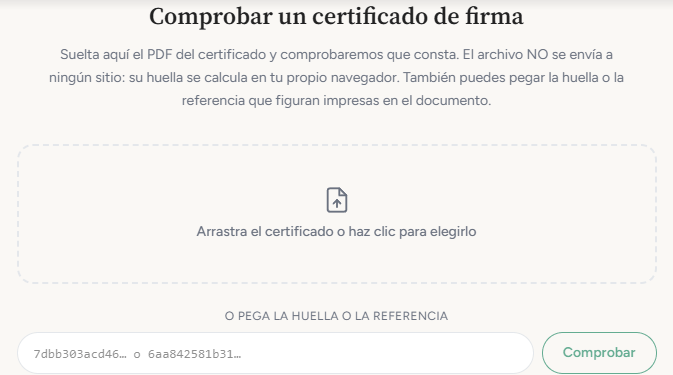
The verification page: drop the PDF or paste the fingerprint or the reference.
1
Drop the PDF, or paste the fingerprint or the reference
The file never leaves your computer: its fingerprint is calculated in your own browser and only that fingerprint is sent. If you do not have the PDF at hand, the fingerprint or the reference printed on it will do.
2
Press Check
If it is on record, you will see Certificate verified with the signer’s name (or Anonymous signature), the email with most of it hidden, the date and time of the signature, the document fingerprint and the status of the blockchain record, with the link to the transaction.
For some older signatures the record was made in batches: the transaction carries the root of a group of signatures, not this fingerprint directly. The page says so when that is the case. Current signatures are recorded one by one.