The three ways to sign in to Causfy and how to leave your account protected from day one.
In Causfy there is no password to remember. You sign in with a code sent to your email, with an account you already have, or with a passkey.There is no separate sign-up: the same screen works for signing in and for creating the account.
The sign-in screen: your email, an account you already have, or your passkey.
First of all, the screen runs an automatic security check to make sure you are a person. It usually clears itself in a second.
Type it on the screen. When you enter the sixth digit it signs you in on its own, without pressing anything else.
The code expires. If it takes a while to arrive, check your spam folder and use Resend code; you have to wait a minute between sends.
You can sign in with Google, LinkedIn or Facebook.Use the same email you would use in Causfy. If you sign in once with Google and another time with the email code, as long as the address is the same it is the same account.
A passkey replaces the password with your device’s fingerprint, face or PIN. It is the fastest way and the hardest to steal.Press Continue with passkey. To use it you have to create it first from your account: we explain how below.
Your identity in Causfy is your email plus the organization. The same address can belong to two different accounts if you work with two organizations. If you don’t see your causes after signing in, check at the top which account you are in.
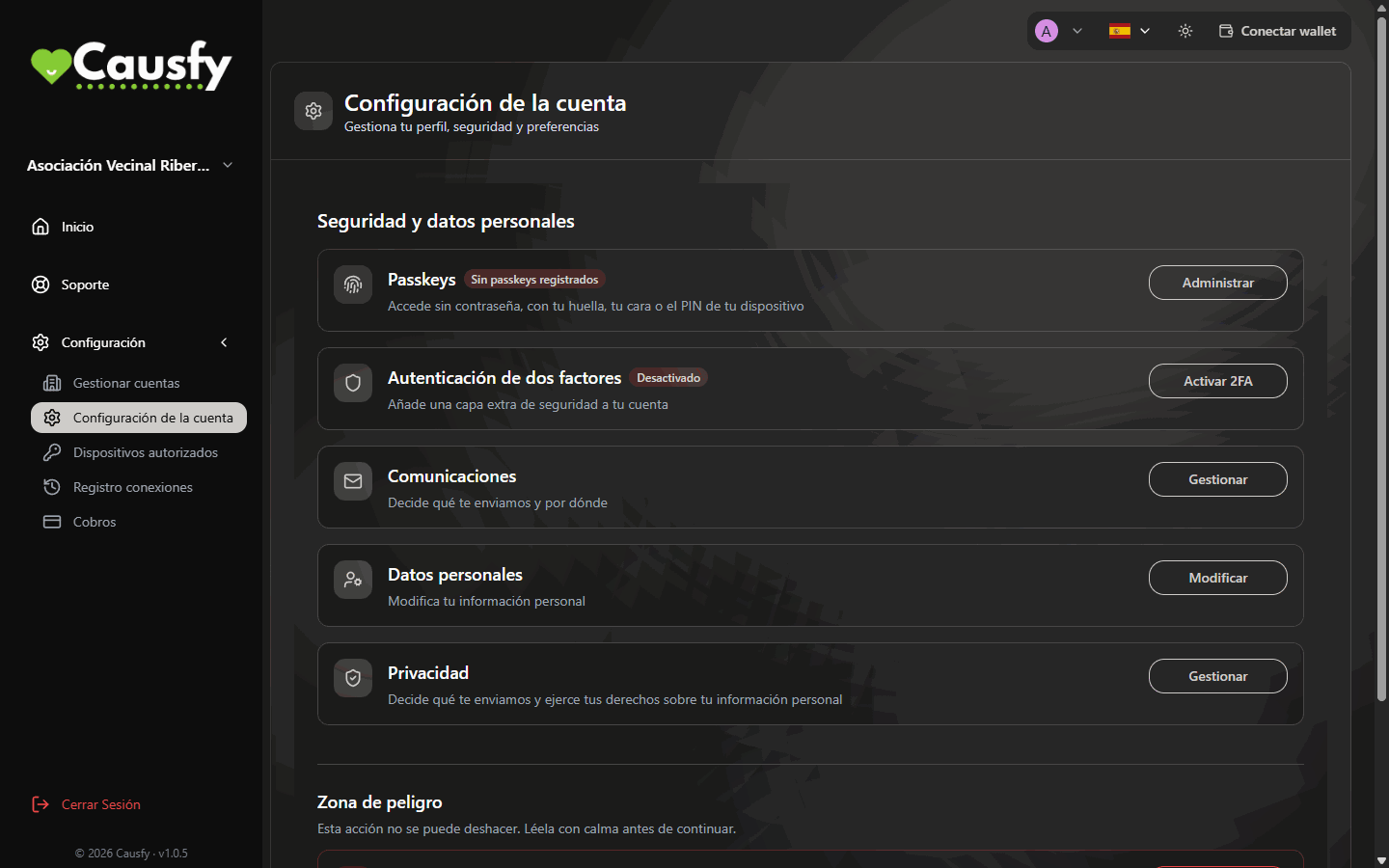
Your causes handle other people’s money and signatures. It is worth spending two minutes on this. Almost everything is in Configuration › Account Settings.
Account Settings: this is where you create passkeys, turn on two-factor authentication and manage your data.
Create a passkey
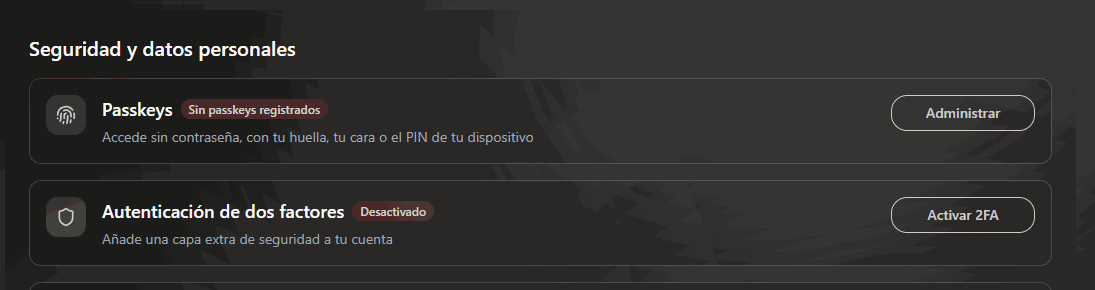
Go to Configuration › Account Settings. In the Passkeys row press Manage and then Add passkey. First we ask you to confirm it’s you, and then your device does the rest with your fingerprint, face or PIN.
In Account Settings: Passkeys to create one, and Two-Factor Authentication to turn on code verification.
Create one on each device you use often, your computer and your phone.
Turn on two-factor authentication
In Configuration › Account Settings, in the Two-Factor Authentication row, press Activate 2FA. Scan the QR code with your authentication app and type the code it shows you.Keep that app somewhere safe: it is what we will ask you for when you do something sensitive.
Review your access
In Configuration › Authorized Devices you see the browsers and passkeys you sign in with, and in Connection Log, where your account has been accessed from. If something doesn’t add up, change your passkeys and tell support.Devices and access
With a passkey or two-factor authentication turned on, we will ask for them again before sensitive actions, such as changing where a cause’s money goes. If you have both, both are asked for, one after the other. It is a few seconds of hassle that saves you a lot of grief.
Check your spam folder and resend it after a minute
You get the code wrong several times
When you run out of attempts you see “You have used all your attempts. Start again to request a new code.” Press Start again and request another one
You changed phones and lost your passkey
Sign in with the email code and create a new passkey
You lost your two-factor authentication app
Write to support from another email account of yours; we will verify who you are before turning it off
{"docsConfig":{"theme":"mint","$schema":"https://mintlify.com/docs.json","name":"Causfy","description":"Guía de uso de Causfy para quien crea y gestiona causas: recoger firmas, recaudar fondos y cobrar.","colors":{"primary":"#1751a9","light":"#5b8def","dark":"#12428b"},"logo":{"light":"https://mintcdn.com/causfy/7NvzZjQeMvlRotvf/logo/light.png?fit=max\u0026auto=format\u0026n=7NvzZjQeMvlRotvf\u0026q=85\u0026s=b9acbe26e6eb66c251c9ca6bc8e8583a","dark":"https://mintcdn.com/causfy/7NvzZjQeMvlRotvf/logo/dark.png?fit=max\u0026auto=format\u0026n=7NvzZjQeMvlRotvf\u0026q=85\u0026s=18d120f4805607c2e0199334047f1735"},"favicon":"https://mintcdn.com/causfy/7NvzZjQeMvlRotvf/favicon.png?fit=max\u0026auto=format\u0026n=7NvzZjQeMvlRotvf\u0026q=85\u0026s=aa71f79bce02d180a39eb79c0632fa1a","navbar":{"links":[{"href":"https://causfy.com/es/contacto/","label":"Contacto"}],"primary":{"type":"button","label":"Ir a Causfy","href":"https://causfy.app"}},"footer":{"socials":{"instagram":"https://www.instagram.com/causfy_app","x":"https://x.com/Causfy_app","threads":"https://www.threads.com/@causfy_app","facebook":"https://www.facebook.com/Causfy","linkedin":"https://www.linkedin.com/company/causfy","youtube":"https://www.youtube.com/@causfy"},"links":[{"header":"Causfy","items":[{"label":"Inicio","href":"https://causfy.com/es"},{"label":"Ver causas","href":"https://causfy.com/causas"}]},{"header":"Legal","items":[{"label":"Términos","href":"https://causfy.com/legal/terminos"},{"label":"Privacidad","href":"https://causfy.com/legal/privacidad"},{"label":"Cookies","href":"https://causfy.com/legal/cookies"}]}]},"contextual":{"options":["copy","view","chatgpt","claude","perplexity","mcp","cursor","vscode"],"display":"header"},"styling":{"latex":true},"navigation":{"languages":[{"language":"es","footer":{"socials":{"instagram":"https://www.instagram.com/causfy_app","x":"https://x.com/Causfy_app","threads":"https://www.threads.com/@causfy_app","facebook":"https://www.facebook.com/Causfy","linkedin":"https://www.linkedin.com/company/causfy","youtube":"https://www.youtube.com/@causfy"},"links":[{"header":"Causfy","items":[{"label":"Inicio","href":"https://causfy.com/es"},{"label":"Ver causas","href":"https://causfy.com/causas"}]},{"header":"Legal","items":[{"label":"Términos","href":"https://causfy.com/es/legal/terminos"},{"label":"Privacidad","href":"https://causfy.com/es/legal/privacidad"},{"label":"Cookies","href":"https://causfy.com/es/legal/cookies"}]}]},"navbar":{"links":[{"href":"https://causfy.com/es/contacto/","label":"Contacto"}],"primary":{"type":"button","label":"Ir a Causfy","href":"https://causfy.app"}},"href":"es"},{"language":"en","footer":{"socials":{"instagram":"https://www.instagram.com/causfy_app","x":"https://x.com/Causfy_app","threads":"https://www.threads.com/@causfy_app","facebook":"https://www.facebook.com/Causfy","linkedin":"https://www.linkedin.com/company/causfy","youtube":"https://www.youtube.com/@causfy"},"links":[{"header":"Causfy","items":[{"label":"Home","href":"https://causfy.com/en"},{"label":"Browse causes","href":"https://causfy.com/causas"}]},{"header":"Legal","items":[{"label":"Terms","href":"https://causfy.com/en/legal/terms"},{"label":"Privacy","href":"https://causfy.com/en/legal/privacy"},{"label":"Cookies","href":"https://causfy.com/en/legal/cookies"}]}]},"navbar":{"links":[{"href":"https://causfy.com/en/contacto/","label":"Contact"}],"primary":{"type":"button","label":"Go to Causfy","href":"https://causfy.app"}},"href":"en"},{"language":"fr","footer":{"socials":{"instagram":"https://www.instagram.com/causfy_app","x":"https://x.com/Causfy_app","threads":"https://www.threads.com/@causfy_app","facebook":"https://www.facebook.com/Causfy","linkedin":"https://www.linkedin.com/company/causfy","youtube":"https://www.youtube.com/@causfy"},"links":[{"header":"Causfy","items":[{"label":"Accueil","href":"https://causfy.com/fr"},{"label":"Voir les causes","href":"https://causfy.com/causas"}]},{"header":"Légal","items":[{"label":"Conditions","href":"https://causfy.com/fr/legal/conditions"},{"label":"Confidentialité","href":"https://causfy.com/fr/legal/confidentialite"},{"label":"Cookies","href":"https://causfy.com/fr/legal/cookies"}]}]},"navbar":{"links":[{"href":"https://causfy.com/fr/contacto/","label":"Contact"}],"primary":{"type":"button","label":"Aller sur Causfy","href":"https://causfy.app"}},"href":"fr"},{"language":"pt","footer":{"socials":{"instagram":"https://www.instagram.com/causfy_app","x":"https://x.com/Causfy_app","threads":"https://www.threads.com/@causfy_app","facebook":"https://www.facebook.com/Causfy","linkedin":"https://www.linkedin.com/company/causfy","youtube":"https://www.youtube.com/@causfy"},"links":[{"header":"Causfy","items":[{"label":"Início","href":"https://causfy.com/pt"},{"label":"Ver causas","href":"https://causfy.com/causas"}]},{"header":"Legal","items":[{"label":"Termos","href":"https://causfy.com/pt/legal/termos"},{"label":"Privacidade","href":"https://causfy.com/pt/legal/privacidade"},{"label":"Cookies","href":"https://causfy.com/pt/legal/cookies"}]}]},"navbar":{"links":[{"href":"https://causfy.com/pt/contacto/","label":"Contato"}],"primary":{"type":"button","label":"Ir para a Causfy","href":"https://causfy.app"}},"href":"pt"},{"language":"it","footer":{"socials":{"instagram":"https://www.instagram.com/causfy_app","x":"https://x.com/Causfy_app","threads":"https://www.threads.com/@causfy_app","facebook":"https://www.facebook.com/Causfy","linkedin":"https://www.linkedin.com/company/causfy","youtube":"https://www.youtube.com/@causfy"},"links":[{"header":"Causfy","items":[{"label":"Home","href":"https://causfy.com/it"},{"label":"Vedi le cause","href":"https://causfy.com/causas"}]},{"header":"Legale","items":[{"label":"Termini","href":"https://causfy.com/it/legal/termini"},{"label":"Privacy","href":"https://causfy.com/it/legal/privacy"},{"label":"Cookie","href":"https://causfy.com/it/legal/cookie"}]}]},"navbar":{"links":[{"href":"https://causfy.com/it/contacto/","label":"Contatti"}],"primary":{"type":"button","label":"Vai su Causfy","href":"https://causfy.app"}},"href":"it"},{"language":"de","footer":{"socials":{"instagram":"https://www.instagram.com/causfy_app","x":"https://x.com/Causfy_app","threads":"https://www.threads.com/@causfy_app","facebook":"https://www.facebook.com/Causfy","linkedin":"https://www.linkedin.com/company/causfy","youtube":"https://www.youtube.com/@causfy"},"links":[{"header":"Causfy","items":[{"label":"Startseite","href":"https://causfy.com/de"},{"label":"Anliegen ansehen","href":"https://causfy.com/causas"}]},{"header":"Rechtliches","items":[{"label":"AGB","href":"https://causfy.com/de/legal/agb"},{"label":"Datenschutz","href":"https://causfy.com/de/legal/datenschutz"},{"label":"Cookies","href":"https://causfy.com/de/legal/cookies"}]}]},"navbar":{"links":[{"href":"https://causfy.com/de/contacto/","label":"Kontakt"}],"primary":{"type":"button","label":"Zu Causfy","href":"https://causfy.app"}},"href":"de"}]}},"deployment":{"deploymentMetadataValue":{"subdomain":"causfy","hasAudioNarration":false,"actualSubdomain":"causfy","customDomains":["docs.causfy.com"],"gitSource":{"type":"github","owner":"causfy-global-technologies","repo":"causfy-app","deployBranch":"main","contentDirectory":"user-manual-docs","isPrivate":true,"mountPath":"","label":""},"chroma":{"latestBuiltDeploymentHistoryId":"6ad7c3ebf75277ee5c2b7db8","collectionId":"d42b9f6e-6561-4884-ba61-7344b29728eb","liveDeploymentHistoryId":"6ad7c3ebf75277ee5c2b7db8","schemaVersion":"v3"},"entitlements":{"AI_CHAT":{"status":"DISABLED"}},"buildId":"6ad7c3ebf75277ee5c2b7db8","clientVersion":"0.0.4071","searchFilterCounts":[{"language":"de","tag":"Ihre Kampagne","count":7},{"language":"en","tag":"Your cause","count":7},{"language":"es","tag":"Tu causa","count":7},{"language":"fr","tag":"Votre cause","count":7},{"language":"it","tag":"La tua causa","count":7},{"language":"pt","tag":"Sua causa","count":7},{"language":"de","tag":"Eine Kampagne unterschreiben","count":6},{"language":"en","tag":"Signing a cause","count":6},{"language":"es","tag":"Firmar una causa","count":6},{"language":"fr","tag":"Signer une cause","count":6},{"language":"it","tag":"Firmare una causa","count":6},{"language":"pt","tag":"Assinar uma causa","count":6},{"language":"de","tag":"Ihr Konto","count":5},{"language":"en","tag":"Your account","count":5},{"language":"es","tag":"Tu cuenta","count":5},{"language":"fr","tag":"Votre compte","count":5},{"language":"it","tag":"Il tuo account","count":5},{"language":"pt","tag":"Sua conta","count":5},{"language":"de","tag":"Erste Schritte","count":3},{"language":"en","tag":"Getting started","count":3},{"language":"es","tag":"Empezar","count":3},{"language":"fr","tag":"Commencer","count":3},{"language":"it","tag":"Iniziare","count":3},{"language":"pt","tag":"Começar","count":3},{"language":"de","tag":"Zahlungen","count":2},{"language":"de","tag":"Support","count":2},{"language":"en","tag":"Getting paid","count":2},{"language":"en","tag":"Support","count":2},{"language":"es","tag":"Cobrar","count":2},{"language":"es","tag":"Soporte","count":2},{"language":"fr","tag":"Encaisser","count":2},{"language":"fr","tag":"Assistance","count":2},{"language":"it","tag":"Incassare","count":2},{"language":"it","tag":"Assistenza","count":2},{"language":"pt","tag":"Receber","count":2},{"language":"pt","tag":"Suporte","count":2}]},"assistantConfig":{"enableAskAiButton":false,"enableStarterQuestions":false,"enableContextualStarterQuestions":false,"enableAskAiSearchBar":true},"basePath":"","hasChatPermissions":false,"hasWebMcpPermissions":false,"toggles":[{"name":"kill-isr","enabled":true,"variant":{"name":"disabled","enabled":false,"feature_enabled":true},"impressionData":false},{"name":"agent-mintlify-slack","enabled":true,"variant":{"name":"disabled","enabled":false,"feature_enabled":true},"impressionData":false},{"name":"agent-integrations-settings","enabled":true,"variant":{"name":"disabled","enabled":false,"feature_enabled":true},"impressionData":false},{"name":"rbac-expansion","enabled":true,"variant":{"name":"disabled","enabled":false,"feature_enabled":true},"impressionData":false},{"name":"automations-pr-grouping","enabled":true,"variant":{"name":"disabled","enabled":false,"feature_enabled":true},"impressionData":false},{"name":"custom-prefix","enabled":true,"variant":{"name":"disabled","enabled":false,"feature_enabled":true},"impressionData":false},{"name":"analytics-v7","enabled":true,"variant":{"name":"disabled","enabled":false,"feature_enabled":true},"impressionData":false},{"name":"user-flows-analytics","enabled":true,"variant":{"name":"disabled","enabled":false,"feature_enabled":true},"impressionData":false},{"name":"no-publish-flow","enabled":true,"variant":{"name":"disabled","enabled":false,"feature_enabled":true},"impressionData":false},{"name":"workos-onboarding","enabled":true,"variant":{"name":"disabled","enabled":false,"feature_enabled":true},"impressionData":false},{"name":"llms-txt-v2","enabled":true,"variant":{"name":"disabled","enabled":false,"feature_enabled":true},"impressionData":false},{"name":"snapshot-serving-live","enabled":true,"variant":{"name":"disabled","enabled":false,"feature_enabled":true},"impressionData":false},{"name":"stripTemperatureMiddleware","enabled":true,"variant":{"name":"disabled","enabled":false,"feature_enabled":true},"impressionData":false},{"name":"support-platform-pylon-zendesk","enabled":true,"variant":{"name":"disabled","enabled":false,"feature_enabled":true},"impressionData":false},{"name":"snapshot-serving","enabled":true,"variant":{"name":"disabled","enabled":false,"feature_enabled":true},"impressionData":false},{"name":"instant-rollback","enabled":true,"variant":{"name":"disabled","enabled":false,"feature_enabled":true},"impressionData":false},{"name":"granular-notifications-server","enabled":true,"variant":{"name":"disabled","enabled":false,"feature_enabled":true},"impressionData":false},{"name":"granular-notifications","enabled":true,"variant":{"name":"disabled","enabled":false,"feature_enabled":true},"impressionData":false},{"name":"automations-fable","enabled":true,"variant":{"name":"disabled","enabled":false,"feature_enabled":true},"impressionData":false},{"name":"fixed-ai-action-pricing","enabled":true,"variant":{"name":"disabled","enabled":false,"feature_enabled":true},"impressionData":false},{"name":"automation-resolve-merge-conflict","enabled":true,"variant":{"name":"disabled","enabled":false,"feature_enabled":true},"impressionData":false},{"name":"scoped-publishing","enabled":true,"variant":{"name":"disabled","enabled":false,"feature_enabled":true},"impressionData":false},{"name":"mintql","enabled":true,"variant":{"name":"disabled","enabled":false,"feature_enabled":true},"impressionData":false},{"name":"page-level-analytics","enabled":true,"variant":{"name":"disabled","enabled":false,"feature_enabled":true},"impressionData":false},{"name":"editor-version-history-v2","enabled":true,"variant":{"name":"disabled","enabled":false,"feature_enabled":true},"impressionData":false},{"name":"billing-page-v2","enabled":true,"variant":{"name":"disabled","enabled":false,"feature_enabled":true},"impressionData":false},{"name":"full-page-search","enabled":true,"variant":{"name":"disabled","enabled":false,"feature_enabled":true},"impressionData":false},{"name":"workspace-projects","enabled":true,"variant":{"name":"disabled","enabled":false,"feature_enabled":true},"impressionData":false},{"name":"assistant-v5","enabled":true,"variant":{"name":"disabled","enabled":false,"feature_enabled":true},"impressionData":false},{"name":"fork-pr-previews","enabled":true,"variant":{"name":"disabled","enabled":false,"feature_enabled":true},"impressionData":false},{"name":"revalidation-jwt","enabled":true,"variant":{"name":"disabled","enabled":false,"feature_enabled":true},"impressionData":false},{"name":"vite-origin","enabled":true,"variant":{"name":"disabled","enabled":false,"feature_enabled":true},"impressionData":false},{"name":"workos-sso-scim","enabled":true,"variant":{"name":"disabled","enabled":false,"feature_enabled":true},"impressionData":false},{"name":"hobby-abuse-scan","enabled":true,"variant":{"name":"disabled","enabled":false,"feature_enabled":true},"impressionData":false},{"name":"dashboard-inbox","enabled":true,"variant":{"name":"disabled","enabled":false,"feature_enabled":true},"impressionData":false},{"name":"workos-signup","enabled":true,"variant":{"name":"disabled","enabled":false,"feature_enabled":true},"impressionData":false},{"name":"turbopuffer-dual-write","enabled":true,"variant":{"name":"disabled","enabled":false,"feature_enabled":true},"impressionData":false},{"name":"workos-enabled","enabled":true,"variant":{"name":"disabled","enabled":false,"feature_enabled":true},"impressionData":false},{"name":"approve-review-flow","enabled":true,"variant":{"name":"disabled","enabled":false,"feature_enabled":true},"impressionData":false},{"name":"sso-setup-deadline-banner","enabled":true,"variant":{"name":"disabled","enabled":false,"feature_enabled":true},"impressionData":false},{"name":"turbopuffer-serve","enabled":true,"variant":{"name":"disabled","enabled":false,"feature_enabled":true},"impressionData":false},{"name":"live-agents","enabled":true,"variant":{"name":"disabled","enabled":false,"feature_enabled":true},"impressionData":false},{"name":"comment-mode","enabled":true,"variant":{"name":"disabled","enabled":false,"feature_enabled":true},"impressionData":false}],"googleFontsInlined":false},"customCss":[],"page":{"pagePath":"en/empezar/cuenta","slug":"/en/empezar/cuenta","pageMetadata":{"title":"Create your account and sign in","description":"The three ways to sign in to Causfy and how to leave your account protected from day one.","icon":"user-plus","keywords":["account","sign in","access","passkey","code","2FA"],"href":"/en/empezar/cuenta"},"description":{"compiledSource":"\"use strict\";\nconst {jsx: _jsx} = arguments[0];\nconst {useMDXComponents: _provideComponents} = arguments[0];\nfunction _createMdxContent(props) {\n const _components = {\n p: \"p\",\n ..._provideComponents(),\n ...props.components\n };\n return _jsx(_components.p, {\n children: \"The three ways to sign in to Causfy and how to leave your account protected from day one.\"\n });\n}\nfunction MDXContent(props = {}) {\n const {wrapper: MDXLayout} = {\n ..._provideComponents(),\n ...props.components\n };\n return MDXLayout ? _jsx(MDXLayout, {\n ...props,\n children: _jsx(_createMdxContent, {\n ...props\n })\n }) : _createMdxContent(props);\n}\nreturn {\n default: MDXContent\n};\n","frontmatter":{},"scope":{}},"pageType":"default","mdx":{"mdxSource":{"compiledSource":"\"use strict\";const{Fragment:_Fragment,jsx:_jsx,jsxs:_jsxs}=arguments[0];const{useMDXComponents:_provideComponents}=arguments[0];function _createMdxContent(props){const _components={a:`a`,li:`li`,ol:`ol`,p:`p`,strong:`strong`,tbody:`tbody`,td:`td`,th:`th`,thead:`thead`,tr:`tr`,ul:`ul`,..._provideComponents(),...props.components},{Frame,Heading,OptimizedImage,Step,Steps,Tab,Table,Tabs,Tip,Warning}=_components;if(!Frame)_missingMdxReference(`Frame`,true);if(!Heading)_missingMdxReference(`Heading`,true);if(!OptimizedImage)_missingMdxReference(`OptimizedImage`,true);if(!Step)_missingMdxReference(`Step`,true);if(!Steps)_missingMdxReference(`Steps`,true);if(!Tab)_missingMdxReference(`Tab`,true);if(!Table)_missingMdxReference(`Table`,true);if(!Tabs)_missingMdxReference(`Tabs`,true);if(!Tip)_missingMdxReference(`Tip`,true);if(!Warning)_missingMdxReference(`Warning`,true);return _jsxs(_Fragment,{children:[_jsxs(_components.p,{children:[`In Causfy `,_jsx(_components.strong,{children:`there is no password to remember`}),`. You sign in with a code sent to your email, with an account you already have, or with a passkey.`]}),`\n`,_jsx(_components.p,{children:`There is no separate sign-up: the same screen works for signing in and for creating the account.`}),`\n`,_jsx(Frame,{caption:`The sign-in screen: your email, an account you already have, or your passkey.`,children:_jsx(OptimizedImage,{src:`https://mintcdn.com/causfy/E4oFDtVHANfMJqrg/imagenes/acceso.png?fit=max\u0026auto=format\u0026n=E4oFDtVHANfMJqrg\u0026q=85\u0026s=b473c92c7a940fff552f7d55b3a58cf6`,alt:`Sign in or create your account screen with the Cloudflare security check, the email field with the Continue button, the Google, LinkedIn and Facebook buttons, and the Continue with passkey button`,\"data-og-width\":`1440`,width:`1440`,\"data-og-height\":`900`,height:`900`,\"data-path\":`imagenes/acceso.png`,\"data-optimize\":`true`,\"data-opv\":`3`,srcset:`https://mintcdn.com/causfy/E4oFDtVHANfMJqrg/imagenes/acceso.png?w=280\u0026fit=max\u0026auto=format\u0026n=E4oFDtVHANfMJqrg\u0026q=85\u0026s=a860d453f4f75e785c82a1911c50eae5 280w, https://mintcdn.com/causfy/E4oFDtVHANfMJqrg/imagenes/acceso.png?w=560\u0026fit=max\u0026auto=format\u0026n=E4oFDtVHANfMJqrg\u0026q=85\u0026s=8bc1f78586da8f7ccf11974739ae5909 560w, https://mintcdn.com/causfy/E4oFDtVHANfMJqrg/imagenes/acceso.png?w=840\u0026fit=max\u0026auto=format\u0026n=E4oFDtVHANfMJqrg\u0026q=85\u0026s=333af582465dda50a8591090c1bd9a32 840w, https://mintcdn.com/causfy/E4oFDtVHANfMJqrg/imagenes/acceso.png?w=1100\u0026fit=max\u0026auto=format\u0026n=E4oFDtVHANfMJqrg\u0026q=85\u0026s=073008c72c872390cb925413608e4f25 1100w, https://mintcdn.com/causfy/E4oFDtVHANfMJqrg/imagenes/acceso.png?w=1650\u0026fit=max\u0026auto=format\u0026n=E4oFDtVHANfMJqrg\u0026q=85\u0026s=6d1b5b4cdbe36327d8f4758400159885 1650w, https://mintcdn.com/causfy/E4oFDtVHANfMJqrg/imagenes/acceso.png?w=2500\u0026fit=max\u0026auto=format\u0026n=E4oFDtVHANfMJqrg\u0026q=85\u0026s=72211b7e47435301ca68e34f194ce414 2500w`})}),`\n`,_jsx(_components.p,{children:`First of all, the screen runs an automatic security check to make sure you are a person. It usually clears itself in a second.`}),`\n`,_jsx(Heading,{level:`2`,id:`the-three-ways-to-sign-in`,children:`The three ways to sign in`}),`\n`,_jsxs(Tabs,{children:[_jsxs(Tab,{title:`With your email`,id:`with-your-email`,children:[_jsxs(_components.ol,{children:[`\n`,_jsxs(_components.li,{children:[`Type your email address and press `,_jsx(_components.strong,{children:`Continue`}),`.`]}),`\n`,_jsx(_components.li,{children:`We send you a six-digit code.`}),`\n`,_jsx(_components.li,{children:`Type it on the screen. When you enter the sixth digit it signs you in on its own, without pressing anything else.`}),`\n`]}),_jsxs(_components.p,{children:[`The code expires. If it takes a while to arrive, check your spam folder and use `,_jsx(_components.strong,{children:`Resend code`}),`; you have to wait a minute between sends.`]})]}),_jsxs(Tab,{title:`With an account you already have`,id:`with-an-account-you-already-have`,children:[_jsxs(_components.p,{children:[`You can sign in with `,_jsx(_components.strong,{children:`Google`}),`, `,_jsx(_components.strong,{children:`LinkedIn`}),` or `,_jsx(_components.strong,{children:`Facebook`}),`.`]}),_jsx(_components.p,{children:`Use the same email you would use in Causfy. If you sign in once with Google and another time with the email code, as long as the address is the same it is the same account.`})]}),_jsxs(Tab,{title:`With a passkey`,id:`with-a-passkey`,children:[_jsx(_components.p,{children:`A passkey replaces the password with your device’s fingerprint, face or PIN. It is the fastest way and the hardest to steal.`}),_jsxs(_components.p,{children:[`Press `,_jsx(_components.strong,{children:`Continue with passkey`}),`. To use it you have to create it first from your account: we explain how below.`]})]})]}),`\n`,_jsx(Heading,{level:`2`,id:`the-first-time-complete-your-profile`,children:`The first time: complete your profile`}),`\n`,_jsxs(_components.p,{children:[`If it is your first time, after signing in you see the `,_jsx(_components.strong,{children:`Complete your profile`}),` screen. Fill in:`]}),`\n`,_jsxs(_components.ul,{children:[`\n`,_jsxs(_components.li,{children:[_jsx(_components.strong,{children:`First name`}),` and `,_jsx(_components.strong,{children:`Last name`}),`.`]}),`\n`,_jsxs(_components.li,{children:[_jsx(_components.strong,{children:`Account type`}),`: `,_jsx(_components.strong,{children:`Personal`}),` (an individual account) or `,_jsx(_components.strong,{children:`Business`}),` (for an organization or company; it will also ask for its name).`]}),`\n`,_jsxs(_components.li,{children:[`Tick `,_jsx(_components.strong,{children:`I accept the Terms of Use`}),` and `,_jsx(_components.strong,{children:`I accept the Privacy Policy`}),`. Without both you cannot continue.`]}),`\n`]}),`\n`,_jsxs(_components.p,{children:[`When you finish you land in your dashboard. `,_jsx(_components.a,{href:`/en/cuenta/cuentas`,children:`More about account types`})]}),`\n`,_jsx(Warning,{children:_jsxs(_components.p,{children:[`Your identity in Causfy is `,_jsx(_components.strong,{children:`your email plus the organization`}),`. The same address can belong to two different accounts if you work with two organizations. If you don’t see your causes after signing in, check at the top which account you are in.`]})}),`\n`,_jsx(Heading,{level:`2`,id:`protect-your-account`,children:`Protect your account`}),`\n`,_jsxs(_components.p,{children:[`Your causes handle other people’s money and signatures. It is worth spending two minutes on this. Almost everything is in `,_jsx(_components.strong,{children:`Configuration › Account Settings`}),`.`]}),`\n`,_jsx(Frame,{caption:`Account Settings: this is where you create passkeys, turn on two-factor authentication and manage your data.`,children:_jsx(OptimizedImage,{src:`https://mintcdn.com/causfy/E4oFDtVHANfMJqrg/imagenes/configuracion-de-la-cuenta.png?fit=max\u0026auto=format\u0026n=E4oFDtVHANfMJqrg\u0026q=85\u0026s=a17776a6f1fb161933d823a48190ad34`,alt:`Account Settings page with the Passkeys, Two-Factor Authentication, Communications, Personal Information and Privacy rows, the Danger zone with Delete Account, and the Configuration side menu`,\"data-og-width\":`1440`,width:`1440`,\"data-og-height\":`900`,height:`900`,\"data-path\":`imagenes/configuracion-de-la-cuenta.png`,\"data-optimize\":`true`,\"data-opv\":`3`,srcset:`https://mintcdn.com/causfy/E4oFDtVHANfMJqrg/imagenes/configuracion-de-la-cuenta.png?w=280\u0026fit=max\u0026auto=format\u0026n=E4oFDtVHANfMJqrg\u0026q=85\u0026s=1746987764b0977d5fd340be832ba14b 280w, https://mintcdn.com/causfy/E4oFDtVHANfMJqrg/imagenes/configuracion-de-la-cuenta.png?w=560\u0026fit=max\u0026auto=format\u0026n=E4oFDtVHANfMJqrg\u0026q=85\u0026s=81be76e03b7795533a09b2086fb16a31 560w, https://mintcdn.com/causfy/E4oFDtVHANfMJqrg/imagenes/configuracion-de-la-cuenta.png?w=840\u0026fit=max\u0026auto=format\u0026n=E4oFDtVHANfMJqrg\u0026q=85\u0026s=5e231677a3d262a304ab281fa8e5dcb1 840w, https://mintcdn.com/causfy/E4oFDtVHANfMJqrg/imagenes/configuracion-de-la-cuenta.png?w=1100\u0026fit=max\u0026auto=format\u0026n=E4oFDtVHANfMJqrg\u0026q=85\u0026s=c877703e9791365c29cc91b0e387964a 1100w, https://mintcdn.com/causfy/E4oFDtVHANfMJqrg/imagenes/configuracion-de-la-cuenta.png?w=1650\u0026fit=max\u0026auto=format\u0026n=E4oFDtVHANfMJqrg\u0026q=85\u0026s=d2dbc4cb73c804dbcb2d1078cdd826d6 1650w, https://mintcdn.com/causfy/E4oFDtVHANfMJqrg/imagenes/configuracion-de-la-cuenta.png?w=2500\u0026fit=max\u0026auto=format\u0026n=E4oFDtVHANfMJqrg\u0026q=85\u0026s=d00fea83cde1250e00776f8b864a0a9b 2500w`})}),`\n`,_jsxs(Steps,{children:[_jsxs(Step,{title:`Create a passkey`,icon:`key`,children:[_jsxs(_components.p,{children:[`Go to `,_jsx(_components.strong,{children:`Configuration › Account Settings`}),`. In the `,_jsx(_components.strong,{children:`Passkeys`}),` row press `,_jsx(_components.strong,{children:`Manage`}),` and then `,_jsx(_components.strong,{children:`Add passkey`}),`. First we ask you to confirm it’s you, and then your device does the rest with your fingerprint, face or PIN.`]}),_jsx(Frame,{caption:`In Account Settings: Passkeys to create one, and Two-Factor Authentication to turn on code verification.`,children:_jsx(OptimizedImage,{src:`https://mintcdn.com/causfy/E4oFDtVHANfMJqrg/imagenes/seguridad.png?fit=max\u0026auto=format\u0026n=E4oFDtVHANfMJqrg\u0026q=85\u0026s=d6638e2f125519a86fa36cd0477eacd1`,alt:`Two rows of the account settings: Passkeys with the Manage button and Two-Factor Authentication with the Activate 2FA button`,\"data-og-width\":`1095`,width:`1095`,\"data-og-height\":`290`,height:`290`,\"data-path\":`imagenes/seguridad.png`,\"data-optimize\":`true`,\"data-opv\":`3`,srcset:`https://mintcdn.com/causfy/E4oFDtVHANfMJqrg/imagenes/seguridad.png?w=280\u0026fit=max\u0026auto=format\u0026n=E4oFDtVHANfMJqrg\u0026q=85\u0026s=0f7a31b62824a5d5cb540a5fe480f4ec 280w, https://mintcdn.com/causfy/E4oFDtVHANfMJqrg/imagenes/seguridad.png?w=560\u0026fit=max\u0026auto=format\u0026n=E4oFDtVHANfMJqrg\u0026q=85\u0026s=913a1f19a5790bf65ed024ccefc74d13 560w, https://mintcdn.com/causfy/E4oFDtVHANfMJqrg/imagenes/seguridad.png?w=840\u0026fit=max\u0026auto=format\u0026n=E4oFDtVHANfMJqrg\u0026q=85\u0026s=bcb20e75de52f9aa4b69c82e0dc71e89 840w, https://mintcdn.com/causfy/E4oFDtVHANfMJqrg/imagenes/seguridad.png?w=1100\u0026fit=max\u0026auto=format\u0026n=E4oFDtVHANfMJqrg\u0026q=85\u0026s=4fd175715493dd43abcf8bed01dd3829 1100w, https://mintcdn.com/causfy/E4oFDtVHANfMJqrg/imagenes/seguridad.png?w=1650\u0026fit=max\u0026auto=format\u0026n=E4oFDtVHANfMJqrg\u0026q=85\u0026s=6cfde04e03f7092e30cc744c0968d5e3 1650w, https://mintcdn.com/causfy/E4oFDtVHANfMJqrg/imagenes/seguridad.png?w=2500\u0026fit=max\u0026auto=format\u0026n=E4oFDtVHANfMJqrg\u0026q=85\u0026s=bc97bdb5b26bd5745d8a5babc74aa7a8 2500w`})}),_jsx(_components.p,{children:`Create one on each device you use often, your computer and your phone.`})]}),_jsxs(Step,{title:`Turn on two-factor authentication`,icon:`shield-check`,children:[_jsxs(_components.p,{children:[`In `,_jsx(_components.strong,{children:`Configuration › Account Settings`}),`, in the `,_jsx(_components.strong,{children:`Two-Factor Authentication`}),` row, press `,_jsx(_components.strong,{children:`Activate 2FA`}),`. Scan the QR code with your authentication app and type the code it shows you.`]}),_jsx(_components.p,{children:`Keep that app somewhere safe: it is what we will ask you for when you do something sensitive.`})]}),_jsxs(Step,{title:`Review your access`,icon:`history`,children:[_jsxs(_components.p,{children:[`In `,_jsx(_components.strong,{children:`Configuration › Authorized Devices`}),` you see the browsers and passkeys you sign in with, and in `,_jsx(_components.strong,{children:`Connection Log`}),`, where your account has been accessed from. If something doesn’t add up, change your passkeys and tell support.`]}),_jsx(_components.p,{children:_jsx(_components.a,{href:`/en/cuenta/dispositivos`,children:`Devices and access`})})]})]}),`\n`,_jsx(Tip,{children:_jsx(_components.p,{children:`With a passkey or two-factor authentication turned on, we will ask for them again before sensitive actions, such as changing where a cause’s money goes. If you have both, both are asked for, one after the other. It is a few seconds of hassle that saves you a lot of grief.`})}),`\n`,_jsx(Heading,{level:`2`,id:`if-you-get-locked-out`,children:`If you get locked out`}),`\n`,_jsxs(Table,{children:[_jsx(_components.thead,{children:_jsxs(_components.tr,{children:[_jsx(_components.th,{children:`What happens`}),_jsx(_components.th,{children:`What to do`})]})}),_jsxs(_components.tbody,{children:[_jsxs(_components.tr,{children:[_jsx(_components.td,{children:`The code doesn’t arrive`}),_jsx(_components.td,{children:`Check your spam folder and resend it after a minute`})]}),_jsxs(_components.tr,{children:[_jsx(_components.td,{children:`You get the code wrong several times`}),_jsxs(_components.td,{children:[`When you run out of attempts you see “You have used all your attempts. Start again to request a new code.” Press `,_jsx(_components.strong,{children:`Start again`}),` and request another one`]})]}),_jsxs(_components.tr,{children:[_jsx(_components.td,{children:`You changed phones and lost your passkey`}),_jsx(_components.td,{children:`Sign in with the email code and create a new passkey`})]}),_jsxs(_components.tr,{children:[_jsx(_components.td,{children:`You lost your two-factor authentication app`}),_jsx(_components.td,{children:`Write to support from another email account of yours; we will verify who you are before turning it off`})]})]})]})]})}function MDXContent(props={}){const{wrapper:MDXLayout}={..._provideComponents(),...props.components};return MDXLayout?_jsx(MDXLayout,{...props,children:_jsx(_createMdxContent,{...props})}):_createMdxContent(props)}return{default:MDXContent};function _missingMdxReference(id,component){throw new Error(`Expected `+(component?`component`:`object`)+\" `\"+id+\"` to be defined: you likely forgot to import, pass, or provide it.\")}","frontmatter":{},"scope":{"config":{},"pageMetadata":{"title":"Create your account and sign in","description":"The three ways to sign in to Causfy and how to leave your account protected from day one.","icon":"user-plus","keywords":["account","sign in","access","passkey","code","2FA"],"href":"/en/empezar/cuenta"}}},"mdxSourceWithNoJs":null},"mdxExtracts":{"tableOfContents":[{"title":"The three ways to sign in","slug":"the-three-ways-to-sign-in","depth":2,"children":[]},{"title":"The first time: complete your profile","slug":"the-first-time-complete-your-profile","depth":2,"children":[]},{"title":"Protect your account","slug":"protect-your-account","depth":2,"children":[]},{"title":"If you get locked out","slug":"if-you-get-locked-out","depth":2,"children":[]}],"codeExamples":{}},"jsLinks":[],"subdomain":"causfy","siteName":"Causfy","title":"Create your account and sign in - Causfy","navMaps":{"firstHrefInVersion":{},"firstHrefInLanguage":{"es":{"href":"/es/empezar/cuenta","matchLevel":1},"en":{"href":"/en/empezar/cuenta","matchLevel":0},"fr":{"href":"/fr/empezar/cuenta","matchLevel":1},"pt":{"href":"/pt/empezar/cuenta","matchLevel":1},"it":{"href":"/it/empezar/cuenta","matchLevel":1},"de":{"href":"/de/empezar/cuenta","matchLevel":1}}},"lastModified":"2026-09-28T07:04:11.580Z","originalFileLocation":"en/empezar/cuenta.mdx","locale":"en"},"headHtml":"\u003cscript data-mint-head>(function(){var d=document.documentElement,p=null;if(!p){try{p=localStorage.getItem(\"isDarkMode\")}catch(e){}if(p==='true')p='dark';else if(p==='false')p='light';if(p!=='light'\u0026\u0026p!=='dark'\u0026\u0026p!=='system')p=\"system\"}var r=p==='system'?(matchMedia(\"(prefers-color-scheme: dark)\").matches?'dark':'light'):p;d.classList.remove(r==='dark'?'light':'dark');d.classList.add(r);d.setAttribute(\"data-theme-preference\",p)})();\u003c/script>\u003cmeta data-mint-head name=\"description\" content=\"The three ways to sign in to Causfy and how to leave your account protected from day one.\">\u003cmeta data-mint-head name=\"application-name\" content=\"Causfy\">\u003cmeta data-mint-head name=\"generator\" content=\"Mintlify\">\u003clink data-mint-head rel=\"icon\" type=\"image/png\" sizes=\"192x192\" href=\"/mintlify-assets/_mintlify/favicons/causfy/5QXY0zDs2VRxaBzG/_generated/favicon/android-chrome-192x192.png\" media=\"(prefers-color-scheme: light)\">\u003clink data-mint-head rel=\"apple-touch-icon\" type=\"image/png\" sizes=\"180x180\" href=\"/mintlify-assets/_mintlify/favicons/causfy/5QXY0zDs2VRxaBzG/_generated/favicon/apple-touch-icon.png\">\u003clink data-mint-head rel=\"icon\" type=\"image/png\" sizes=\"16x16\" href=\"/mintlify-assets/_mintlify/favicons/causfy/5QXY0zDs2VRxaBzG/_generated/favicon/favicon-16x16.png\" media=\"(prefers-color-scheme: light)\">\u003clink data-mint-head rel=\"icon\" type=\"image/png\" sizes=\"32x32\" href=\"/mintlify-assets/_mintlify/favicons/causfy/5QXY0zDs2VRxaBzG/_generated/favicon/favicon-32x32.png\" media=\"(prefers-color-scheme: light)\">\u003clink data-mint-head rel=\"shortcut icon\" type=\"image/x-icon\" href=\"/mintlify-assets/_mintlify/favicons/causfy/5QXY0zDs2VRxaBzG/_generated/favicon/favicon.ico\" media=\"(prefers-color-scheme: light)\">\u003clink data-mint-head rel=\"icon\" type=\"image/png\" sizes=\"192x192\" href=\"/mintlify-assets/_mintlify/favicons/causfy/5QXY0zDs2VRxaBzG/_generated/favicon-dark/android-chrome-192x192.png\" media=\"(prefers-color-scheme: dark)\">\u003clink data-mint-head rel=\"icon\" type=\"image/png\" sizes=\"16x16\" href=\"/mintlify-assets/_mintlify/favicons/causfy/5QXY0zDs2VRxaBzG/_generated/favicon-dark/favicon-16x16.png\" media=\"(prefers-color-scheme: dark)\">\u003clink data-mint-head rel=\"icon\" type=\"image/png\" sizes=\"32x32\" href=\"/mintlify-assets/_mintlify/favicons/causfy/5QXY0zDs2VRxaBzG/_generated/favicon-dark/favicon-32x32.png\" media=\"(prefers-color-scheme: dark)\">\u003clink data-mint-head rel=\"shortcut icon\" type=\"image/x-icon\" href=\"/mintlify-assets/_mintlify/favicons/causfy/5QXY0zDs2VRxaBzG/_generated/favicon-dark/favicon.ico\" media=\"(prefers-color-scheme: dark)\">\u003cmeta data-mint-head property=\"og:title\" content=\"Create your account and sign in - Causfy\">\u003cmeta data-mint-head property=\"og:description\" content=\"The three ways to sign in to Causfy and how to leave your account protected from day one.\">\u003cmeta data-mint-head property=\"og:site_name\" content=\"Causfy\">\u003cmeta data-mint-head property=\"og:url\" content=\"https://docs.causfy.com/en/empezar/cuenta\">\u003cmeta data-mint-head property=\"og:type\" content=\"website\">\u003cmeta data-mint-head property=\"og:image\" content=\"https://causfy.mintlify.app/_mintlify/api/og/v2?division=Getting+started\u0026amp;title=Create+your+account+and+sign+in\u0026amp;description=The+three+ways+to+sign+in+to+Causfy+and+how+to+leave+your+account+protected+from+day+one.\u0026amp;theme=513e08ea350cba9edb6de533\u0026amp;signature=d1fd0c7c248d84b299fce694290019da54ff8c5e1afb0a92e6499ae6d3207797\">\u003cmeta data-mint-head property=\"og:image:width\" content=\"1200\">\u003cmeta data-mint-head property=\"og:image:height\" content=\"630\">\u003cmeta data-mint-head name=\"twitter:card\" content=\"summary_large_image\">\u003cmeta data-mint-head name=\"twitter:title\" content=\"Create your account and sign in - Causfy\">\u003cmeta data-mint-head name=\"twitter:description\" content=\"The three ways to sign in to Causfy and how to leave your account protected from day one.\">\u003cmeta data-mint-head name=\"twitter:image\" content=\"https://causfy.mintlify.app/_mintlify/api/og/v2?division=Getting+started\u0026amp;title=Create+your+account+and+sign+in\u0026amp;description=The+three+ways+to+sign+in+to+Causfy+and+how+to+leave+your+account+protected+from+day+one.\u0026amp;theme=513e08ea350cba9edb6de533\u0026amp;signature=d1fd0c7c248d84b299fce694290019da54ff8c5e1afb0a92e6499ae6d3207797\">\u003cmeta data-mint-head name=\"twitter:image:width\" content=\"1200\">\u003cmeta data-mint-head name=\"twitter:image:height\" content=\"630\">\u003cmeta data-mint-head name=\"msapplication-config\" content=\"/mintlify-assets/_mintlify/favicons/causfy/5QXY0zDs2VRxaBzG/_generated/favicon/browserconfig.xml\">\u003cmeta data-mint-head name=\"apple-mobile-web-app-title\" content=\"Causfy\">\u003cmeta data-mint-head name=\"msapplication-TileColor\" content=\"#1751a9\">\u003clink data-mint-head rel=\"canonical\" href=\"https://docs.causfy.com/en/empezar/cuenta\">\u003clink data-mint-head rel=\"alternate\" type=\"application/xml\" href=\"/sitemap.xml\">\u003clink data-mint-head rel=\"alternate\" type=\"text/markdown\" href=\"/en/empezar/cuenta.md\">\u003clink data-mint-head rel=\"alternate\" hreflang=\"en\" href=\"https://docs.causfy.com/en/empezar/cuenta\">\u003clink data-mint-head rel=\"alternate\" hreflang=\"es\" href=\"https://docs.causfy.com/es/empezar/cuenta\">\u003clink data-mint-head rel=\"alternate\" hreflang=\"fr\" href=\"https://docs.causfy.com/fr/empezar/cuenta\">\u003clink data-mint-head rel=\"alternate\" hreflang=\"pt\" href=\"https://docs.causfy.com/pt/empezar/cuenta\">\u003clink data-mint-head rel=\"alternate\" hreflang=\"it\" href=\"https://docs.causfy.com/it/empezar/cuenta\">\u003clink data-mint-head rel=\"alternate\" hreflang=\"de\" href=\"https://docs.causfy.com/de/empezar/cuenta\">\u003clink data-mint-head rel=\"alternate\" hreflang=\"x-default\" href=\"https://docs.causfy.com/es/empezar/cuenta\">\u003cscript data-mint-head type=\"application/ld+json\">{\"@context\":\"https://schema.org\",\"@graph\":[{\"@type\":\"Organization\",\"@id\":\"https://docs.causfy.com/#organization\",\"name\":\"Causfy\",\"url\":\"https://docs.causfy.com\",\"logo\":{\"@type\":\"ImageObject\",\"url\":\"https://mintcdn.com/causfy/7NvzZjQeMvlRotvf/logo/light.png?fit=max\u0026auto=format\u0026n=7NvzZjQeMvlRotvf\u0026q=85\u0026s=b9acbe26e6eb66c251c9ca6bc8e8583a\"}},{\"@type\":\"WebSite\",\"@id\":\"https://docs.causfy.com#website\",\"name\":\"Causfy\",\"url\":\"https://docs.causfy.com\",\"publisher\":{\"@id\":\"https://docs.causfy.com/#organization\"}},{\"@type\":\"WebPage\",\"@id\":\"https://docs.causfy.com/en/empezar/cuenta#webpage\",\"url\":\"https://docs.causfy.com/en/empezar/cuenta\",\"name\":\"Create your account and sign in\",\"description\":\"The three ways to sign in to Causfy and how to leave your account protected from day one.\",\"dateModified\":\"2026-09-28T07:04:11.580Z\",\"isPartOf\":{\"@id\":\"https://docs.causfy.com#website\"},\"breadcrumb\":{\"@id\":\"https://docs.causfy.com/en/empezar/cuenta#breadcrumb\"}},{\"@type\":\"BreadcrumbList\",\"@id\":\"https://docs.causfy.com/en/empezar/cuenta#breadcrumb\",\"itemListElement\":[{\"@type\":\"ListItem\",\"position\":1,\"name\":\"Getting started\",\"item\":\"https://docs.causfy.com/en/index\"},{\"@type\":\"ListItem\",\"position\":2,\"name\":\"Create your account and sign in\",\"item\":\"https://docs.causfy.com/en/empezar/cuenta\"}]},{\"@type\":[\"Article\",\"TechArticle\"],\"@id\":\"https://docs.causfy.com/en/empezar/cuenta#article\",\"headline\":\"Create your account and sign in\",\"name\":\"Create your account and sign in\",\"description\":\"The three ways to sign in to Causfy and how to leave your account protected from day one.\",\"url\":\"https://docs.causfy.com/en/empezar/cuenta\",\"mainEntityOfPage\":{\"@id\":\"https://docs.causfy.com/en/empezar/cuenta#webpage\"},\"dateModified\":\"2026-09-28T07:04:11.580Z\",\"keywords\":\"account, sign in, access, passkey, code, 2FA\",\"publisher\":{\"@id\":\"https://docs.causfy.com/#organization\"},\"isPartOf\":{\"@id\":\"https://docs.causfy.com#website\"}}]}\u003c/script>\u003cscript data-mint-head type=\"application/ld+json\">{\"@context\":\"https://schema.org\",\"@type\":\"WebSite\",\"name\":\"Causfy\",\"creator\":{\"@type\":\"Organization\",\"name\":\"Mintlify\",\"url\":\"https://mintlify.com\"}}\u003c/script>","siteName":"Causfy","nav":{"global":null,"languages":[{"language":"es","footer":{"socials":{"instagram":"https://www.instagram.com/causfy_app","x":"https://x.com/Causfy_app","threads":"https://www.threads.com/@causfy_app","facebook":"https://www.facebook.com/Causfy","linkedin":"https://www.linkedin.com/company/causfy","youtube":"https://www.youtube.com/@causfy"},"links":[{"header":"Causfy","items":[{"label":"Inicio","href":"https://causfy.com/es"},{"label":"Ver causas","href":"https://causfy.com/causas"}]},{"header":"Legal","items":[{"label":"Términos","href":"https://causfy.com/es/legal/terminos"},{"label":"Privacidad","href":"https://causfy.com/es/legal/privacidad"},{"label":"Cookies","href":"https://causfy.com/es/legal/cookies"}]}]},"navbar":{"links":[{"href":"https://causfy.com/es/contacto/","label":"Contacto"}],"primary":{"type":"button","label":"Ir a Causfy","href":"https://causfy.app"}},"pages":[{"title":"es","href":"/es/empezar/cuenta"}]},{"language":"en","footer":{"socials":{"instagram":"https://www.instagram.com/causfy_app","x":"https://x.com/Causfy_app","threads":"https://www.threads.com/@causfy_app","facebook":"https://www.facebook.com/Causfy","linkedin":"https://www.linkedin.com/company/causfy","youtube":"https://www.youtube.com/@causfy"},"links":[{"header":"Causfy","items":[{"label":"Home","href":"https://causfy.com/en"},{"label":"Browse causes","href":"https://causfy.com/causas"}]},{"header":"Legal","items":[{"label":"Terms","href":"https://causfy.com/en/legal/terms"},{"label":"Privacy","href":"https://causfy.com/en/legal/privacy"},{"label":"Cookies","href":"https://causfy.com/en/legal/cookies"}]}]},"navbar":{"links":[{"href":"https://causfy.com/en/contacto/","label":"Contact"}],"primary":{"type":"button","label":"Go to Causfy","href":"https://causfy.app"}},"groups":[{"group":"Getting started","icon":"rocket","pages":[{"title":"Welcome to Causfy","description":"How to create a cause, collect signatures or raise funds, and run it all from your dashboard.","icon":"hand-heart","href":"/en"},{"title":"Create your account and sign in","icon":"user-plus","href":"/en/empezar/cuenta"},{"title":"Your first cause","description":"The whole journey, from opening your dashboard to the first signature.","icon":"rocket","href":"/en/empezar/primera-causa"}]},{"group":"Your cause","icon":"megaphone","pages":[{"title":"Create a cause","icon":"list-check","href":"/en/causa/crear"},{"title":"What happens during review","icon":"shield-check","href":"/en/causa/revision"},{"title":"Your cause's page","icon":"table-columns","href":"/en/causa/pagina"},{"title":"Updates","icon":"megaphone","href":"/en/causa/actualizaciones"},{"title":"Signatures and certificates","icon":"file-signature","href":"/en/causa/firmas"},{"title":"Sharing your cause","icon":"share-nodes","href":"/en/causa/compartir"},{"title":"Live streams","icon":"radio","href":"/en/causa/directos"}]},{"group":"Getting paid","icon":"credit-card","pages":[{"title":"Ways to get paid","icon":"credit-card","href":"/en/cobrar/formas"},{"title":"A cause's bank account","icon":"landmark","href":"/en/cobrar/cuenta-bancaria"}]},{"group":"Your account","icon":"circle-user","pages":[{"title":"Your details and notifications","icon":"user","href":"/en/cuenta/perfil"},{"title":"Security","icon":"shield","href":"/en/cuenta/seguridad"},{"title":"Devices and access","icon":"laptop-mobile","href":"/en/cuenta/dispositivos"},{"title":"Accounts and team","icon":"users","href":"/en/cuenta/cuentas"},{"title":"Privacy and your rights","icon":"lock","href":"/en/cuenta/privacidad"}]},{"group":"Signing a cause","icon":"pen-line","pages":[{"title":"How to sign a cause","icon":"pen-line","href":"/en/firmar/como-firmar"},{"title":"Basic and advanced signatures","icon":"shield-check","href":"/en/firmar/tipos-de-firma"},{"title":"Your signature certificate","icon":"file-check","href":"/en/firmar/certificado"},{"title":"Withdraw your signature and your data","icon":"user-shield","href":"/en/firmar/tus-datos"},{"title":"Boosting a cause","icon":"bolt","href":"/en/firmar/impulsar"},{"title":"Signers' frequently asked questions","icon":"circle-question","href":"/en/firmar/preguntas"}]},{"group":"Support","icon":"life-ring","pages":[{"title":"Contacting support","icon":"life-ring","href":"/en/soporte/contacto"},{"title":"Common problems","icon":"circle-question","href":"/en/soporte/problemas-frecuentes"}]}]},{"language":"fr","footer":{"socials":{"instagram":"https://www.instagram.com/causfy_app","x":"https://x.com/Causfy_app","threads":"https://www.threads.com/@causfy_app","facebook":"https://www.facebook.com/Causfy","linkedin":"https://www.linkedin.com/company/causfy","youtube":"https://www.youtube.com/@causfy"},"links":[{"header":"Causfy","items":[{"label":"Accueil","href":"https://causfy.com/fr"},{"label":"Voir les causes","href":"https://causfy.com/causas"}]},{"header":"Légal","items":[{"label":"Conditions","href":"https://causfy.com/fr/legal/conditions"},{"label":"Confidentialité","href":"https://causfy.com/fr/legal/confidentialite"},{"label":"Cookies","href":"https://causfy.com/fr/legal/cookies"}]}]},"navbar":{"links":[{"href":"https://causfy.com/fr/contacto/","label":"Contact"}],"primary":{"type":"button","label":"Aller sur Causfy","href":"https://causfy.app"}},"pages":[{"title":"fr","href":"/fr/empezar/cuenta"}]},{"language":"pt","footer":{"socials":{"instagram":"https://www.instagram.com/causfy_app","x":"https://x.com/Causfy_app","threads":"https://www.threads.com/@causfy_app","facebook":"https://www.facebook.com/Causfy","linkedin":"https://www.linkedin.com/company/causfy","youtube":"https://www.youtube.com/@causfy"},"links":[{"header":"Causfy","items":[{"label":"Início","href":"https://causfy.com/pt"},{"label":"Ver causas","href":"https://causfy.com/causas"}]},{"header":"Legal","items":[{"label":"Termos","href":"https://causfy.com/pt/legal/termos"},{"label":"Privacidade","href":"https://causfy.com/pt/legal/privacidade"},{"label":"Cookies","href":"https://causfy.com/pt/legal/cookies"}]}]},"navbar":{"links":[{"href":"https://causfy.com/pt/contacto/","label":"Contato"}],"primary":{"type":"button","label":"Ir para a Causfy","href":"https://causfy.app"}},"pages":[{"title":"pt","href":"/pt/empezar/cuenta"}]},{"language":"it","footer":{"socials":{"instagram":"https://www.instagram.com/causfy_app","x":"https://x.com/Causfy_app","threads":"https://www.threads.com/@causfy_app","facebook":"https://www.facebook.com/Causfy","linkedin":"https://www.linkedin.com/company/causfy","youtube":"https://www.youtube.com/@causfy"},"links":[{"header":"Causfy","items":[{"label":"Home","href":"https://causfy.com/it"},{"label":"Vedi le cause","href":"https://causfy.com/causas"}]},{"header":"Legale","items":[{"label":"Termini","href":"https://causfy.com/it/legal/termini"},{"label":"Privacy","href":"https://causfy.com/it/legal/privacy"},{"label":"Cookie","href":"https://causfy.com/it/legal/cookie"}]}]},"navbar":{"links":[{"href":"https://causfy.com/it/contacto/","label":"Contatti"}],"primary":{"type":"button","label":"Vai su Causfy","href":"https://causfy.app"}},"pages":[{"title":"it","href":"/it/empezar/cuenta"}]},{"language":"de","footer":{"socials":{"instagram":"https://www.instagram.com/causfy_app","x":"https://x.com/Causfy_app","threads":"https://www.threads.com/@causfy_app","facebook":"https://www.facebook.com/Causfy","linkedin":"https://www.linkedin.com/company/causfy","youtube":"https://www.youtube.com/@causfy"},"links":[{"header":"Causfy","items":[{"label":"Startseite","href":"https://causfy.com/de"},{"label":"Anliegen ansehen","href":"https://causfy.com/causas"}]},{"header":"Rechtliches","items":[{"label":"AGB","href":"https://causfy.com/de/legal/agb"},{"label":"Datenschutz","href":"https://causfy.com/de/legal/datenschutz"},{"label":"Cookies","href":"https://causfy.com/de/legal/cookies"}]}]},"navbar":{"links":[{"href":"https://causfy.com/de/contacto/","label":"Kontakt"}],"primary":{"type":"button","label":"Zu Causfy","href":"https://causfy.app"}},"pages":[{"title":"de","href":"/de/empezar/cuenta"}]}]},"basePath":"","title":"Create your account and sign in - Causfy","buildId":"dpl_GZsjphRpnhWkstV12jxWNcMHFyox","deploymentId":"dpl_GZsjphRpnhWkstV12jxWNcMHFyox","dynamics":["07c022d89b","a74be98ba7"],"chunks":["Frame-BJc2v2A3.js","DynamicMarkdown-CWvhfcZc.js","zoom-image-lightbox-CAita2ok.js","lightbox-handle-r17bVUz3.js"]}