The whole journey, from opening your dashboard to the first signature.
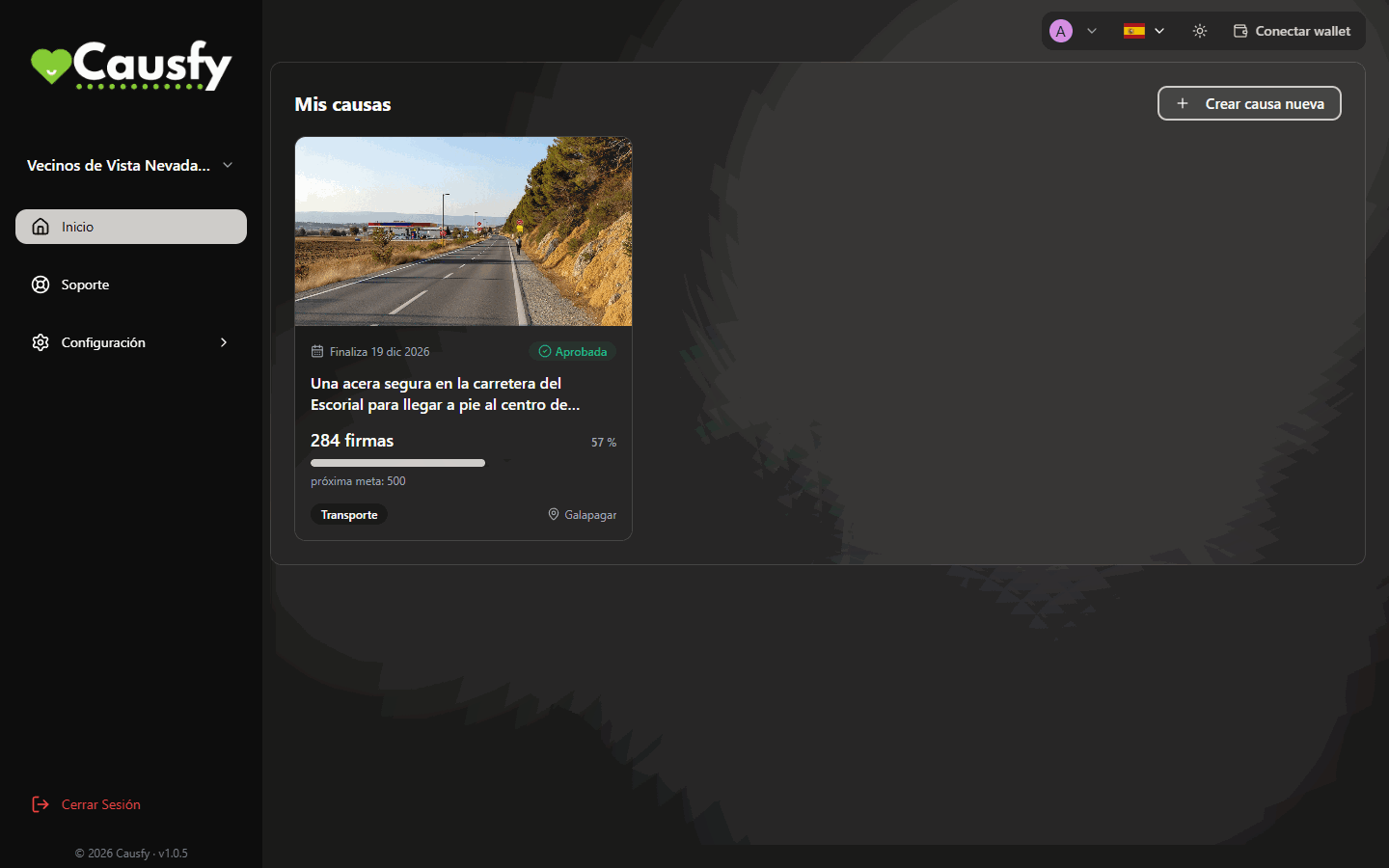
This is the whole path seen from above. Each step has its own page with the details.It all starts in your dashboard, on Home, with the Create new cause button.
Home: this is where you see your causes and the button to create a new one.
Decide what you want to achieve
Signatures to ask for a change, or funds to pay for something. A cause pursues a single thing, and the questions we ask you afterwards depend on that decision.Today you can only create signature causes: the funding option is on hold and shows marked Coming soon.
The first question: Collect signatures. Raise funds shows as Coming soon.
Fill in the wizard
It takes you step by step: ten steps, from the scope to the final review. Do it in one sitting: the wizard does not save drafts, and if you leave before publishing, what you wrote is lost.The hardest part is the title, the petition and the story, and that is what decides whether people sign or scroll past. If you get stuck, press Write with AI: it asks you to “Tell us in your own words what you want to achieve and why” and, from that, prepares a draft title, petition and story that you then edit.
Step 4, Title and petition: the text people will sign, with the Write with AI button.
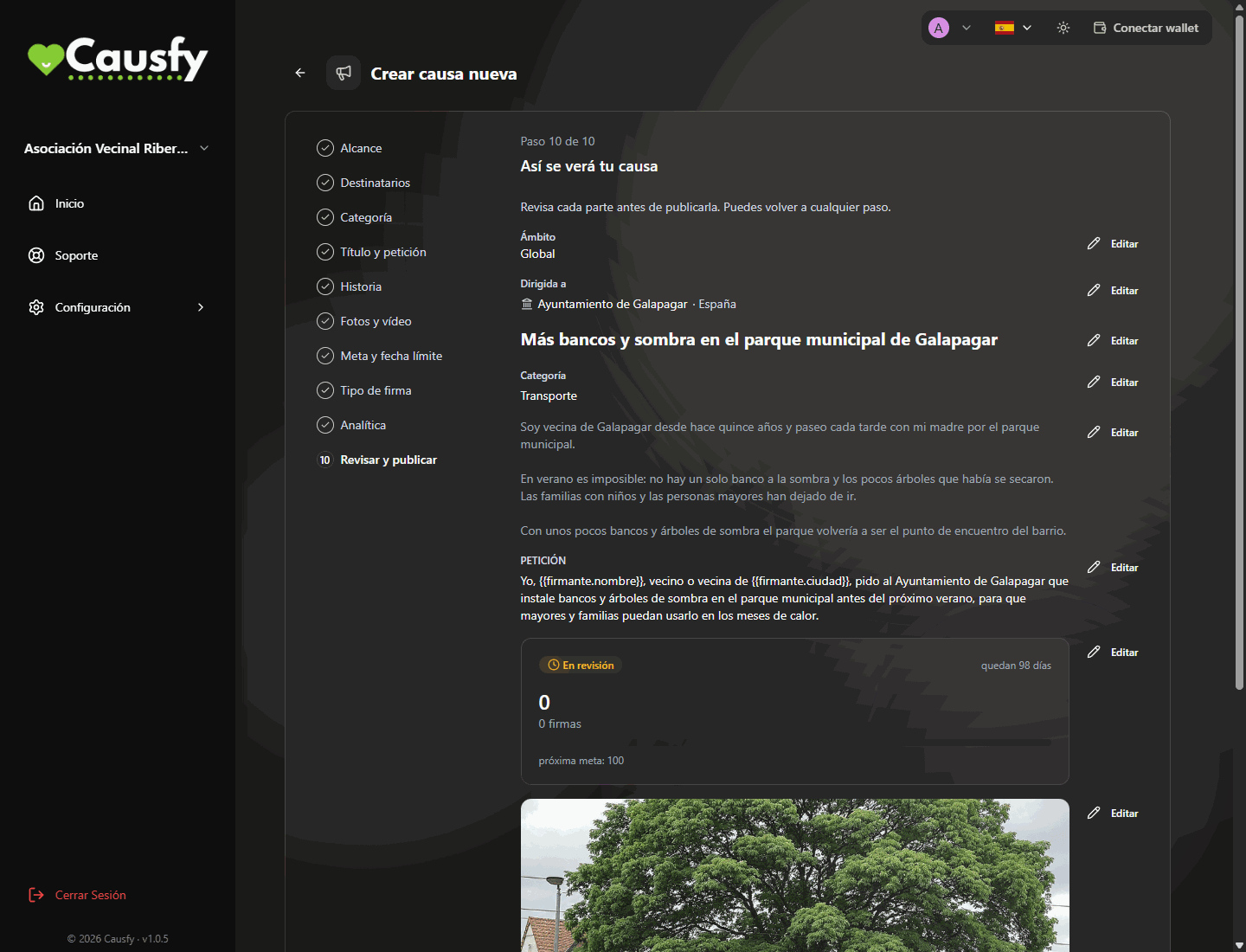
In the last step, Review & publish, you see how your cause will look and press Publish cause. It moves to Under review. First an automatic review looks at it: if it sees no problem, it approves it on its own, sometimes in seconds; if it has doubts, it passes it to a person on the team. The automatic review never rejects a cause.
The last step: this is how your cause will look. Each block has its own Edit button in case you want to change something.
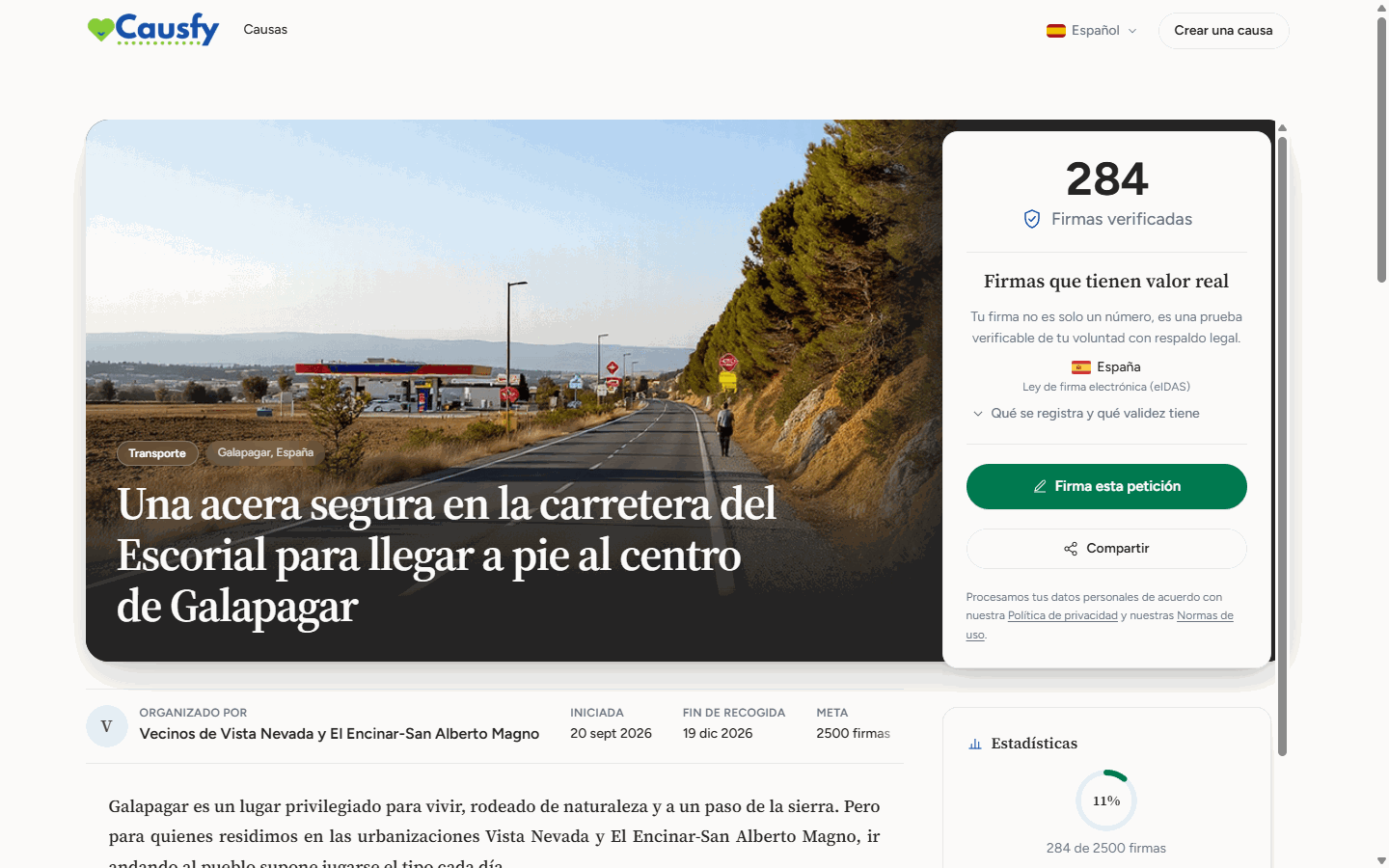
Once approved, your cause gets its own address and appears on the portal, where anyone can find it.From that moment you can share it, and only from that moment: before then there is no public link to give out.
The public page of your cause, just as anyone sees it on causfy.com.
Share it
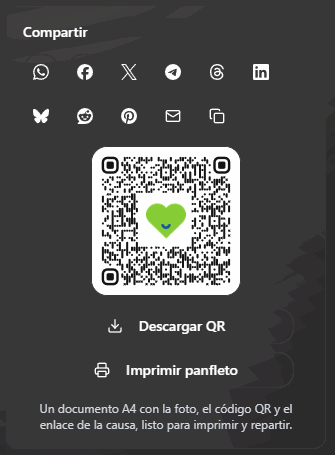
This is where it is won or lost. A cause nobody shares is a cause nobody sees: the portal helps, but the first push comes from you.Start with the people who already know you and will surely back you. The first signatures make the next ones easier.
The Share card, in your cause's detail view: social networks, link, QR code and a flyer to print.
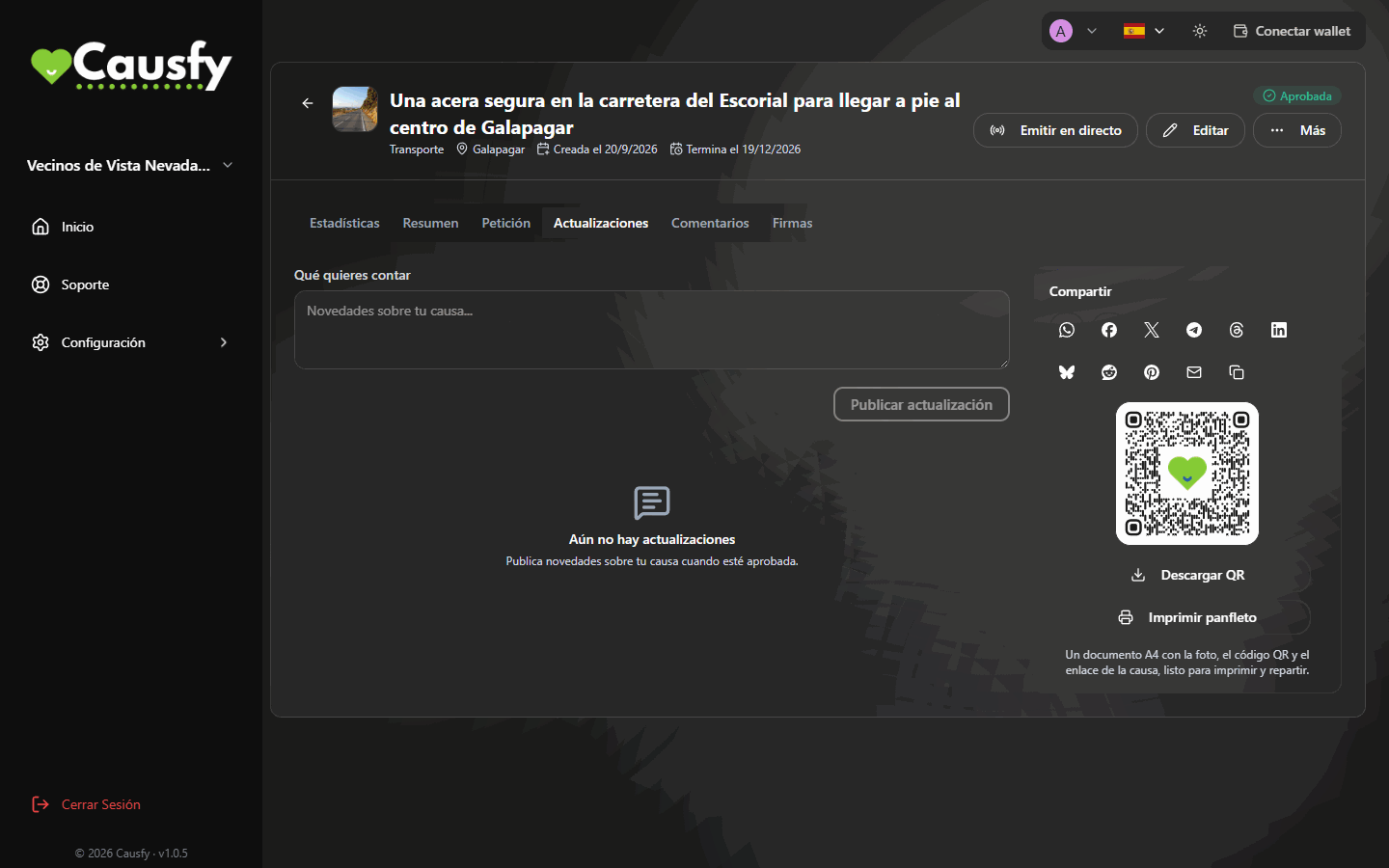
Post an update when something happens: a meeting, a reply, an obstacle. People who signed want to know what came of it, and a cause that tells how it is going gets more support than one that stays silent.
Your cause's Updates tab: write what has happened and press Publish update.
From fifteen minutes to an hour, depending on how clear your story is
Review
It is often approved on its own in seconds; if it goes to a person on the team, it takes a little longer. We let you know as soon as there is a decision
Fundraising is on hold (Coming soon), so for now there are no payouts to set up.
Before sending it for review, read it as if you knew nothing about the issue. If an outsider can’t tell in ten seconds what you are asking for and from whom, rewrite the title.
{"docsConfig":{"theme":"mint","$schema":"https://mintlify.com/docs.json","name":"Causfy","description":"Guía de uso de Causfy para quien crea y gestiona causas: recoger firmas, recaudar fondos y cobrar.","colors":{"primary":"#1751a9","light":"#5b8def","dark":"#12428b"},"logo":{"light":"https://mintcdn.com/causfy/7NvzZjQeMvlRotvf/logo/light.png?fit=max\u0026auto=format\u0026n=7NvzZjQeMvlRotvf\u0026q=85\u0026s=b9acbe26e6eb66c251c9ca6bc8e8583a","dark":"https://mintcdn.com/causfy/7NvzZjQeMvlRotvf/logo/dark.png?fit=max\u0026auto=format\u0026n=7NvzZjQeMvlRotvf\u0026q=85\u0026s=18d120f4805607c2e0199334047f1735"},"favicon":"https://mintcdn.com/causfy/7NvzZjQeMvlRotvf/favicon.png?fit=max\u0026auto=format\u0026n=7NvzZjQeMvlRotvf\u0026q=85\u0026s=aa71f79bce02d180a39eb79c0632fa1a","navbar":{"links":[{"href":"https://causfy.com/es/contacto/","label":"Contacto"}],"primary":{"type":"button","label":"Ir a Causfy","href":"https://causfy.app"}},"footer":{"socials":{"instagram":"https://www.instagram.com/causfy_app","x":"https://x.com/Causfy_app","threads":"https://www.threads.com/@causfy_app","facebook":"https://www.facebook.com/Causfy","linkedin":"https://www.linkedin.com/company/causfy","youtube":"https://www.youtube.com/@causfy"},"links":[{"header":"Causfy","items":[{"label":"Inicio","href":"https://causfy.com/es"},{"label":"Ver causas","href":"https://causfy.com/causas"}]},{"header":"Legal","items":[{"label":"Términos","href":"https://causfy.com/legal/terminos"},{"label":"Privacidad","href":"https://causfy.com/legal/privacidad"},{"label":"Cookies","href":"https://causfy.com/legal/cookies"}]}]},"contextual":{"options":["copy","view","chatgpt","claude","perplexity","mcp","cursor","vscode"],"display":"header"},"styling":{"latex":true},"navigation":{"languages":[{"language":"es","footer":{"socials":{"instagram":"https://www.instagram.com/causfy_app","x":"https://x.com/Causfy_app","threads":"https://www.threads.com/@causfy_app","facebook":"https://www.facebook.com/Causfy","linkedin":"https://www.linkedin.com/company/causfy","youtube":"https://www.youtube.com/@causfy"},"links":[{"header":"Causfy","items":[{"label":"Inicio","href":"https://causfy.com/es"},{"label":"Ver causas","href":"https://causfy.com/causas"}]},{"header":"Legal","items":[{"label":"Términos","href":"https://causfy.com/es/legal/terminos"},{"label":"Privacidad","href":"https://causfy.com/es/legal/privacidad"},{"label":"Cookies","href":"https://causfy.com/es/legal/cookies"}]}]},"navbar":{"links":[{"href":"https://causfy.com/es/contacto/","label":"Contacto"}],"primary":{"type":"button","label":"Ir a Causfy","href":"https://causfy.app"}},"href":"es"},{"language":"en","footer":{"socials":{"instagram":"https://www.instagram.com/causfy_app","x":"https://x.com/Causfy_app","threads":"https://www.threads.com/@causfy_app","facebook":"https://www.facebook.com/Causfy","linkedin":"https://www.linkedin.com/company/causfy","youtube":"https://www.youtube.com/@causfy"},"links":[{"header":"Causfy","items":[{"label":"Home","href":"https://causfy.com/en"},{"label":"Browse causes","href":"https://causfy.com/causas"}]},{"header":"Legal","items":[{"label":"Terms","href":"https://causfy.com/en/legal/terms"},{"label":"Privacy","href":"https://causfy.com/en/legal/privacy"},{"label":"Cookies","href":"https://causfy.com/en/legal/cookies"}]}]},"navbar":{"links":[{"href":"https://causfy.com/en/contacto/","label":"Contact"}],"primary":{"type":"button","label":"Go to Causfy","href":"https://causfy.app"}},"href":"en"},{"language":"fr","footer":{"socials":{"instagram":"https://www.instagram.com/causfy_app","x":"https://x.com/Causfy_app","threads":"https://www.threads.com/@causfy_app","facebook":"https://www.facebook.com/Causfy","linkedin":"https://www.linkedin.com/company/causfy","youtube":"https://www.youtube.com/@causfy"},"links":[{"header":"Causfy","items":[{"label":"Accueil","href":"https://causfy.com/fr"},{"label":"Voir les causes","href":"https://causfy.com/causas"}]},{"header":"Légal","items":[{"label":"Conditions","href":"https://causfy.com/fr/legal/conditions"},{"label":"Confidentialité","href":"https://causfy.com/fr/legal/confidentialite"},{"label":"Cookies","href":"https://causfy.com/fr/legal/cookies"}]}]},"navbar":{"links":[{"href":"https://causfy.com/fr/contacto/","label":"Contact"}],"primary":{"type":"button","label":"Aller sur Causfy","href":"https://causfy.app"}},"href":"fr"},{"language":"pt","footer":{"socials":{"instagram":"https://www.instagram.com/causfy_app","x":"https://x.com/Causfy_app","threads":"https://www.threads.com/@causfy_app","facebook":"https://www.facebook.com/Causfy","linkedin":"https://www.linkedin.com/company/causfy","youtube":"https://www.youtube.com/@causfy"},"links":[{"header":"Causfy","items":[{"label":"Início","href":"https://causfy.com/pt"},{"label":"Ver causas","href":"https://causfy.com/causas"}]},{"header":"Legal","items":[{"label":"Termos","href":"https://causfy.com/pt/legal/termos"},{"label":"Privacidade","href":"https://causfy.com/pt/legal/privacidade"},{"label":"Cookies","href":"https://causfy.com/pt/legal/cookies"}]}]},"navbar":{"links":[{"href":"https://causfy.com/pt/contacto/","label":"Contato"}],"primary":{"type":"button","label":"Ir para a Causfy","href":"https://causfy.app"}},"href":"pt"},{"language":"it","footer":{"socials":{"instagram":"https://www.instagram.com/causfy_app","x":"https://x.com/Causfy_app","threads":"https://www.threads.com/@causfy_app","facebook":"https://www.facebook.com/Causfy","linkedin":"https://www.linkedin.com/company/causfy","youtube":"https://www.youtube.com/@causfy"},"links":[{"header":"Causfy","items":[{"label":"Home","href":"https://causfy.com/it"},{"label":"Vedi le cause","href":"https://causfy.com/causas"}]},{"header":"Legale","items":[{"label":"Termini","href":"https://causfy.com/it/legal/termini"},{"label":"Privacy","href":"https://causfy.com/it/legal/privacy"},{"label":"Cookie","href":"https://causfy.com/it/legal/cookie"}]}]},"navbar":{"links":[{"href":"https://causfy.com/it/contacto/","label":"Contatti"}],"primary":{"type":"button","label":"Vai su Causfy","href":"https://causfy.app"}},"href":"it"},{"language":"de","footer":{"socials":{"instagram":"https://www.instagram.com/causfy_app","x":"https://x.com/Causfy_app","threads":"https://www.threads.com/@causfy_app","facebook":"https://www.facebook.com/Causfy","linkedin":"https://www.linkedin.com/company/causfy","youtube":"https://www.youtube.com/@causfy"},"links":[{"header":"Causfy","items":[{"label":"Startseite","href":"https://causfy.com/de"},{"label":"Anliegen ansehen","href":"https://causfy.com/causas"}]},{"header":"Rechtliches","items":[{"label":"AGB","href":"https://causfy.com/de/legal/agb"},{"label":"Datenschutz","href":"https://causfy.com/de/legal/datenschutz"},{"label":"Cookies","href":"https://causfy.com/de/legal/cookies"}]}]},"navbar":{"links":[{"href":"https://causfy.com/de/contacto/","label":"Kontakt"}],"primary":{"type":"button","label":"Zu Causfy","href":"https://causfy.app"}},"href":"de"}]}},"deployment":{"deploymentMetadataValue":{"subdomain":"causfy","hasAudioNarration":false,"actualSubdomain":"causfy","customDomains":["docs.causfy.com"],"gitSource":{"type":"github","owner":"causfy-global-technologies","repo":"causfy-app","deployBranch":"main","contentDirectory":"user-manual-docs","isPrivate":true,"mountPath":"","label":""},"chroma":{"latestBuiltDeploymentHistoryId":"6ad7c3ebf75277ee5c2b7db8","collectionId":"d42b9f6e-6561-4884-ba61-7344b29728eb","liveDeploymentHistoryId":"6ad7c3ebf75277ee5c2b7db8","schemaVersion":"v3"},"entitlements":{"AI_CHAT":{"status":"DISABLED"}},"buildId":"6ad7c3ebf75277ee5c2b7db8","clientVersion":"0.0.4071","searchFilterCounts":[{"language":"de","tag":"Ihre Kampagne","count":7},{"language":"en","tag":"Your cause","count":7},{"language":"es","tag":"Tu causa","count":7},{"language":"fr","tag":"Votre cause","count":7},{"language":"it","tag":"La tua causa","count":7},{"language":"pt","tag":"Sua causa","count":7},{"language":"de","tag":"Eine Kampagne unterschreiben","count":6},{"language":"en","tag":"Signing a cause","count":6},{"language":"es","tag":"Firmar una causa","count":6},{"language":"fr","tag":"Signer une cause","count":6},{"language":"it","tag":"Firmare una causa","count":6},{"language":"pt","tag":"Assinar uma causa","count":6},{"language":"de","tag":"Ihr Konto","count":5},{"language":"en","tag":"Your account","count":5},{"language":"es","tag":"Tu cuenta","count":5},{"language":"fr","tag":"Votre compte","count":5},{"language":"it","tag":"Il tuo account","count":5},{"language":"pt","tag":"Sua conta","count":5},{"language":"de","tag":"Erste Schritte","count":3},{"language":"en","tag":"Getting started","count":3},{"language":"es","tag":"Empezar","count":3},{"language":"fr","tag":"Commencer","count":3},{"language":"it","tag":"Iniziare","count":3},{"language":"pt","tag":"Começar","count":3},{"language":"de","tag":"Zahlungen","count":2},{"language":"de","tag":"Support","count":2},{"language":"en","tag":"Getting paid","count":2},{"language":"en","tag":"Support","count":2},{"language":"es","tag":"Cobrar","count":2},{"language":"es","tag":"Soporte","count":2},{"language":"fr","tag":"Encaisser","count":2},{"language":"fr","tag":"Assistance","count":2},{"language":"it","tag":"Incassare","count":2},{"language":"it","tag":"Assistenza","count":2},{"language":"pt","tag":"Receber","count":2},{"language":"pt","tag":"Suporte","count":2}]},"assistantConfig":{"enableAskAiButton":false,"enableStarterQuestions":false,"enableContextualStarterQuestions":false,"enableAskAiSearchBar":true},"basePath":"","hasChatPermissions":false,"hasWebMcpPermissions":false,"toggles":[{"name":"kill-isr","enabled":true,"variant":{"name":"disabled","enabled":false,"feature_enabled":true},"impressionData":false},{"name":"agent-mintlify-slack","enabled":true,"variant":{"name":"disabled","enabled":false,"feature_enabled":true},"impressionData":false},{"name":"agent-integrations-settings","enabled":true,"variant":{"name":"disabled","enabled":false,"feature_enabled":true},"impressionData":false},{"name":"rbac-expansion","enabled":true,"variant":{"name":"disabled","enabled":false,"feature_enabled":true},"impressionData":false},{"name":"automations-pr-grouping","enabled":true,"variant":{"name":"disabled","enabled":false,"feature_enabled":true},"impressionData":false},{"name":"custom-prefix","enabled":true,"variant":{"name":"disabled","enabled":false,"feature_enabled":true},"impressionData":false},{"name":"analytics-v7","enabled":true,"variant":{"name":"disabled","enabled":false,"feature_enabled":true},"impressionData":false},{"name":"user-flows-analytics","enabled":true,"variant":{"name":"disabled","enabled":false,"feature_enabled":true},"impressionData":false},{"name":"no-publish-flow","enabled":true,"variant":{"name":"disabled","enabled":false,"feature_enabled":true},"impressionData":false},{"name":"workos-onboarding","enabled":true,"variant":{"name":"disabled","enabled":false,"feature_enabled":true},"impressionData":false},{"name":"llms-txt-v2","enabled":true,"variant":{"name":"disabled","enabled":false,"feature_enabled":true},"impressionData":false},{"name":"snapshot-serving-live","enabled":true,"variant":{"name":"disabled","enabled":false,"feature_enabled":true},"impressionData":false},{"name":"stripTemperatureMiddleware","enabled":true,"variant":{"name":"disabled","enabled":false,"feature_enabled":true},"impressionData":false},{"name":"support-platform-pylon-zendesk","enabled":true,"variant":{"name":"disabled","enabled":false,"feature_enabled":true},"impressionData":false},{"name":"snapshot-serving","enabled":true,"variant":{"name":"disabled","enabled":false,"feature_enabled":true},"impressionData":false},{"name":"instant-rollback","enabled":true,"variant":{"name":"disabled","enabled":false,"feature_enabled":true},"impressionData":false},{"name":"granular-notifications-server","enabled":true,"variant":{"name":"disabled","enabled":false,"feature_enabled":true},"impressionData":false},{"name":"granular-notifications","enabled":true,"variant":{"name":"disabled","enabled":false,"feature_enabled":true},"impressionData":false},{"name":"automations-fable","enabled":true,"variant":{"name":"disabled","enabled":false,"feature_enabled":true},"impressionData":false},{"name":"fixed-ai-action-pricing","enabled":true,"variant":{"name":"disabled","enabled":false,"feature_enabled":true},"impressionData":false},{"name":"automation-resolve-merge-conflict","enabled":true,"variant":{"name":"disabled","enabled":false,"feature_enabled":true},"impressionData":false},{"name":"scoped-publishing","enabled":true,"variant":{"name":"disabled","enabled":false,"feature_enabled":true},"impressionData":false},{"name":"mintql","enabled":true,"variant":{"name":"disabled","enabled":false,"feature_enabled":true},"impressionData":false},{"name":"page-level-analytics","enabled":true,"variant":{"name":"disabled","enabled":false,"feature_enabled":true},"impressionData":false},{"name":"editor-version-history-v2","enabled":true,"variant":{"name":"disabled","enabled":false,"feature_enabled":true},"impressionData":false},{"name":"billing-page-v2","enabled":true,"variant":{"name":"disabled","enabled":false,"feature_enabled":true},"impressionData":false},{"name":"full-page-search","enabled":true,"variant":{"name":"disabled","enabled":false,"feature_enabled":true},"impressionData":false},{"name":"workspace-projects","enabled":true,"variant":{"name":"disabled","enabled":false,"feature_enabled":true},"impressionData":false},{"name":"assistant-v5","enabled":true,"variant":{"name":"disabled","enabled":false,"feature_enabled":true},"impressionData":false},{"name":"fork-pr-previews","enabled":true,"variant":{"name":"disabled","enabled":false,"feature_enabled":true},"impressionData":false},{"name":"revalidation-jwt","enabled":true,"variant":{"name":"disabled","enabled":false,"feature_enabled":true},"impressionData":false},{"name":"vite-origin","enabled":true,"variant":{"name":"disabled","enabled":false,"feature_enabled":true},"impressionData":false},{"name":"workos-sso-scim","enabled":true,"variant":{"name":"disabled","enabled":false,"feature_enabled":true},"impressionData":false},{"name":"hobby-abuse-scan","enabled":true,"variant":{"name":"disabled","enabled":false,"feature_enabled":true},"impressionData":false},{"name":"dashboard-inbox","enabled":true,"variant":{"name":"disabled","enabled":false,"feature_enabled":true},"impressionData":false},{"name":"workos-signup","enabled":true,"variant":{"name":"disabled","enabled":false,"feature_enabled":true},"impressionData":false},{"name":"turbopuffer-dual-write","enabled":true,"variant":{"name":"disabled","enabled":false,"feature_enabled":true},"impressionData":false},{"name":"workos-enabled","enabled":true,"variant":{"name":"disabled","enabled":false,"feature_enabled":true},"impressionData":false},{"name":"approve-review-flow","enabled":true,"variant":{"name":"disabled","enabled":false,"feature_enabled":true},"impressionData":false},{"name":"sso-setup-deadline-banner","enabled":true,"variant":{"name":"disabled","enabled":false,"feature_enabled":true},"impressionData":false},{"name":"turbopuffer-serve","enabled":true,"variant":{"name":"disabled","enabled":false,"feature_enabled":true},"impressionData":false},{"name":"live-agents","enabled":true,"variant":{"name":"disabled","enabled":false,"feature_enabled":true},"impressionData":false},{"name":"comment-mode","enabled":true,"variant":{"name":"disabled","enabled":false,"feature_enabled":true},"impressionData":false}],"googleFontsInlined":false},"customCss":[],"page":{"pagePath":"en/empezar/primera-causa","slug":"/en/empezar/primera-causa","pageMetadata":{"title":"Your first cause","description":"The whole journey, from opening your dashboard to the first signature.","icon":"rocket","keywords":["first cause","getting started","publish","review"],"href":"/en/empezar/primera-causa"},"description":{"compiledSource":"\"use strict\";\nconst {jsx: _jsx} = arguments[0];\nconst {useMDXComponents: _provideComponents} = arguments[0];\nfunction _createMdxContent(props) {\n const _components = {\n p: \"p\",\n ..._provideComponents(),\n ...props.components\n };\n return _jsx(_components.p, {\n children: \"The whole journey, from opening your dashboard to the first signature.\"\n });\n}\nfunction MDXContent(props = {}) {\n const {wrapper: MDXLayout} = {\n ..._provideComponents(),\n ...props.components\n };\n return MDXLayout ? _jsx(MDXLayout, {\n ...props,\n children: _jsx(_createMdxContent, {\n ...props\n })\n }) : _createMdxContent(props);\n}\nreturn {\n default: MDXContent\n};\n","frontmatter":{},"scope":{}},"pageType":"default","mdx":{"mdxSource":{"compiledSource":"\"use strict\";const{Fragment:_Fragment,jsx:_jsx,jsxs:_jsxs}=arguments[0];const{useMDXComponents:_provideComponents}=arguments[0];function _createMdxContent(props){const _components={a:`a`,p:`p`,strong:`strong`,tbody:`tbody`,td:`td`,th:`th`,thead:`thead`,tr:`tr`,..._provideComponents(),...props.components},{Frame,Heading,Note,OptimizedImage,Step,Steps,Table,Tip}=_components;if(!Frame)_missingMdxReference(`Frame`,true);if(!Heading)_missingMdxReference(`Heading`,true);if(!Note)_missingMdxReference(`Note`,true);if(!OptimizedImage)_missingMdxReference(`OptimizedImage`,true);if(!Step)_missingMdxReference(`Step`,true);if(!Steps)_missingMdxReference(`Steps`,true);if(!Table)_missingMdxReference(`Table`,true);if(!Tip)_missingMdxReference(`Tip`,true);return _jsxs(_Fragment,{children:[_jsx(_components.p,{children:`This is the whole path seen from above. Each step has its own page with the details.`}),`\n`,_jsxs(_components.p,{children:[`It all starts in your dashboard, on `,_jsx(_components.strong,{children:`Home`}),`, with the `,_jsx(_components.strong,{children:`Create new cause`}),` button.`]}),`\n`,_jsx(Frame,{caption:`Home: this is where you see your causes and the button to create a new one.`,children:_jsx(OptimizedImage,{src:`https://mintcdn.com/causfy/E4oFDtVHANfMJqrg/imagenes/panel.png?fit=max\u0026auto=format\u0026n=E4oFDtVHANfMJqrg\u0026q=85\u0026s=3736f1d1c5e1751e643e85b23d96bee4`,alt:`Home screen with the My causes section, a cause card with photo, Approved status, signatures and next goal, and the Create new cause button`,\"data-og-width\":`1440`,width:`1440`,\"data-og-height\":`900`,height:`900`,\"data-path\":`imagenes/panel.png`,\"data-optimize\":`true`,\"data-opv\":`3`,srcset:`https://mintcdn.com/causfy/E4oFDtVHANfMJqrg/imagenes/panel.png?w=280\u0026fit=max\u0026auto=format\u0026n=E4oFDtVHANfMJqrg\u0026q=85\u0026s=ebd70fff24e389206a7f3f9295c16f57 280w, https://mintcdn.com/causfy/E4oFDtVHANfMJqrg/imagenes/panel.png?w=560\u0026fit=max\u0026auto=format\u0026n=E4oFDtVHANfMJqrg\u0026q=85\u0026s=8bcadbedcd808f2ee1fdcdcd73113119 560w, https://mintcdn.com/causfy/E4oFDtVHANfMJqrg/imagenes/panel.png?w=840\u0026fit=max\u0026auto=format\u0026n=E4oFDtVHANfMJqrg\u0026q=85\u0026s=8011e084c7874eece11489adbbc55054 840w, https://mintcdn.com/causfy/E4oFDtVHANfMJqrg/imagenes/panel.png?w=1100\u0026fit=max\u0026auto=format\u0026n=E4oFDtVHANfMJqrg\u0026q=85\u0026s=ac5c94feb04a00929a22a24a60ecc278 1100w, https://mintcdn.com/causfy/E4oFDtVHANfMJqrg/imagenes/panel.png?w=1650\u0026fit=max\u0026auto=format\u0026n=E4oFDtVHANfMJqrg\u0026q=85\u0026s=e205b4ddbc6e06195ee6156dfec97d4c 1650w, https://mintcdn.com/causfy/E4oFDtVHANfMJqrg/imagenes/panel.png?w=2500\u0026fit=max\u0026auto=format\u0026n=E4oFDtVHANfMJqrg\u0026q=85\u0026s=361a6374ada7ebe1d225628ab7150a7e 2500w`})}),`\n`,_jsxs(Steps,{children:[_jsxs(Step,{title:`Decide what you want to achieve`,icon:`bullseye`,children:[_jsxs(_components.p,{children:[`Signatures to ask for a change, or funds to pay for something. `,_jsx(_components.strong,{children:`A cause pursues a single thing`}),`, and the questions we ask you afterwards depend on that decision.`]}),_jsxs(_components.p,{children:[`Today you can only create signature causes: the funding option is on hold and shows marked `,_jsx(_components.strong,{children:`Coming soon`}),`.`]}),_jsx(Frame,{caption:`The first question: Collect signatures. Raise funds shows as Coming soon.`,children:_jsx(OptimizedImage,{src:`https://mintcdn.com/causfy/E4oFDtVHANfMJqrg/imagenes/asistente-objetivo.png?fit=max\u0026auto=format\u0026n=E4oFDtVHANfMJqrg\u0026q=85\u0026s=980fd78b587949d969a6239235ae0734`,alt:`Create new cause screen with the question What does your cause need to move forward: support or funding? and two cards: Collect signatures, available, and Raise funds, marked Coming soon`,\"data-og-width\":`1440`,width:`1440`,\"data-og-height\":`900`,height:`900`,\"data-path\":`imagenes/asistente-objetivo.png`,\"data-optimize\":`true`,\"data-opv\":`3`,srcset:`https://mintcdn.com/causfy/E4oFDtVHANfMJqrg/imagenes/asistente-objetivo.png?w=280\u0026fit=max\u0026auto=format\u0026n=E4oFDtVHANfMJqrg\u0026q=85\u0026s=9897d593369c0a0487b474d34625ceb4 280w, https://mintcdn.com/causfy/E4oFDtVHANfMJqrg/imagenes/asistente-objetivo.png?w=560\u0026fit=max\u0026auto=format\u0026n=E4oFDtVHANfMJqrg\u0026q=85\u0026s=d5970638935be6ece1dc53e1d824f985 560w, https://mintcdn.com/causfy/E4oFDtVHANfMJqrg/imagenes/asistente-objetivo.png?w=840\u0026fit=max\u0026auto=format\u0026n=E4oFDtVHANfMJqrg\u0026q=85\u0026s=e1964bb1e62360a77dc84245ca6d6690 840w, https://mintcdn.com/causfy/E4oFDtVHANfMJqrg/imagenes/asistente-objetivo.png?w=1100\u0026fit=max\u0026auto=format\u0026n=E4oFDtVHANfMJqrg\u0026q=85\u0026s=0e08cdf54c87ce90a24e9b100e48a1d9 1100w, https://mintcdn.com/causfy/E4oFDtVHANfMJqrg/imagenes/asistente-objetivo.png?w=1650\u0026fit=max\u0026auto=format\u0026n=E4oFDtVHANfMJqrg\u0026q=85\u0026s=8eed62698f83f08f6fde9c2a7233ce1f 1650w, https://mintcdn.com/causfy/E4oFDtVHANfMJqrg/imagenes/asistente-objetivo.png?w=2500\u0026fit=max\u0026auto=format\u0026n=E4oFDtVHANfMJqrg\u0026q=85\u0026s=1d84082a9aadb2c6d3753868e9d499c6 2500w`})})]}),_jsxs(Step,{title:`Fill in the wizard`,icon:`list-check`,children:[_jsxs(_components.p,{children:[`It takes you step by step: ten steps, from the scope to the final review. `,_jsx(_components.strong,{children:`Do it in one sitting`}),`: the wizard does not save drafts, and if you leave before publishing, what you wrote is lost.`]}),_jsxs(_components.p,{children:[`The hardest part is the title, the petition and the story, and that is what decides whether people sign or scroll past. If you get stuck, press `,_jsx(_components.strong,{children:`Write with AI`}),`: it asks you to “Tell us in your own words what you want to achieve and why” and, from that, prepares a draft title, petition and story that you then edit.`]}),_jsx(Frame,{caption:`Step 4, Title and petition: the text people will sign, with the Write with AI button.`,children:_jsx(OptimizedImage,{src:`https://mintcdn.com/causfy/E4oFDtVHANfMJqrg/imagenes/asistente-titulo-y-peticion.png?fit=max\u0026auto=format\u0026n=E4oFDtVHANfMJqrg\u0026q=85\u0026s=719a98f8a53cc0ca8042bf0daddee81b`,alt:`Title and petition step of the wizard with the title field, the petition editor with the signer's details, the Insert data and Show example buttons, the How a signer will read it box with sample data and the Write with AI button`,\"data-og-width\":`1440`,width:`1440`,\"data-og-height\":`1100`,height:`1100`,\"data-path\":`imagenes/asistente-titulo-y-peticion.png`,\"data-optimize\":`true`,\"data-opv\":`3`,srcset:`https://mintcdn.com/causfy/E4oFDtVHANfMJqrg/imagenes/asistente-titulo-y-peticion.png?w=280\u0026fit=max\u0026auto=format\u0026n=E4oFDtVHANfMJqrg\u0026q=85\u0026s=2fd4befc7be792e13b04d252ab1d1050 280w, https://mintcdn.com/causfy/E4oFDtVHANfMJqrg/imagenes/asistente-titulo-y-peticion.png?w=560\u0026fit=max\u0026auto=format\u0026n=E4oFDtVHANfMJqrg\u0026q=85\u0026s=7b14a36a43037395e6b50074d3e5ae9c 560w, https://mintcdn.com/causfy/E4oFDtVHANfMJqrg/imagenes/asistente-titulo-y-peticion.png?w=840\u0026fit=max\u0026auto=format\u0026n=E4oFDtVHANfMJqrg\u0026q=85\u0026s=5c8b7ff663fbc446318e54c44c46dfdb 840w, https://mintcdn.com/causfy/E4oFDtVHANfMJqrg/imagenes/asistente-titulo-y-peticion.png?w=1100\u0026fit=max\u0026auto=format\u0026n=E4oFDtVHANfMJqrg\u0026q=85\u0026s=b24b02e219e8246daeac953e48a09a68 1100w, https://mintcdn.com/causfy/E4oFDtVHANfMJqrg/imagenes/asistente-titulo-y-peticion.png?w=1650\u0026fit=max\u0026auto=format\u0026n=E4oFDtVHANfMJqrg\u0026q=85\u0026s=0eeb9143cb4ea1f3f543a7aa064265b4 1650w, https://mintcdn.com/causfy/E4oFDtVHANfMJqrg/imagenes/asistente-titulo-y-peticion.png?w=2500\u0026fit=max\u0026auto=format\u0026n=E4oFDtVHANfMJqrg\u0026q=85\u0026s=0d0ab76574ef4f0085e31ac7036c54e1 2500w`})}),_jsx(_components.p,{children:_jsx(_components.a,{href:`/en/causa/crear`,children:`How the wizard works`})})]}),_jsxs(Step,{title:`Send it for review`,icon:`send`,children:[_jsxs(_components.p,{children:[`In the last step, `,_jsx(_components.strong,{children:`Review \u0026 publish`}),`, you see how your cause will look and press `,_jsx(_components.strong,{children:`Publish cause`}),`. It moves to `,_jsx(_components.strong,{children:`Under review`}),`. First an automatic review looks at it: if it sees no problem, it approves it on its own, sometimes in seconds; if it has doubts, it passes it to a person on the team. The automatic review never rejects a cause.`]}),_jsx(Frame,{caption:`The last step: this is how your cause will look. Each block has its own Edit button in case you want to change something.`,children:_jsx(OptimizedImage,{src:`https://mintcdn.com/causfy/E4oFDtVHANfMJqrg/imagenes/asistente-revisar.png?fit=max\u0026auto=format\u0026n=E4oFDtVHANfMJqrg\u0026q=85\u0026s=b166842be8edaa2cd994cfc5ddfa9f15`,alt:`Review \u0026 publish step with the heading This is how your cause will look, each block with its Edit button and a card showing Under review`,\"data-og-width\":`1440`,width:`1440`,\"data-og-height\":`1100`,height:`1100`,\"data-path\":`imagenes/asistente-revisar.png`,\"data-optimize\":`true`,\"data-opv\":`3`,srcset:`https://mintcdn.com/causfy/E4oFDtVHANfMJqrg/imagenes/asistente-revisar.png?w=280\u0026fit=max\u0026auto=format\u0026n=E4oFDtVHANfMJqrg\u0026q=85\u0026s=fbc1470eb1432a4ba0fc4826c31e8e4d 280w, https://mintcdn.com/causfy/E4oFDtVHANfMJqrg/imagenes/asistente-revisar.png?w=560\u0026fit=max\u0026auto=format\u0026n=E4oFDtVHANfMJqrg\u0026q=85\u0026s=5467f695ce4240b444058c1262abd319 560w, https://mintcdn.com/causfy/E4oFDtVHANfMJqrg/imagenes/asistente-revisar.png?w=840\u0026fit=max\u0026auto=format\u0026n=E4oFDtVHANfMJqrg\u0026q=85\u0026s=bad7e13fd6a3897914a9ce6051ac54a0 840w, https://mintcdn.com/causfy/E4oFDtVHANfMJqrg/imagenes/asistente-revisar.png?w=1100\u0026fit=max\u0026auto=format\u0026n=E4oFDtVHANfMJqrg\u0026q=85\u0026s=e6aeb0b0bdbdbd4663f818e1885532ba 1100w, https://mintcdn.com/causfy/E4oFDtVHANfMJqrg/imagenes/asistente-revisar.png?w=1650\u0026fit=max\u0026auto=format\u0026n=E4oFDtVHANfMJqrg\u0026q=85\u0026s=aef93aed29b9014ce8bf2b6a278eabe6 1650w, https://mintcdn.com/causfy/E4oFDtVHANfMJqrg/imagenes/asistente-revisar.png?w=2500\u0026fit=max\u0026auto=format\u0026n=E4oFDtVHANfMJqrg\u0026q=85\u0026s=1a7f49478a283ebdcdd20166b0d92df9 2500w`})}),_jsxs(_components.p,{children:[`While it is `,_jsx(_components.strong,{children:`Under review`}),` it cannot be edited.`]}),_jsx(_components.p,{children:_jsx(_components.a,{href:`/en/causa/revision`,children:`What the review looks at`})})]}),_jsxs(Step,{title:`It is approved and goes public`,icon:`check`,children:[_jsx(_components.p,{children:`Once approved, your cause gets its own address and appears on the portal, where anyone can find it.`}),_jsx(_components.p,{children:`From that moment you can share it, and only from that moment: before then there is no public link to give out.`}),_jsx(Frame,{caption:`The public page of your cause, just as anyone sees it on causfy.com.`,children:_jsx(OptimizedImage,{src:`https://mintcdn.com/causfy/E4oFDtVHANfMJqrg/imagenes/pagina-publica.png?fit=max\u0026auto=format\u0026n=E4oFDtVHANfMJqrg\u0026q=85\u0026s=18e90bf75b57385b1fea0e76ee0a293f`,alt:`Public page of a cause with its photo and title, and a card with 284 verified signatures, the Sign this petition button, the Share button, the organizer, the dates and the goal`,\"data-og-width\":`1440`,width:`1440`,\"data-og-height\":`900`,height:`900`,\"data-path\":`imagenes/pagina-publica.png`,\"data-optimize\":`true`,\"data-opv\":`3`,srcset:`https://mintcdn.com/causfy/E4oFDtVHANfMJqrg/imagenes/pagina-publica.png?w=280\u0026fit=max\u0026auto=format\u0026n=E4oFDtVHANfMJqrg\u0026q=85\u0026s=dd1bb959ca34caa637f409fbd5da87b0 280w, https://mintcdn.com/causfy/E4oFDtVHANfMJqrg/imagenes/pagina-publica.png?w=560\u0026fit=max\u0026auto=format\u0026n=E4oFDtVHANfMJqrg\u0026q=85\u0026s=2ee94a9eca77024576319bdca952563f 560w, https://mintcdn.com/causfy/E4oFDtVHANfMJqrg/imagenes/pagina-publica.png?w=840\u0026fit=max\u0026auto=format\u0026n=E4oFDtVHANfMJqrg\u0026q=85\u0026s=9cc0395300fe02549599dfce3681b99a 840w, https://mintcdn.com/causfy/E4oFDtVHANfMJqrg/imagenes/pagina-publica.png?w=1100\u0026fit=max\u0026auto=format\u0026n=E4oFDtVHANfMJqrg\u0026q=85\u0026s=681a834548bb406c138824e707f15e75 1100w, https://mintcdn.com/causfy/E4oFDtVHANfMJqrg/imagenes/pagina-publica.png?w=1650\u0026fit=max\u0026auto=format\u0026n=E4oFDtVHANfMJqrg\u0026q=85\u0026s=5ffcf8efdf319f97dedf758dbe2bb4ed 1650w, https://mintcdn.com/causfy/E4oFDtVHANfMJqrg/imagenes/pagina-publica.png?w=2500\u0026fit=max\u0026auto=format\u0026n=E4oFDtVHANfMJqrg\u0026q=85\u0026s=eb8d7713f1267aa83d9eb19d999dadbf 2500w`})})]}),_jsxs(Step,{title:`Share it`,icon:`share-nodes`,children:[_jsx(_components.p,{children:`This is where it is won or lost. A cause nobody shares is a cause nobody sees: the portal helps, but the first push comes from you.`}),_jsx(_components.p,{children:`Start with the people who already know you and will surely back you. The first signatures make the next ones easier.`}),_jsx(Frame,{caption:`The Share card, in your cause's detail view: social networks, link, QR code and a flyer to print.`,children:_jsx(OptimizedImage,{src:`https://mintcdn.com/causfy/E4oFDtVHANfMJqrg/imagenes/compartir.png?fit=max\u0026auto=format\u0026n=E4oFDtVHANfMJqrg\u0026q=85\u0026s=ebcca48fc9a98624c1aea3e3d332a54b`,alt:`Share card with WhatsApp, Facebook, X, Telegram, Threads, LinkedIn, Bluesky, Reddit, Pinterest, email and copy link buttons, a QR code with the logo and the Download QR and Print flyer buttons`,\"data-og-width\":`335`,width:`335`,\"data-og-height\":`455`,height:`455`,\"data-path\":`imagenes/compartir.png`,\"data-optimize\":`true`,\"data-opv\":`3`,srcset:`https://mintcdn.com/causfy/E4oFDtVHANfMJqrg/imagenes/compartir.png?w=280\u0026fit=max\u0026auto=format\u0026n=E4oFDtVHANfMJqrg\u0026q=85\u0026s=997365cade0e95fdab4e8d4adae2c90f 280w, https://mintcdn.com/causfy/E4oFDtVHANfMJqrg/imagenes/compartir.png?w=560\u0026fit=max\u0026auto=format\u0026n=E4oFDtVHANfMJqrg\u0026q=85\u0026s=9dc38a6d372d2389849a026ceca75c2f 560w, https://mintcdn.com/causfy/E4oFDtVHANfMJqrg/imagenes/compartir.png?w=840\u0026fit=max\u0026auto=format\u0026n=E4oFDtVHANfMJqrg\u0026q=85\u0026s=276c1351da5108a21e50e44baa37bab3 840w, https://mintcdn.com/causfy/E4oFDtVHANfMJqrg/imagenes/compartir.png?w=1100\u0026fit=max\u0026auto=format\u0026n=E4oFDtVHANfMJqrg\u0026q=85\u0026s=4aaf3e15044767751084416558a80c7b 1100w, https://mintcdn.com/causfy/E4oFDtVHANfMJqrg/imagenes/compartir.png?w=1650\u0026fit=max\u0026auto=format\u0026n=E4oFDtVHANfMJqrg\u0026q=85\u0026s=124a9e1aca125c3d6f7b568265c3d9f5 1650w, https://mintcdn.com/causfy/E4oFDtVHANfMJqrg/imagenes/compartir.png?w=2500\u0026fit=max\u0026auto=format\u0026n=E4oFDtVHANfMJqrg\u0026q=85\u0026s=ea8d5604d36c681440bc3a47197dea05 2500w`})}),_jsx(_components.p,{children:_jsx(_components.a,{href:`/en/causa/compartir`,children:`Ways to share it`})})]}),_jsxs(Step,{title:`Keep it alive`,icon:`megaphone`,children:[_jsx(_components.p,{children:`Post an update when something happens: a meeting, a reply, an obstacle. People who signed want to know what came of it, and a cause that tells how it is going gets more support than one that stays silent.`}),_jsx(Frame,{caption:`Your cause's Updates tab: write what has happened and press Publish update.`,children:_jsx(OptimizedImage,{src:`https://mintcdn.com/causfy/E4oFDtVHANfMJqrg/imagenes/actualizaciones.png?fit=max\u0026auto=format\u0026n=E4oFDtVHANfMJqrg\u0026q=85\u0026s=b9d2cf18d1ca6a54b69d2b52f8c5e588`,alt:`Updates tab of a cause's detail view with the What do you want to share field, the Publish update button and the notice that there are no updates yet`,\"data-og-width\":`1440`,width:`1440`,\"data-og-height\":`900`,height:`900`,\"data-path\":`imagenes/actualizaciones.png`,\"data-optimize\":`true`,\"data-opv\":`3`,srcset:`https://mintcdn.com/causfy/E4oFDtVHANfMJqrg/imagenes/actualizaciones.png?w=280\u0026fit=max\u0026auto=format\u0026n=E4oFDtVHANfMJqrg\u0026q=85\u0026s=439d053f623f650fcb1d5ad87c6b76ee 280w, https://mintcdn.com/causfy/E4oFDtVHANfMJqrg/imagenes/actualizaciones.png?w=560\u0026fit=max\u0026auto=format\u0026n=E4oFDtVHANfMJqrg\u0026q=85\u0026s=b50c5281328025c8afcef7493ffb366b 560w, https://mintcdn.com/causfy/E4oFDtVHANfMJqrg/imagenes/actualizaciones.png?w=840\u0026fit=max\u0026auto=format\u0026n=E4oFDtVHANfMJqrg\u0026q=85\u0026s=719ed742bbb57beabe79a58655dff344 840w, https://mintcdn.com/causfy/E4oFDtVHANfMJqrg/imagenes/actualizaciones.png?w=1100\u0026fit=max\u0026auto=format\u0026n=E4oFDtVHANfMJqrg\u0026q=85\u0026s=8b7dc9d4da52c98c86ad14321aaa3692 1100w, https://mintcdn.com/causfy/E4oFDtVHANfMJqrg/imagenes/actualizaciones.png?w=1650\u0026fit=max\u0026auto=format\u0026n=E4oFDtVHANfMJqrg\u0026q=85\u0026s=7aa58a7df5ddf0a3f2f30b793343c25d 1650w, https://mintcdn.com/causfy/E4oFDtVHANfMJqrg/imagenes/actualizaciones.png?w=2500\u0026fit=max\u0026auto=format\u0026n=E4oFDtVHANfMJqrg\u0026q=85\u0026s=a618c2c127293b327186a145213af1b7 2500w`})}),_jsx(_components.p,{children:_jsx(_components.a,{href:`/en/causa/actualizaciones`,children:`Posting updates`})})]})]}),`\n`,_jsx(Heading,{level:`2`,id:`how-long-it-takes`,children:`How long it takes`}),`\n`,_jsxs(Table,{children:[_jsx(_components.thead,{children:_jsxs(_components.tr,{children:[_jsx(_components.th,{children:`Step`}),_jsx(_components.th,{children:`Approximate time`})]})}),_jsxs(_components.tbody,{children:[_jsxs(_components.tr,{children:[_jsx(_components.td,{children:`Filling in the wizard`}),_jsx(_components.td,{children:`From fifteen minutes to an hour, depending on how clear your story is`})]}),_jsxs(_components.tr,{children:[_jsx(_components.td,{children:`Review`}),_jsx(_components.td,{children:`It is often approved on its own in seconds; if it goes to a person on the team, it takes a little longer. We let you know as soon as there is a decision`})]})]})]}),`\n`,_jsx(Note,{children:_jsxs(_components.p,{children:[`Fundraising is on hold (`,_jsx(_components.strong,{children:`Coming soon`}),`), so for now there are no payouts to set up.`]})}),`\n`,_jsx(Tip,{children:_jsx(_components.p,{children:`Before sending it for review, read it as if you knew nothing about the issue. If an outsider can’t tell in ten seconds what you are asking for and from whom, rewrite the title.`})})]})}function MDXContent(props={}){const{wrapper:MDXLayout}={..._provideComponents(),...props.components};return MDXLayout?_jsx(MDXLayout,{...props,children:_jsx(_createMdxContent,{...props})}):_createMdxContent(props)}return{default:MDXContent};function _missingMdxReference(id,component){throw new Error(`Expected `+(component?`component`:`object`)+\" `\"+id+\"` to be defined: you likely forgot to import, pass, or provide it.\")}","frontmatter":{},"scope":{"config":{},"pageMetadata":{"title":"Your first cause","description":"The whole journey, from opening your dashboard to the first signature.","icon":"rocket","keywords":["first cause","getting started","publish","review"],"href":"/en/empezar/primera-causa"}}},"mdxSourceWithNoJs":null},"mdxExtracts":{"tableOfContents":[{"title":"How long it takes","slug":"how-long-it-takes","depth":2,"children":[]}],"codeExamples":{}},"jsLinks":[],"subdomain":"causfy","siteName":"Causfy","title":"Your first cause - Causfy","navMaps":{"firstHrefInVersion":{},"firstHrefInLanguage":{"es":{"href":"/es/empezar/primera-causa","matchLevel":1},"en":{"href":"/en/empezar/primera-causa","matchLevel":0},"fr":{"href":"/fr/empezar/primera-causa","matchLevel":1},"pt":{"href":"/pt/empezar/primera-causa","matchLevel":1},"it":{"href":"/it/empezar/primera-causa","matchLevel":1},"de":{"href":"/de/empezar/primera-causa","matchLevel":1}}},"lastModified":"2026-09-28T07:04:11.585Z","originalFileLocation":"en/empezar/primera-causa.mdx","locale":"en"},"headHtml":"\u003cscript data-mint-head>(function(){var d=document.documentElement,p=null;if(!p){try{p=localStorage.getItem(\"isDarkMode\")}catch(e){}if(p==='true')p='dark';else if(p==='false')p='light';if(p!=='light'\u0026\u0026p!=='dark'\u0026\u0026p!=='system')p=\"system\"}var r=p==='system'?(matchMedia(\"(prefers-color-scheme: dark)\").matches?'dark':'light'):p;d.classList.remove(r==='dark'?'light':'dark');d.classList.add(r);d.setAttribute(\"data-theme-preference\",p)})();\u003c/script>\u003cmeta data-mint-head name=\"description\" content=\"The whole journey, from opening your dashboard to the first signature.\">\u003cmeta data-mint-head name=\"application-name\" content=\"Causfy\">\u003cmeta data-mint-head name=\"generator\" content=\"Mintlify\">\u003clink data-mint-head rel=\"icon\" type=\"image/png\" sizes=\"192x192\" href=\"/mintlify-assets/_mintlify/favicons/causfy/5QXY0zDs2VRxaBzG/_generated/favicon/android-chrome-192x192.png\" media=\"(prefers-color-scheme: light)\">\u003clink data-mint-head rel=\"apple-touch-icon\" type=\"image/png\" sizes=\"180x180\" href=\"/mintlify-assets/_mintlify/favicons/causfy/5QXY0zDs2VRxaBzG/_generated/favicon/apple-touch-icon.png\">\u003clink data-mint-head rel=\"icon\" type=\"image/png\" sizes=\"16x16\" href=\"/mintlify-assets/_mintlify/favicons/causfy/5QXY0zDs2VRxaBzG/_generated/favicon/favicon-16x16.png\" media=\"(prefers-color-scheme: light)\">\u003clink data-mint-head rel=\"icon\" type=\"image/png\" sizes=\"32x32\" href=\"/mintlify-assets/_mintlify/favicons/causfy/5QXY0zDs2VRxaBzG/_generated/favicon/favicon-32x32.png\" media=\"(prefers-color-scheme: light)\">\u003clink data-mint-head rel=\"shortcut icon\" type=\"image/x-icon\" href=\"/mintlify-assets/_mintlify/favicons/causfy/5QXY0zDs2VRxaBzG/_generated/favicon/favicon.ico\" media=\"(prefers-color-scheme: light)\">\u003clink data-mint-head rel=\"icon\" type=\"image/png\" sizes=\"192x192\" href=\"/mintlify-assets/_mintlify/favicons/causfy/5QXY0zDs2VRxaBzG/_generated/favicon-dark/android-chrome-192x192.png\" media=\"(prefers-color-scheme: dark)\">\u003clink data-mint-head rel=\"icon\" type=\"image/png\" sizes=\"16x16\" href=\"/mintlify-assets/_mintlify/favicons/causfy/5QXY0zDs2VRxaBzG/_generated/favicon-dark/favicon-16x16.png\" media=\"(prefers-color-scheme: dark)\">\u003clink data-mint-head rel=\"icon\" type=\"image/png\" sizes=\"32x32\" href=\"/mintlify-assets/_mintlify/favicons/causfy/5QXY0zDs2VRxaBzG/_generated/favicon-dark/favicon-32x32.png\" media=\"(prefers-color-scheme: dark)\">\u003clink data-mint-head rel=\"shortcut icon\" type=\"image/x-icon\" href=\"/mintlify-assets/_mintlify/favicons/causfy/5QXY0zDs2VRxaBzG/_generated/favicon-dark/favicon.ico\" media=\"(prefers-color-scheme: dark)\">\u003cmeta data-mint-head property=\"og:title\" content=\"Your first cause - Causfy\">\u003cmeta data-mint-head property=\"og:description\" content=\"The whole journey, from opening your dashboard to the first signature.\">\u003cmeta data-mint-head property=\"og:site_name\" content=\"Causfy\">\u003cmeta data-mint-head property=\"og:url\" content=\"https://docs.causfy.com/en/empezar/primera-causa\">\u003cmeta data-mint-head property=\"og:type\" content=\"website\">\u003cmeta data-mint-head property=\"og:image\" content=\"https://causfy.mintlify.app/_mintlify/api/og/v2?division=Getting+started\u0026amp;title=Your+first+cause\u0026amp;description=The+whole+journey%2C+from+opening+your+dashboard+to+the+first+signature.\u0026amp;theme=513e08ea350cba9edb6de533\u0026amp;signature=a2ba89e8b2b5502af7584f849ad77f5d5224da85bc8d49dae8e3bba5ce883349\">\u003cmeta data-mint-head property=\"og:image:width\" content=\"1200\">\u003cmeta data-mint-head property=\"og:image:height\" content=\"630\">\u003cmeta data-mint-head name=\"twitter:card\" content=\"summary_large_image\">\u003cmeta data-mint-head name=\"twitter:title\" content=\"Your first cause - Causfy\">\u003cmeta data-mint-head name=\"twitter:description\" content=\"The whole journey, from opening your dashboard to the first signature.\">\u003cmeta data-mint-head name=\"twitter:image\" content=\"https://causfy.mintlify.app/_mintlify/api/og/v2?division=Getting+started\u0026amp;title=Your+first+cause\u0026amp;description=The+whole+journey%2C+from+opening+your+dashboard+to+the+first+signature.\u0026amp;theme=513e08ea350cba9edb6de533\u0026amp;signature=a2ba89e8b2b5502af7584f849ad77f5d5224da85bc8d49dae8e3bba5ce883349\">\u003cmeta data-mint-head name=\"twitter:image:width\" content=\"1200\">\u003cmeta data-mint-head name=\"twitter:image:height\" content=\"630\">\u003cmeta data-mint-head name=\"msapplication-config\" content=\"/mintlify-assets/_mintlify/favicons/causfy/5QXY0zDs2VRxaBzG/_generated/favicon/browserconfig.xml\">\u003cmeta data-mint-head name=\"apple-mobile-web-app-title\" content=\"Causfy\">\u003cmeta data-mint-head name=\"msapplication-TileColor\" content=\"#1751a9\">\u003clink data-mint-head rel=\"canonical\" href=\"https://docs.causfy.com/en/empezar/primera-causa\">\u003clink data-mint-head rel=\"alternate\" type=\"application/xml\" href=\"/sitemap.xml\">\u003clink data-mint-head rel=\"alternate\" type=\"text/markdown\" href=\"/en/empezar/primera-causa.md\">\u003clink data-mint-head rel=\"alternate\" hreflang=\"en\" href=\"https://docs.causfy.com/en/empezar/primera-causa\">\u003clink data-mint-head rel=\"alternate\" hreflang=\"es\" href=\"https://docs.causfy.com/es/empezar/primera-causa\">\u003clink data-mint-head rel=\"alternate\" hreflang=\"fr\" href=\"https://docs.causfy.com/fr/empezar/primera-causa\">\u003clink data-mint-head rel=\"alternate\" hreflang=\"pt\" href=\"https://docs.causfy.com/pt/empezar/primera-causa\">\u003clink data-mint-head rel=\"alternate\" hreflang=\"it\" href=\"https://docs.causfy.com/it/empezar/primera-causa\">\u003clink data-mint-head rel=\"alternate\" hreflang=\"de\" href=\"https://docs.causfy.com/de/empezar/primera-causa\">\u003clink data-mint-head rel=\"alternate\" hreflang=\"x-default\" href=\"https://docs.causfy.com/es/empezar/primera-causa\">\u003cscript data-mint-head type=\"application/ld+json\">{\"@context\":\"https://schema.org\",\"@graph\":[{\"@type\":\"Organization\",\"@id\":\"https://docs.causfy.com/#organization\",\"name\":\"Causfy\",\"url\":\"https://docs.causfy.com\",\"logo\":{\"@type\":\"ImageObject\",\"url\":\"https://mintcdn.com/causfy/7NvzZjQeMvlRotvf/logo/light.png?fit=max\u0026auto=format\u0026n=7NvzZjQeMvlRotvf\u0026q=85\u0026s=b9acbe26e6eb66c251c9ca6bc8e8583a\"}},{\"@type\":\"WebSite\",\"@id\":\"https://docs.causfy.com#website\",\"name\":\"Causfy\",\"url\":\"https://docs.causfy.com\",\"publisher\":{\"@id\":\"https://docs.causfy.com/#organization\"}},{\"@type\":\"WebPage\",\"@id\":\"https://docs.causfy.com/en/empezar/primera-causa#webpage\",\"url\":\"https://docs.causfy.com/en/empezar/primera-causa\",\"name\":\"Your first cause\",\"description\":\"The whole journey, from opening your dashboard to the first signature.\",\"dateModified\":\"2026-09-28T07:04:11.585Z\",\"isPartOf\":{\"@id\":\"https://docs.causfy.com#website\"},\"breadcrumb\":{\"@id\":\"https://docs.causfy.com/en/empezar/primera-causa#breadcrumb\"}},{\"@type\":\"BreadcrumbList\",\"@id\":\"https://docs.causfy.com/en/empezar/primera-causa#breadcrumb\",\"itemListElement\":[{\"@type\":\"ListItem\",\"position\":1,\"name\":\"Getting started\",\"item\":\"https://docs.causfy.com/en/index\"},{\"@type\":\"ListItem\",\"position\":2,\"name\":\"Your first cause\",\"item\":\"https://docs.causfy.com/en/empezar/primera-causa\"}]},{\"@type\":[\"Article\",\"TechArticle\"],\"@id\":\"https://docs.causfy.com/en/empezar/primera-causa#article\",\"headline\":\"Your first cause\",\"name\":\"Your first cause\",\"description\":\"The whole journey, from opening your dashboard to the first signature.\",\"url\":\"https://docs.causfy.com/en/empezar/primera-causa\",\"mainEntityOfPage\":{\"@id\":\"https://docs.causfy.com/en/empezar/primera-causa#webpage\"},\"dateModified\":\"2026-09-28T07:04:11.585Z\",\"keywords\":\"first cause, getting started, publish, review\",\"publisher\":{\"@id\":\"https://docs.causfy.com/#organization\"},\"isPartOf\":{\"@id\":\"https://docs.causfy.com#website\"}}]}\u003c/script>\u003cscript data-mint-head type=\"application/ld+json\">{\"@context\":\"https://schema.org\",\"@type\":\"WebSite\",\"name\":\"Causfy\",\"creator\":{\"@type\":\"Organization\",\"name\":\"Mintlify\",\"url\":\"https://mintlify.com\"}}\u003c/script>","siteName":"Causfy","nav":{"global":null,"languages":[{"language":"es","footer":{"socials":{"instagram":"https://www.instagram.com/causfy_app","x":"https://x.com/Causfy_app","threads":"https://www.threads.com/@causfy_app","facebook":"https://www.facebook.com/Causfy","linkedin":"https://www.linkedin.com/company/causfy","youtube":"https://www.youtube.com/@causfy"},"links":[{"header":"Causfy","items":[{"label":"Inicio","href":"https://causfy.com/es"},{"label":"Ver causas","href":"https://causfy.com/causas"}]},{"header":"Legal","items":[{"label":"Términos","href":"https://causfy.com/es/legal/terminos"},{"label":"Privacidad","href":"https://causfy.com/es/legal/privacidad"},{"label":"Cookies","href":"https://causfy.com/es/legal/cookies"}]}]},"navbar":{"links":[{"href":"https://causfy.com/es/contacto/","label":"Contacto"}],"primary":{"type":"button","label":"Ir a Causfy","href":"https://causfy.app"}},"pages":[{"title":"es","href":"/es/empezar/primera-causa"}]},{"language":"en","footer":{"socials":{"instagram":"https://www.instagram.com/causfy_app","x":"https://x.com/Causfy_app","threads":"https://www.threads.com/@causfy_app","facebook":"https://www.facebook.com/Causfy","linkedin":"https://www.linkedin.com/company/causfy","youtube":"https://www.youtube.com/@causfy"},"links":[{"header":"Causfy","items":[{"label":"Home","href":"https://causfy.com/en"},{"label":"Browse causes","href":"https://causfy.com/causas"}]},{"header":"Legal","items":[{"label":"Terms","href":"https://causfy.com/en/legal/terms"},{"label":"Privacy","href":"https://causfy.com/en/legal/privacy"},{"label":"Cookies","href":"https://causfy.com/en/legal/cookies"}]}]},"navbar":{"links":[{"href":"https://causfy.com/en/contacto/","label":"Contact"}],"primary":{"type":"button","label":"Go to Causfy","href":"https://causfy.app"}},"groups":[{"group":"Getting started","icon":"rocket","pages":[{"title":"Welcome to Causfy","icon":"hand-heart","href":"/en"},{"title":"Create your account and sign in","description":"The three ways to sign in to Causfy and how to leave your account protected from day one.","icon":"user-plus","href":"/en/empezar/cuenta"},{"title":"Your first cause","icon":"rocket","href":"/en/empezar/primera-causa"}]},{"group":"Your cause","icon":"megaphone","pages":[{"title":"Create a cause","description":"The steps of the wizard, which differ depending on whether you collect signatures or raise funds.","icon":"list-check","href":"/en/causa/crear"},{"title":"What happens during review","icon":"shield-check","href":"/en/causa/revision"},{"title":"Your cause's page","icon":"table-columns","href":"/en/causa/pagina"},{"title":"Updates","icon":"megaphone","href":"/en/causa/actualizaciones"},{"title":"Signatures and certificates","icon":"file-signature","href":"/en/causa/firmas"},{"title":"Sharing your cause","icon":"share-nodes","href":"/en/causa/compartir"},{"title":"Live streams","icon":"radio","href":"/en/causa/directos"}]},{"group":"Getting paid","icon":"credit-card","pages":[{"title":"Ways to get paid","icon":"credit-card","href":"/en/cobrar/formas"},{"title":"A cause's bank account","icon":"landmark","href":"/en/cobrar/cuenta-bancaria"}]},{"group":"Your account","icon":"circle-user","pages":[{"title":"Your details and notifications","icon":"user","href":"/en/cuenta/perfil"},{"title":"Security","icon":"shield","href":"/en/cuenta/seguridad"},{"title":"Devices and access","icon":"laptop-mobile","href":"/en/cuenta/dispositivos"},{"title":"Accounts and team","icon":"users","href":"/en/cuenta/cuentas"},{"title":"Privacy and your rights","icon":"lock","href":"/en/cuenta/privacidad"}]},{"group":"Signing a cause","icon":"pen-line","pages":[{"title":"How to sign a cause","icon":"pen-line","href":"/en/firmar/como-firmar"},{"title":"Basic and advanced signatures","icon":"shield-check","href":"/en/firmar/tipos-de-firma"},{"title":"Your signature certificate","icon":"file-check","href":"/en/firmar/certificado"},{"title":"Withdraw your signature and your data","icon":"user-shield","href":"/en/firmar/tus-datos"},{"title":"Boosting a cause","icon":"bolt","href":"/en/firmar/impulsar"},{"title":"Signers' frequently asked questions","icon":"circle-question","href":"/en/firmar/preguntas"}]},{"group":"Support","icon":"life-ring","pages":[{"title":"Contacting support","icon":"life-ring","href":"/en/soporte/contacto"},{"title":"Common problems","icon":"circle-question","href":"/en/soporte/problemas-frecuentes"}]}]},{"language":"fr","footer":{"socials":{"instagram":"https://www.instagram.com/causfy_app","x":"https://x.com/Causfy_app","threads":"https://www.threads.com/@causfy_app","facebook":"https://www.facebook.com/Causfy","linkedin":"https://www.linkedin.com/company/causfy","youtube":"https://www.youtube.com/@causfy"},"links":[{"header":"Causfy","items":[{"label":"Accueil","href":"https://causfy.com/fr"},{"label":"Voir les causes","href":"https://causfy.com/causas"}]},{"header":"Légal","items":[{"label":"Conditions","href":"https://causfy.com/fr/legal/conditions"},{"label":"Confidentialité","href":"https://causfy.com/fr/legal/confidentialite"},{"label":"Cookies","href":"https://causfy.com/fr/legal/cookies"}]}]},"navbar":{"links":[{"href":"https://causfy.com/fr/contacto/","label":"Contact"}],"primary":{"type":"button","label":"Aller sur Causfy","href":"https://causfy.app"}},"pages":[{"title":"fr","href":"/fr/empezar/primera-causa"}]},{"language":"pt","footer":{"socials":{"instagram":"https://www.instagram.com/causfy_app","x":"https://x.com/Causfy_app","threads":"https://www.threads.com/@causfy_app","facebook":"https://www.facebook.com/Causfy","linkedin":"https://www.linkedin.com/company/causfy","youtube":"https://www.youtube.com/@causfy"},"links":[{"header":"Causfy","items":[{"label":"Início","href":"https://causfy.com/pt"},{"label":"Ver causas","href":"https://causfy.com/causas"}]},{"header":"Legal","items":[{"label":"Termos","href":"https://causfy.com/pt/legal/termos"},{"label":"Privacidade","href":"https://causfy.com/pt/legal/privacidade"},{"label":"Cookies","href":"https://causfy.com/pt/legal/cookies"}]}]},"navbar":{"links":[{"href":"https://causfy.com/pt/contacto/","label":"Contato"}],"primary":{"type":"button","label":"Ir para a Causfy","href":"https://causfy.app"}},"pages":[{"title":"pt","href":"/pt/empezar/primera-causa"}]},{"language":"it","footer":{"socials":{"instagram":"https://www.instagram.com/causfy_app","x":"https://x.com/Causfy_app","threads":"https://www.threads.com/@causfy_app","facebook":"https://www.facebook.com/Causfy","linkedin":"https://www.linkedin.com/company/causfy","youtube":"https://www.youtube.com/@causfy"},"links":[{"header":"Causfy","items":[{"label":"Home","href":"https://causfy.com/it"},{"label":"Vedi le cause","href":"https://causfy.com/causas"}]},{"header":"Legale","items":[{"label":"Termini","href":"https://causfy.com/it/legal/termini"},{"label":"Privacy","href":"https://causfy.com/it/legal/privacy"},{"label":"Cookie","href":"https://causfy.com/it/legal/cookie"}]}]},"navbar":{"links":[{"href":"https://causfy.com/it/contacto/","label":"Contatti"}],"primary":{"type":"button","label":"Vai su Causfy","href":"https://causfy.app"}},"pages":[{"title":"it","href":"/it/empezar/primera-causa"}]},{"language":"de","footer":{"socials":{"instagram":"https://www.instagram.com/causfy_app","x":"https://x.com/Causfy_app","threads":"https://www.threads.com/@causfy_app","facebook":"https://www.facebook.com/Causfy","linkedin":"https://www.linkedin.com/company/causfy","youtube":"https://www.youtube.com/@causfy"},"links":[{"header":"Causfy","items":[{"label":"Startseite","href":"https://causfy.com/de"},{"label":"Anliegen ansehen","href":"https://causfy.com/causas"}]},{"header":"Rechtliches","items":[{"label":"AGB","href":"https://causfy.com/de/legal/agb"},{"label":"Datenschutz","href":"https://causfy.com/de/legal/datenschutz"},{"label":"Cookies","href":"https://causfy.com/de/legal/cookies"}]}]},"navbar":{"links":[{"href":"https://causfy.com/de/contacto/","label":"Kontakt"}],"primary":{"type":"button","label":"Zu Causfy","href":"https://causfy.app"}},"pages":[{"title":"de","href":"/de/empezar/primera-causa"}]}]},"basePath":"","title":"Your first cause - Causfy","buildId":"dpl_GZsjphRpnhWkstV12jxWNcMHFyox","deploymentId":"dpl_GZsjphRpnhWkstV12jxWNcMHFyox","dynamics":["07c022d89b","a74be98ba7"],"chunks":["Frame-BJc2v2A3.js","DynamicMarkdown-CWvhfcZc.js","zoom-image-lightbox-CAita2ok.js","lightbox-handle-r17bVUz3.js"]}