The steps of the wizard, which differ depending on whether you collect signatures or raise funds.
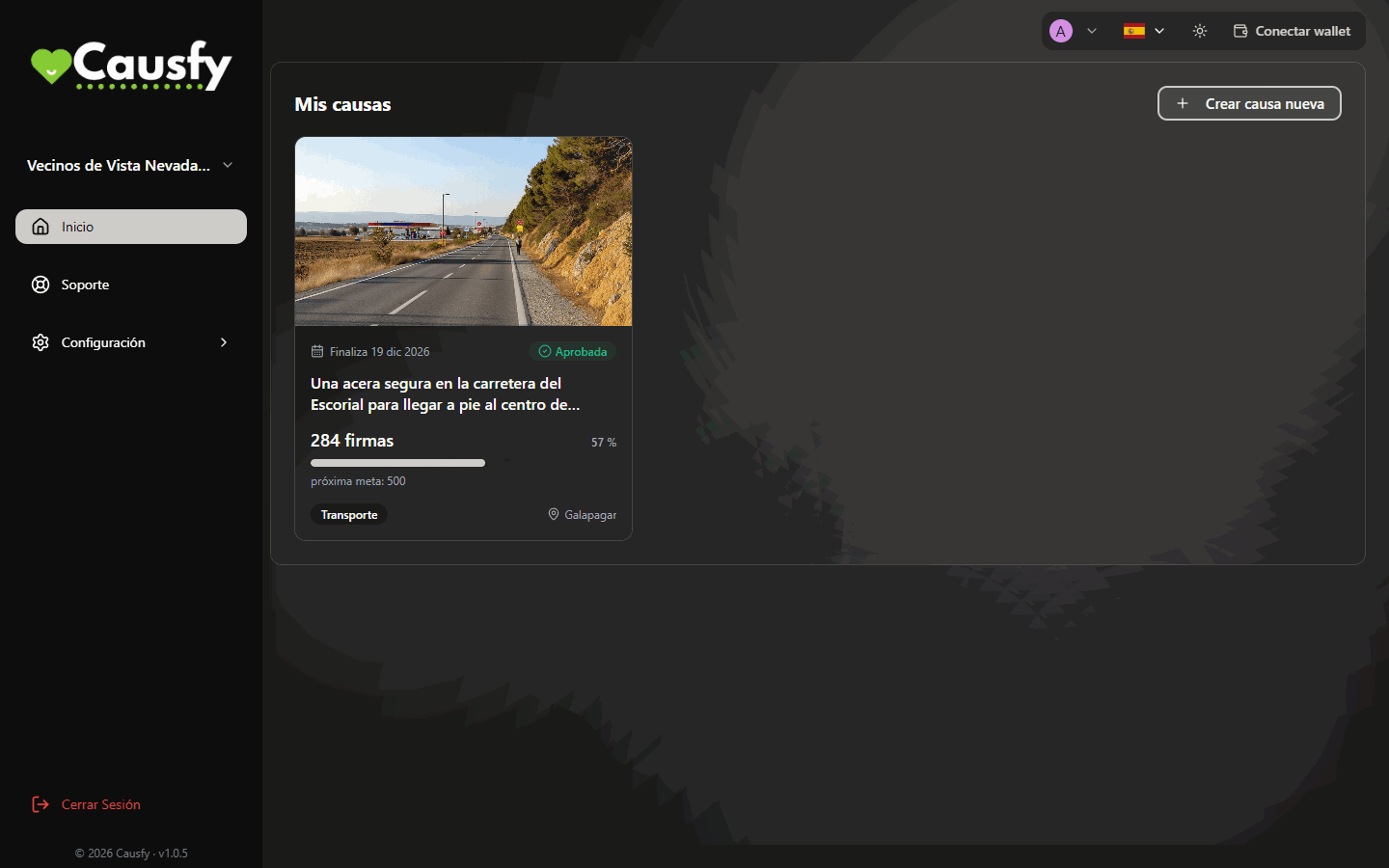
In your dashboard, on Home, press Create new cause. The first question decides everything else: what you want to achieve.
Home: the Create new cause button opens the wizard.
Right now you can only create signature causes. The fundraising option shows on screen marked Coming soon and cannot be chosen. You cannot donate from the portal for now either: the Donate button shows a Coming soon notice.
The wizard does not save drafts. If you leave before pressing Publish cause, whatever you wrote is lost. Have the text, the photo and the recipient’s name to hand before you start.
The first question. Raise funds shows greyed out while the option is on hold.
Collect signatures
Raise funds
Ten steps. On the left you always see the list of steps and which one you are on. The first three are for working out whom you are asking for the change.
1
Scope
Local, national or global. A city council or a school is local; the government or parliament, national; an international institution or a large company, global.Don’t inflate it: a well-aimed local petition achieves more than a global one with no clear recipient.
Step 1 of 10, Scope. On the left, the ten steps of the wizard.
2
Recipients
Who can make the change you are asking for. It is the most important question in the whole wizard.For each recipient you choose whether it is an Institution or a Person, and you type its name and its country. If there is more than one, press Add recipient.If you don’t know whom to address it to, find out before you go on. A petition without a recipient is just a wish.
Step 2, Recipients: whom your petition is addressed to.
3
Category
What your cause is about. It helps people find it on the portal.
Step 3, Category: choose the one that best describes your cause.
4
Title and petition
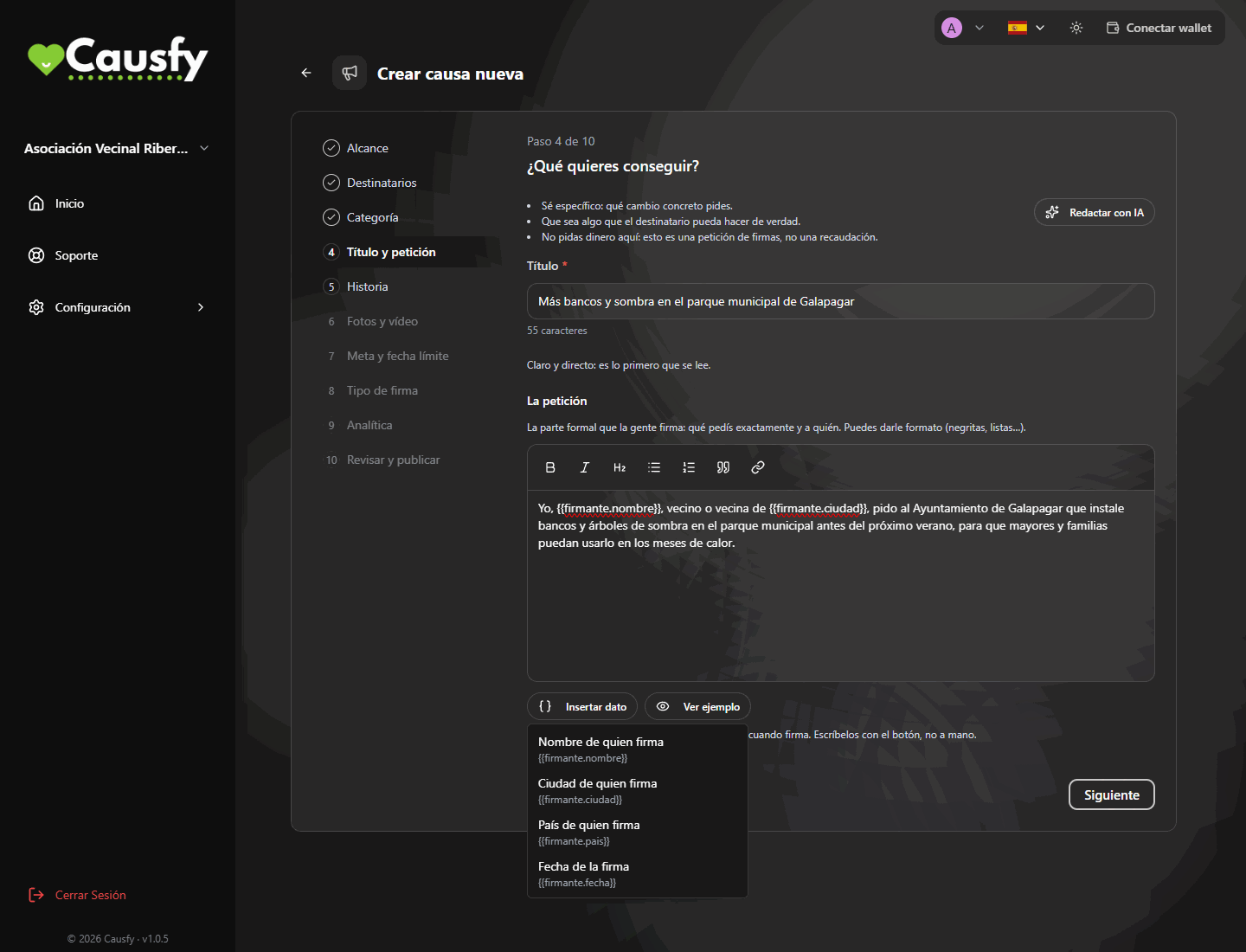
The title is read in a second and decides whether someone clicks. Short and clear.The petition is the formal text people sign: exactly what you are asking for and from whom. You can format it, with bold or lists. What you write here is what will appear on every signature, so take care over it. Further down we explain how to put the signer’s details into it with Insert data.If you find it hard to get going, press Write with AI. It asks you to “Tell us in your own words what you want to achieve and why” and, from that, prepares a draft title, petition and story that you then review and make your own. It can be used up to three times per cause; when you reach the limit you will see AI limit reached.
Step 4, Title and petition: the text that gets signed, with the signer's details and the example of how it will read.
5
Story
Here you answer “Who are you, and why are you running this cause?”. Tell something about yourself: whether it affects you closely, what you have seen, why you can’t let it go. Two or three paragraphs, up to 1500 characters. What you are asking for specifically is already in the petition.If you used Write with AI in the previous step, you will also find a draft of the story here.
Step 5, Story: who you are and why this cause moves you. The counter goes up to 1500 characters.
6
Photos & video
Each cause has a single photo: it is the one shown on the portal and when shared on social networks and in messages. Choose one that makes sense on its own, without small text.If you don’t have a photo, press Generate with AI and it creates one based on your cause. You can generate up to three; the button tells you how many you have used, for example Generate with AI (0/3).You can also add a YouTube video (optional) by pasting its link.
Step 6, Photos & video: the cause's photo, the option to generate it with AI and the YouTube link.
7
Goal & deadline
How many signatures you need and by when. The goal is a whole number, with no decimals. The deadline has to be at least 15 days from today.An achievable goal that gets beaten is more encouraging than a huge one left half done.
Step 7, Goal & deadline: how many signatures and until what day.
8
Signature type
You choose just one, and it determines the legal value of each signature. We explain it below.
9
Analytics
Optional. If you run paid campaigns, this is where you connect your own Google Analytics, Meta or TikTok identifiers to measure them.They only switch on if the person visiting the cause accepts marketing cookies, and the processing of that data is your responsibility.
10
Review & publish
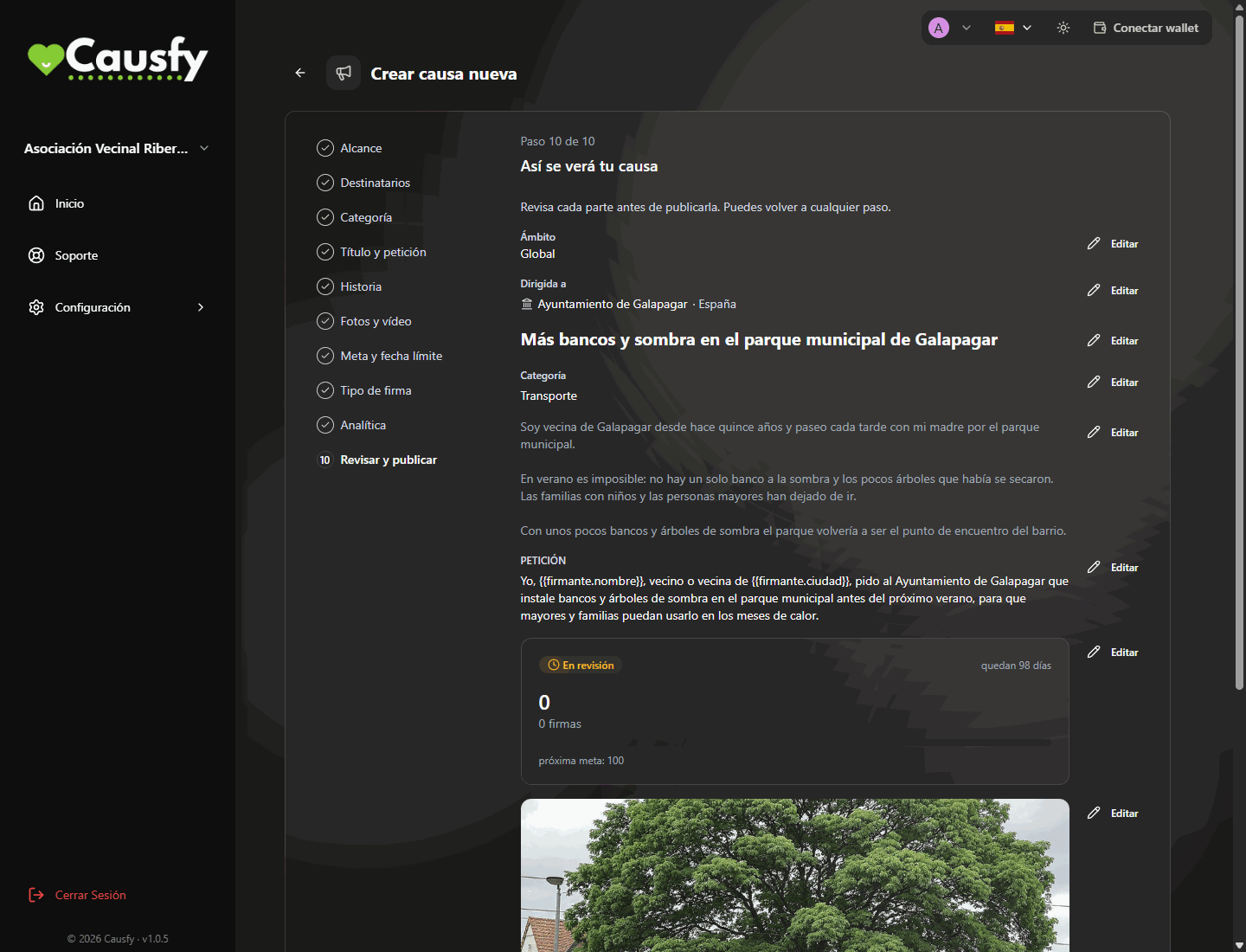
You see how your cause will look, block by block. If something doesn’t convince you, press Edit on that block and you go back to its step. When it is right, press Publish cause and it moves to Under review.
Step 10, Review & publish: this is how your cause will look. Each block has its own Edit button.
This option is on hold (Coming soon): you cannot create new fundraising causes or donate from the portal. What follows describes how the wizard works for when it opens again.
Seven steps.
1
Category
What it is about. It helps people find it.
2
Goal
How much money you need and what for. Be specific: “two thousand euros for the rent of the premises for six months” raises more than “help for the project”.
3
Scope
Local, national or global.
4
Title
Short and clear.
5
Story
What is happening, why it matters and what you are going to do with the money. You can also write it with the help of artificial intelligence.
6
Photos & video
A single photo, the one that travels when shared, and a YouTube video if you like.
7
Review & publish
You go over it and send it.
Getting paid is separate. When fundraising returns, the cause will be able to be approved and receiving visits while you set up card payments. How to get paid
The petition can include details that are filled in with each person’s own when they sign. That way each signature becomes a personal statement: instead of a generic text, the signer reads and signs something like “I, Ana García, resident of Madrid, ask…”. And that is also how it appears on each signature’s receipt.There are four details you can insert:
In the menu it is called
It is filled in with
Signer’s name
The name of the person signing
Signer’s city
Their city
Signer’s country
Their country
Date of signature
The day they sign
1
Put the cursor where you want the detail
Inside the petition text, at the exact spot where it should go, for example right after “I, ”.
2
Press Insert data and choose which one
A menu opens with the four details. When you choose one, it appears in the editor as a tag between braces, for example {{firmante.nombre}} or {{firmante.ciudad}}. That tag is the gap that will be filled in.
The Insert data menu: choose which of the signer's details you want to put in the petition.
3
Check how it looks with Show example
Press Show example. The How a signer will read it (with sample data) box appears, with the tags already replaced by made-up details such as “Ana García” and “Madrid”. Read it out loud: if the sentence sounds right with any name and any city, it is ready. To remove it, Hide example.
Always insert the details with the Insert data button, not by typing them by hand. If you type a tag that doesn’t exist or mistype it, the editor warns you with “This is not a real data item and will be printed as written”, and the signature will show that text with its braces, not filled in.
On the public page, people who have not signed yet see the gaps like this: [your name], [your city], [your country] and [date of your signature]. When they sign, they are filled in with their details.
You don’t need to use all four. The most common are the name and the city: “I, {{firmante.nombre}}, resident of {{firmante.ciudad}}, ask the City Council…”.
You see three cards, but right now only the basic one can be chosen. The other two show the Coming soon badge and are greyed out.
Step 8 of 10. Only the basic signature can be chosen today.
Basic signature (SES), free — available
The signer confirms their email with a one-time code. Their identity is not checked.It works as a public show of support: citizen petitions, pledges and pressure campaigns aimed at institutions or companies. It is the one most people use.
Advanced signature (AES) — coming soon
The signer would verify their identity with an official document, a liveness check and a face match, and each signature would generate an individual certificate.It cannot be chosen yet. A cause that already had it assigned keeps it.
Qualified signature (QES) — coming soon
It would be legally equivalent to a handwritten signature. It is not available either.
The signature type shapes the value of everything you collect. It can be changed until the first signature arrives; after that it is fixed. If your petition is going to end up in an official register, ask whoever receives it beforehand which level they will accept.
While it is Under review, the cause cannot be edited.
An approved or rejected cause can be edited, but any change sends it back to review: the final button becomes Resubmit for review.
With the first signature the scope, the recipients, the title and the petition, and the signature type are locked: what people signed cannot be changed. You will see those steps marked Locked. The goal can only go up and the deadline can only be extended.
{"docsConfig":{"theme":"mint","$schema":"https://mintlify.com/docs.json","name":"Causfy","description":"Guía de uso de Causfy para quien crea y gestiona causas: recoger firmas, recaudar fondos y cobrar.","colors":{"primary":"#1751a9","light":"#5b8def","dark":"#12428b"},"logo":{"light":"https://mintcdn.com/causfy/7NvzZjQeMvlRotvf/logo/light.png?fit=max\u0026auto=format\u0026n=7NvzZjQeMvlRotvf\u0026q=85\u0026s=b9acbe26e6eb66c251c9ca6bc8e8583a","dark":"https://mintcdn.com/causfy/7NvzZjQeMvlRotvf/logo/dark.png?fit=max\u0026auto=format\u0026n=7NvzZjQeMvlRotvf\u0026q=85\u0026s=18d120f4805607c2e0199334047f1735"},"favicon":"https://mintcdn.com/causfy/7NvzZjQeMvlRotvf/favicon.png?fit=max\u0026auto=format\u0026n=7NvzZjQeMvlRotvf\u0026q=85\u0026s=aa71f79bce02d180a39eb79c0632fa1a","navbar":{"links":[{"href":"https://causfy.com/es/contacto/","label":"Contacto"}],"primary":{"type":"button","label":"Ir a Causfy","href":"https://causfy.app"}},"footer":{"socials":{"instagram":"https://www.instagram.com/causfy_app","x":"https://x.com/Causfy_app","threads":"https://www.threads.com/@causfy_app","facebook":"https://www.facebook.com/Causfy","linkedin":"https://www.linkedin.com/company/causfy","youtube":"https://www.youtube.com/@causfy"},"links":[{"header":"Causfy","items":[{"label":"Inicio","href":"https://causfy.com/es"},{"label":"Ver causas","href":"https://causfy.com/causas"}]},{"header":"Legal","items":[{"label":"Términos","href":"https://causfy.com/legal/terminos"},{"label":"Privacidad","href":"https://causfy.com/legal/privacidad"},{"label":"Cookies","href":"https://causfy.com/legal/cookies"}]}]},"contextual":{"options":["copy","view","chatgpt","claude","perplexity","mcp","cursor","vscode"],"display":"header"},"styling":{"latex":true},"navigation":{"languages":[{"language":"es","footer":{"socials":{"instagram":"https://www.instagram.com/causfy_app","x":"https://x.com/Causfy_app","threads":"https://www.threads.com/@causfy_app","facebook":"https://www.facebook.com/Causfy","linkedin":"https://www.linkedin.com/company/causfy","youtube":"https://www.youtube.com/@causfy"},"links":[{"header":"Causfy","items":[{"label":"Inicio","href":"https://causfy.com/es"},{"label":"Ver causas","href":"https://causfy.com/causas"}]},{"header":"Legal","items":[{"label":"Términos","href":"https://causfy.com/es/legal/terminos"},{"label":"Privacidad","href":"https://causfy.com/es/legal/privacidad"},{"label":"Cookies","href":"https://causfy.com/es/legal/cookies"}]}]},"navbar":{"links":[{"href":"https://causfy.com/es/contacto/","label":"Contacto"}],"primary":{"type":"button","label":"Ir a Causfy","href":"https://causfy.app"}},"href":"es"},{"language":"en","footer":{"socials":{"instagram":"https://www.instagram.com/causfy_app","x":"https://x.com/Causfy_app","threads":"https://www.threads.com/@causfy_app","facebook":"https://www.facebook.com/Causfy","linkedin":"https://www.linkedin.com/company/causfy","youtube":"https://www.youtube.com/@causfy"},"links":[{"header":"Causfy","items":[{"label":"Home","href":"https://causfy.com/en"},{"label":"Browse causes","href":"https://causfy.com/causas"}]},{"header":"Legal","items":[{"label":"Terms","href":"https://causfy.com/en/legal/terms"},{"label":"Privacy","href":"https://causfy.com/en/legal/privacy"},{"label":"Cookies","href":"https://causfy.com/en/legal/cookies"}]}]},"navbar":{"links":[{"href":"https://causfy.com/en/contacto/","label":"Contact"}],"primary":{"type":"button","label":"Go to Causfy","href":"https://causfy.app"}},"href":"en"},{"language":"fr","footer":{"socials":{"instagram":"https://www.instagram.com/causfy_app","x":"https://x.com/Causfy_app","threads":"https://www.threads.com/@causfy_app","facebook":"https://www.facebook.com/Causfy","linkedin":"https://www.linkedin.com/company/causfy","youtube":"https://www.youtube.com/@causfy"},"links":[{"header":"Causfy","items":[{"label":"Accueil","href":"https://causfy.com/fr"},{"label":"Voir les causes","href":"https://causfy.com/causas"}]},{"header":"Légal","items":[{"label":"Conditions","href":"https://causfy.com/fr/legal/conditions"},{"label":"Confidentialité","href":"https://causfy.com/fr/legal/confidentialite"},{"label":"Cookies","href":"https://causfy.com/fr/legal/cookies"}]}]},"navbar":{"links":[{"href":"https://causfy.com/fr/contacto/","label":"Contact"}],"primary":{"type":"button","label":"Aller sur Causfy","href":"https://causfy.app"}},"href":"fr"},{"language":"pt","footer":{"socials":{"instagram":"https://www.instagram.com/causfy_app","x":"https://x.com/Causfy_app","threads":"https://www.threads.com/@causfy_app","facebook":"https://www.facebook.com/Causfy","linkedin":"https://www.linkedin.com/company/causfy","youtube":"https://www.youtube.com/@causfy"},"links":[{"header":"Causfy","items":[{"label":"Início","href":"https://causfy.com/pt"},{"label":"Ver causas","href":"https://causfy.com/causas"}]},{"header":"Legal","items":[{"label":"Termos","href":"https://causfy.com/pt/legal/termos"},{"label":"Privacidade","href":"https://causfy.com/pt/legal/privacidade"},{"label":"Cookies","href":"https://causfy.com/pt/legal/cookies"}]}]},"navbar":{"links":[{"href":"https://causfy.com/pt/contacto/","label":"Contato"}],"primary":{"type":"button","label":"Ir para a Causfy","href":"https://causfy.app"}},"href":"pt"},{"language":"it","footer":{"socials":{"instagram":"https://www.instagram.com/causfy_app","x":"https://x.com/Causfy_app","threads":"https://www.threads.com/@causfy_app","facebook":"https://www.facebook.com/Causfy","linkedin":"https://www.linkedin.com/company/causfy","youtube":"https://www.youtube.com/@causfy"},"links":[{"header":"Causfy","items":[{"label":"Home","href":"https://causfy.com/it"},{"label":"Vedi le cause","href":"https://causfy.com/causas"}]},{"header":"Legale","items":[{"label":"Termini","href":"https://causfy.com/it/legal/termini"},{"label":"Privacy","href":"https://causfy.com/it/legal/privacy"},{"label":"Cookie","href":"https://causfy.com/it/legal/cookie"}]}]},"navbar":{"links":[{"href":"https://causfy.com/it/contacto/","label":"Contatti"}],"primary":{"type":"button","label":"Vai su Causfy","href":"https://causfy.app"}},"href":"it"},{"language":"de","footer":{"socials":{"instagram":"https://www.instagram.com/causfy_app","x":"https://x.com/Causfy_app","threads":"https://www.threads.com/@causfy_app","facebook":"https://www.facebook.com/Causfy","linkedin":"https://www.linkedin.com/company/causfy","youtube":"https://www.youtube.com/@causfy"},"links":[{"header":"Causfy","items":[{"label":"Startseite","href":"https://causfy.com/de"},{"label":"Anliegen ansehen","href":"https://causfy.com/causas"}]},{"header":"Rechtliches","items":[{"label":"AGB","href":"https://causfy.com/de/legal/agb"},{"label":"Datenschutz","href":"https://causfy.com/de/legal/datenschutz"},{"label":"Cookies","href":"https://causfy.com/de/legal/cookies"}]}]},"navbar":{"links":[{"href":"https://causfy.com/de/contacto/","label":"Kontakt"}],"primary":{"type":"button","label":"Zu Causfy","href":"https://causfy.app"}},"href":"de"}]}},"deployment":{"deploymentMetadataValue":{"subdomain":"causfy","hasAudioNarration":false,"actualSubdomain":"causfy","customDomains":["docs.causfy.com"],"gitSource":{"type":"github","owner":"causfy-global-technologies","repo":"causfy-app","deployBranch":"main","contentDirectory":"user-manual-docs","isPrivate":true,"mountPath":"","label":""},"chroma":{"latestBuiltDeploymentHistoryId":"6ad7c3ebf75277ee5c2b7db8","collectionId":"d42b9f6e-6561-4884-ba61-7344b29728eb","liveDeploymentHistoryId":"6ad7c3ebf75277ee5c2b7db8","schemaVersion":"v3"},"entitlements":{"AI_CHAT":{"status":"DISABLED"}},"buildId":"6ad7c3ebf75277ee5c2b7db8","clientVersion":"0.0.4071","searchFilterCounts":[{"language":"de","tag":"Ihre Kampagne","count":7},{"language":"en","tag":"Your cause","count":7},{"language":"es","tag":"Tu causa","count":7},{"language":"fr","tag":"Votre cause","count":7},{"language":"it","tag":"La tua causa","count":7},{"language":"pt","tag":"Sua causa","count":7},{"language":"de","tag":"Eine Kampagne unterschreiben","count":6},{"language":"en","tag":"Signing a cause","count":6},{"language":"es","tag":"Firmar una causa","count":6},{"language":"fr","tag":"Signer une cause","count":6},{"language":"it","tag":"Firmare una causa","count":6},{"language":"pt","tag":"Assinar uma causa","count":6},{"language":"de","tag":"Ihr Konto","count":5},{"language":"en","tag":"Your account","count":5},{"language":"es","tag":"Tu cuenta","count":5},{"language":"fr","tag":"Votre compte","count":5},{"language":"it","tag":"Il tuo account","count":5},{"language":"pt","tag":"Sua conta","count":5},{"language":"de","tag":"Erste Schritte","count":3},{"language":"en","tag":"Getting started","count":3},{"language":"es","tag":"Empezar","count":3},{"language":"fr","tag":"Commencer","count":3},{"language":"it","tag":"Iniziare","count":3},{"language":"pt","tag":"Começar","count":3},{"language":"de","tag":"Zahlungen","count":2},{"language":"de","tag":"Support","count":2},{"language":"en","tag":"Getting paid","count":2},{"language":"en","tag":"Support","count":2},{"language":"es","tag":"Cobrar","count":2},{"language":"es","tag":"Soporte","count":2},{"language":"fr","tag":"Encaisser","count":2},{"language":"fr","tag":"Assistance","count":2},{"language":"it","tag":"Incassare","count":2},{"language":"it","tag":"Assistenza","count":2},{"language":"pt","tag":"Receber","count":2},{"language":"pt","tag":"Suporte","count":2}]},"assistantConfig":{"enableAskAiButton":false,"enableStarterQuestions":false,"enableContextualStarterQuestions":false,"enableAskAiSearchBar":true},"basePath":"","hasChatPermissions":false,"hasWebMcpPermissions":false,"toggles":[{"name":"kill-isr","enabled":true,"variant":{"name":"disabled","enabled":false,"feature_enabled":true},"impressionData":false},{"name":"agent-mintlify-slack","enabled":true,"variant":{"name":"disabled","enabled":false,"feature_enabled":true},"impressionData":false},{"name":"agent-integrations-settings","enabled":true,"variant":{"name":"disabled","enabled":false,"feature_enabled":true},"impressionData":false},{"name":"rbac-expansion","enabled":true,"variant":{"name":"disabled","enabled":false,"feature_enabled":true},"impressionData":false},{"name":"automations-pr-grouping","enabled":true,"variant":{"name":"disabled","enabled":false,"feature_enabled":true},"impressionData":false},{"name":"custom-prefix","enabled":true,"variant":{"name":"disabled","enabled":false,"feature_enabled":true},"impressionData":false},{"name":"analytics-v7","enabled":true,"variant":{"name":"disabled","enabled":false,"feature_enabled":true},"impressionData":false},{"name":"user-flows-analytics","enabled":true,"variant":{"name":"disabled","enabled":false,"feature_enabled":true},"impressionData":false},{"name":"no-publish-flow","enabled":true,"variant":{"name":"disabled","enabled":false,"feature_enabled":true},"impressionData":false},{"name":"workos-onboarding","enabled":true,"variant":{"name":"disabled","enabled":false,"feature_enabled":true},"impressionData":false},{"name":"llms-txt-v2","enabled":true,"variant":{"name":"disabled","enabled":false,"feature_enabled":true},"impressionData":false},{"name":"snapshot-serving-live","enabled":true,"variant":{"name":"disabled","enabled":false,"feature_enabled":true},"impressionData":false},{"name":"stripTemperatureMiddleware","enabled":true,"variant":{"name":"disabled","enabled":false,"feature_enabled":true},"impressionData":false},{"name":"support-platform-pylon-zendesk","enabled":true,"variant":{"name":"disabled","enabled":false,"feature_enabled":true},"impressionData":false},{"name":"snapshot-serving","enabled":true,"variant":{"name":"disabled","enabled":false,"feature_enabled":true},"impressionData":false},{"name":"instant-rollback","enabled":true,"variant":{"name":"disabled","enabled":false,"feature_enabled":true},"impressionData":false},{"name":"granular-notifications-server","enabled":true,"variant":{"name":"disabled","enabled":false,"feature_enabled":true},"impressionData":false},{"name":"granular-notifications","enabled":true,"variant":{"name":"disabled","enabled":false,"feature_enabled":true},"impressionData":false},{"name":"automations-fable","enabled":true,"variant":{"name":"disabled","enabled":false,"feature_enabled":true},"impressionData":false},{"name":"fixed-ai-action-pricing","enabled":true,"variant":{"name":"disabled","enabled":false,"feature_enabled":true},"impressionData":false},{"name":"automation-resolve-merge-conflict","enabled":true,"variant":{"name":"disabled","enabled":false,"feature_enabled":true},"impressionData":false},{"name":"scoped-publishing","enabled":true,"variant":{"name":"disabled","enabled":false,"feature_enabled":true},"impressionData":false},{"name":"mintql","enabled":true,"variant":{"name":"disabled","enabled":false,"feature_enabled":true},"impressionData":false},{"name":"page-level-analytics","enabled":true,"variant":{"name":"disabled","enabled":false,"feature_enabled":true},"impressionData":false},{"name":"editor-version-history-v2","enabled":true,"variant":{"name":"disabled","enabled":false,"feature_enabled":true},"impressionData":false},{"name":"billing-page-v2","enabled":true,"variant":{"name":"disabled","enabled":false,"feature_enabled":true},"impressionData":false},{"name":"full-page-search","enabled":true,"variant":{"name":"disabled","enabled":false,"feature_enabled":true},"impressionData":false},{"name":"workspace-projects","enabled":true,"variant":{"name":"disabled","enabled":false,"feature_enabled":true},"impressionData":false},{"name":"assistant-v5","enabled":true,"variant":{"name":"disabled","enabled":false,"feature_enabled":true},"impressionData":false},{"name":"fork-pr-previews","enabled":true,"variant":{"name":"disabled","enabled":false,"feature_enabled":true},"impressionData":false},{"name":"revalidation-jwt","enabled":true,"variant":{"name":"disabled","enabled":false,"feature_enabled":true},"impressionData":false},{"name":"vite-origin","enabled":true,"variant":{"name":"disabled","enabled":false,"feature_enabled":true},"impressionData":false},{"name":"workos-sso-scim","enabled":true,"variant":{"name":"disabled","enabled":false,"feature_enabled":true},"impressionData":false},{"name":"hobby-abuse-scan","enabled":true,"variant":{"name":"disabled","enabled":false,"feature_enabled":true},"impressionData":false},{"name":"dashboard-inbox","enabled":true,"variant":{"name":"disabled","enabled":false,"feature_enabled":true},"impressionData":false},{"name":"workos-signup","enabled":true,"variant":{"name":"disabled","enabled":false,"feature_enabled":true},"impressionData":false},{"name":"turbopuffer-dual-write","enabled":true,"variant":{"name":"disabled","enabled":false,"feature_enabled":true},"impressionData":false},{"name":"workos-enabled","enabled":true,"variant":{"name":"disabled","enabled":false,"feature_enabled":true},"impressionData":false},{"name":"approve-review-flow","enabled":true,"variant":{"name":"disabled","enabled":false,"feature_enabled":true},"impressionData":false},{"name":"sso-setup-deadline-banner","enabled":true,"variant":{"name":"disabled","enabled":false,"feature_enabled":true},"impressionData":false},{"name":"turbopuffer-serve","enabled":true,"variant":{"name":"disabled","enabled":false,"feature_enabled":true},"impressionData":false},{"name":"live-agents","enabled":true,"variant":{"name":"disabled","enabled":false,"feature_enabled":true},"impressionData":false},{"name":"comment-mode","enabled":true,"variant":{"name":"disabled","enabled":false,"feature_enabled":true},"impressionData":false}],"googleFontsInlined":false},"customCss":[],"page":{"pagePath":"en/causa/crear","slug":"/en/causa/crear","pageMetadata":{"title":"Create a cause","description":"The steps of the wizard, which differ depending on whether you collect signatures or raise funds.","icon":"list-check","keywords":["create cause","wizard","signatures","funds","story","petition","insert data"],"href":"/en/causa/crear"},"description":{"compiledSource":"\"use strict\";\nconst {jsx: _jsx} = arguments[0];\nconst {useMDXComponents: _provideComponents} = arguments[0];\nfunction _createMdxContent(props) {\n const _components = {\n p: \"p\",\n ..._provideComponents(),\n ...props.components\n };\n return _jsx(_components.p, {\n children: \"The steps of the wizard, which differ depending on whether you collect signatures or raise funds.\"\n });\n}\nfunction MDXContent(props = {}) {\n const {wrapper: MDXLayout} = {\n ..._provideComponents(),\n ...props.components\n };\n return MDXLayout ? _jsx(MDXLayout, {\n ...props,\n children: _jsx(_createMdxContent, {\n ...props\n })\n }) : _createMdxContent(props);\n}\nreturn {\n default: MDXContent\n};\n","frontmatter":{},"scope":{}},"pageType":"default","mdx":{"mdxSource":{"compiledSource":"\"use strict\";const{Fragment:_Fragment,jsx:_jsx,jsxs:_jsxs}=arguments[0];const{useMDXComponents:_provideComponents}=arguments[0];function _createMdxContent(props){const _components={a:`a`,code:`code`,li:`li`,p:`p`,strong:`strong`,tbody:`tbody`,td:`td`,th:`th`,thead:`thead`,tr:`tr`,ul:`ul`,..._provideComponents(),...props.components},{Accordion,AccordionGroup,Frame,Heading,Note,OptimizedImage,Step,Steps,Tab,Table,Tabs,Tip,Warning}=_components;if(!Accordion)_missingMdxReference(`Accordion`,true);if(!AccordionGroup)_missingMdxReference(`AccordionGroup`,true);if(!Frame)_missingMdxReference(`Frame`,true);if(!Heading)_missingMdxReference(`Heading`,true);if(!Note)_missingMdxReference(`Note`,true);if(!OptimizedImage)_missingMdxReference(`OptimizedImage`,true);if(!Step)_missingMdxReference(`Step`,true);if(!Steps)_missingMdxReference(`Steps`,true);if(!Tab)_missingMdxReference(`Tab`,true);if(!Table)_missingMdxReference(`Table`,true);if(!Tabs)_missingMdxReference(`Tabs`,true);if(!Tip)_missingMdxReference(`Tip`,true);if(!Warning)_missingMdxReference(`Warning`,true);return _jsxs(_Fragment,{children:[_jsxs(_components.p,{children:[`In your dashboard, on `,_jsx(_components.strong,{children:`Home`}),`, press `,_jsx(_components.strong,{children:`Create new cause`}),`. The first question decides everything else: what you want to achieve.`]}),`\n`,_jsx(Frame,{caption:`Home: the Create new cause button opens the wizard.`,children:_jsx(OptimizedImage,{src:`https://mintcdn.com/causfy/E4oFDtVHANfMJqrg/imagenes/panel.png?fit=max\u0026auto=format\u0026n=E4oFDtVHANfMJqrg\u0026q=85\u0026s=3736f1d1c5e1751e643e85b23d96bee4`,alt:`Home screen with the My causes section, a cause card with photo, Approved status, signatures and next goal, and the Create new cause button`,\"data-og-width\":`1440`,width:`1440`,\"data-og-height\":`900`,height:`900`,\"data-path\":`imagenes/panel.png`,\"data-optimize\":`true`,\"data-opv\":`3`,srcset:`https://mintcdn.com/causfy/E4oFDtVHANfMJqrg/imagenes/panel.png?w=280\u0026fit=max\u0026auto=format\u0026n=E4oFDtVHANfMJqrg\u0026q=85\u0026s=ebd70fff24e389206a7f3f9295c16f57 280w, https://mintcdn.com/causfy/E4oFDtVHANfMJqrg/imagenes/panel.png?w=560\u0026fit=max\u0026auto=format\u0026n=E4oFDtVHANfMJqrg\u0026q=85\u0026s=8bcadbedcd808f2ee1fdcdcd73113119 560w, https://mintcdn.com/causfy/E4oFDtVHANfMJqrg/imagenes/panel.png?w=840\u0026fit=max\u0026auto=format\u0026n=E4oFDtVHANfMJqrg\u0026q=85\u0026s=8011e084c7874eece11489adbbc55054 840w, https://mintcdn.com/causfy/E4oFDtVHANfMJqrg/imagenes/panel.png?w=1100\u0026fit=max\u0026auto=format\u0026n=E4oFDtVHANfMJqrg\u0026q=85\u0026s=ac5c94feb04a00929a22a24a60ecc278 1100w, https://mintcdn.com/causfy/E4oFDtVHANfMJqrg/imagenes/panel.png?w=1650\u0026fit=max\u0026auto=format\u0026n=E4oFDtVHANfMJqrg\u0026q=85\u0026s=e205b4ddbc6e06195ee6156dfec97d4c 1650w, https://mintcdn.com/causfy/E4oFDtVHANfMJqrg/imagenes/panel.png?w=2500\u0026fit=max\u0026auto=format\u0026n=E4oFDtVHANfMJqrg\u0026q=85\u0026s=361a6374ada7ebe1d225628ab7150a7e 2500w`})}),`\n`,_jsx(Warning,{children:_jsxs(_components.p,{children:[_jsx(_components.strong,{children:`Right now you can only create signature causes.`}),` The fundraising option shows on screen marked `,_jsx(_components.strong,{children:`Coming soon`}),` and cannot be chosen. You cannot donate from the portal for now either: the `,_jsx(_components.strong,{children:`Donate`}),` button shows a `,_jsx(_components.strong,{children:`Coming soon`}),` notice.`]})}),`\n`,_jsx(Warning,{children:_jsxs(_components.p,{children:[_jsx(_components.strong,{children:`The wizard does not save drafts.`}),` If you leave before pressing `,_jsx(_components.strong,{children:`Publish cause`}),`, whatever you wrote is lost. Have the text, the photo and the recipient’s name to hand before you start.`]})}),`\n`,_jsx(Frame,{caption:`The first question. Raise funds shows greyed out while the option is on hold.`,children:_jsx(OptimizedImage,{src:`https://mintcdn.com/causfy/E4oFDtVHANfMJqrg/imagenes/asistente-objetivo.png?fit=max\u0026auto=format\u0026n=E4oFDtVHANfMJqrg\u0026q=85\u0026s=980fd78b587949d969a6239235ae0734`,alt:`Create new cause screen with the question What does your cause need to move forward: support or funding? and two cards: Collect signatures, active, and Raise funds, greyed out with the Coming soon badge`,\"data-og-width\":`1440`,width:`1440`,\"data-og-height\":`900`,height:`900`,\"data-path\":`imagenes/asistente-objetivo.png`,\"data-optimize\":`true`,\"data-opv\":`3`,srcset:`https://mintcdn.com/causfy/E4oFDtVHANfMJqrg/imagenes/asistente-objetivo.png?w=280\u0026fit=max\u0026auto=format\u0026n=E4oFDtVHANfMJqrg\u0026q=85\u0026s=9897d593369c0a0487b474d34625ceb4 280w, https://mintcdn.com/causfy/E4oFDtVHANfMJqrg/imagenes/asistente-objetivo.png?w=560\u0026fit=max\u0026auto=format\u0026n=E4oFDtVHANfMJqrg\u0026q=85\u0026s=d5970638935be6ece1dc53e1d824f985 560w, https://mintcdn.com/causfy/E4oFDtVHANfMJqrg/imagenes/asistente-objetivo.png?w=840\u0026fit=max\u0026auto=format\u0026n=E4oFDtVHANfMJqrg\u0026q=85\u0026s=e1964bb1e62360a77dc84245ca6d6690 840w, https://mintcdn.com/causfy/E4oFDtVHANfMJqrg/imagenes/asistente-objetivo.png?w=1100\u0026fit=max\u0026auto=format\u0026n=E4oFDtVHANfMJqrg\u0026q=85\u0026s=0e08cdf54c87ce90a24e9b100e48a1d9 1100w, https://mintcdn.com/causfy/E4oFDtVHANfMJqrg/imagenes/asistente-objetivo.png?w=1650\u0026fit=max\u0026auto=format\u0026n=E4oFDtVHANfMJqrg\u0026q=85\u0026s=8eed62698f83f08f6fde9c2a7233ce1f 1650w, https://mintcdn.com/causfy/E4oFDtVHANfMJqrg/imagenes/asistente-objetivo.png?w=2500\u0026fit=max\u0026auto=format\u0026n=E4oFDtVHANfMJqrg\u0026q=85\u0026s=1d84082a9aadb2c6d3753868e9d499c6 2500w`})}),`\n`,_jsxs(Tabs,{children:[_jsxs(Tab,{title:`Collect signatures`,id:`collect-signatures`,children:[_jsx(_components.p,{children:`Ten steps. On the left you always see the list of steps and which one you are on. The first three are for working out whom you are asking for the change.`}),_jsxs(Steps,{children:[_jsxs(Step,{title:`Scope`,children:[_jsx(_components.p,{children:`Local, national or global. A city council or a school is local; the government or parliament, national; an international institution or a large company, global.`}),_jsx(_components.p,{children:`Don’t inflate it: a well-aimed local petition achieves more than a global one with no clear recipient.`}),_jsx(Frame,{caption:`Step 1 of 10, Scope. On the left, the ten steps of the wizard.`,children:_jsx(OptimizedImage,{src:`https://mintcdn.com/causfy/E4oFDtVHANfMJqrg/imagenes/asistente-alcance.png?fit=max\u0026auto=format\u0026n=E4oFDtVHANfMJqrg\u0026q=85\u0026s=89ac23de9defd7e3a52e40323546cac1`,alt:`Step 1 of 10 of the wizard, Scope, with three options: Local, National and Global, and on the left the list of the ten steps`,\"data-og-width\":`1440`,width:`1440`,\"data-og-height\":`900`,height:`900`,\"data-path\":`imagenes/asistente-alcance.png`,\"data-optimize\":`true`,\"data-opv\":`3`,srcset:`https://mintcdn.com/causfy/E4oFDtVHANfMJqrg/imagenes/asistente-alcance.png?w=280\u0026fit=max\u0026auto=format\u0026n=E4oFDtVHANfMJqrg\u0026q=85\u0026s=ceeddafce0a6f95e4fa963ef1aa0d4f0 280w, https://mintcdn.com/causfy/E4oFDtVHANfMJqrg/imagenes/asistente-alcance.png?w=560\u0026fit=max\u0026auto=format\u0026n=E4oFDtVHANfMJqrg\u0026q=85\u0026s=bcc79ddbb021cbc66f8499da3e376cf8 560w, https://mintcdn.com/causfy/E4oFDtVHANfMJqrg/imagenes/asistente-alcance.png?w=840\u0026fit=max\u0026auto=format\u0026n=E4oFDtVHANfMJqrg\u0026q=85\u0026s=babac70b9880efd082931879c5987d6a 840w, https://mintcdn.com/causfy/E4oFDtVHANfMJqrg/imagenes/asistente-alcance.png?w=1100\u0026fit=max\u0026auto=format\u0026n=E4oFDtVHANfMJqrg\u0026q=85\u0026s=ddd023f5862b050c126e13ed3fe85cfa 1100w, https://mintcdn.com/causfy/E4oFDtVHANfMJqrg/imagenes/asistente-alcance.png?w=1650\u0026fit=max\u0026auto=format\u0026n=E4oFDtVHANfMJqrg\u0026q=85\u0026s=a80e6f8d36221a76b6f81b2bd679702c 1650w, https://mintcdn.com/causfy/E4oFDtVHANfMJqrg/imagenes/asistente-alcance.png?w=2500\u0026fit=max\u0026auto=format\u0026n=E4oFDtVHANfMJqrg\u0026q=85\u0026s=1491ae7abda6a6dde76a5c8aa43b66e8 2500w`})})]}),_jsxs(Step,{title:`Recipients`,children:[_jsx(_components.p,{children:`Who can make the change you are asking for. It is the most important question in the whole wizard.`}),_jsxs(_components.p,{children:[`For each recipient you choose whether it is an `,_jsx(_components.strong,{children:`Institution`}),` or a `,_jsx(_components.strong,{children:`Person`}),`, and you type its name and its country. If there is more than one, press `,_jsx(_components.strong,{children:`Add recipient`}),`.`]}),_jsx(_components.p,{children:`If you don’t know whom to address it to, find out before you go on. A petition without a recipient is just a wish.`}),_jsx(Frame,{caption:`Step 2, Recipients: whom your petition is addressed to.`,children:_jsx(OptimizedImage,{src:`https://mintcdn.com/causfy/E4oFDtVHANfMJqrg/imagenes/asistente-destinatarios.png?fit=max\u0026auto=format\u0026n=E4oFDtVHANfMJqrg\u0026q=85\u0026s=c4935c972e223b68304b343b5a7b2aee`,alt:`Recipients step with the choice between Institution and Person, the name and country fields, and the Add recipient button`,\"data-og-width\":`1440`,width:`1440`,\"data-og-height\":`900`,height:`900`,\"data-path\":`imagenes/asistente-destinatarios.png`,\"data-optimize\":`true`,\"data-opv\":`3`,srcset:`https://mintcdn.com/causfy/E4oFDtVHANfMJqrg/imagenes/asistente-destinatarios.png?w=280\u0026fit=max\u0026auto=format\u0026n=E4oFDtVHANfMJqrg\u0026q=85\u0026s=0061768124f674cc826612eeaaf261d9 280w, https://mintcdn.com/causfy/E4oFDtVHANfMJqrg/imagenes/asistente-destinatarios.png?w=560\u0026fit=max\u0026auto=format\u0026n=E4oFDtVHANfMJqrg\u0026q=85\u0026s=f112c8b5d2afbd11c100d1d34eeb488c 560w, https://mintcdn.com/causfy/E4oFDtVHANfMJqrg/imagenes/asistente-destinatarios.png?w=840\u0026fit=max\u0026auto=format\u0026n=E4oFDtVHANfMJqrg\u0026q=85\u0026s=7683ba47d290593c38d5910af631ced6 840w, https://mintcdn.com/causfy/E4oFDtVHANfMJqrg/imagenes/asistente-destinatarios.png?w=1100\u0026fit=max\u0026auto=format\u0026n=E4oFDtVHANfMJqrg\u0026q=85\u0026s=c580d1d96675227e4bb5dbfd82dcb93f 1100w, https://mintcdn.com/causfy/E4oFDtVHANfMJqrg/imagenes/asistente-destinatarios.png?w=1650\u0026fit=max\u0026auto=format\u0026n=E4oFDtVHANfMJqrg\u0026q=85\u0026s=f13ec6482a981af66736331ab43a7003 1650w, https://mintcdn.com/causfy/E4oFDtVHANfMJqrg/imagenes/asistente-destinatarios.png?w=2500\u0026fit=max\u0026auto=format\u0026n=E4oFDtVHANfMJqrg\u0026q=85\u0026s=9ce3214f07fbd8c292f0620c6fe8bf6e 2500w`})})]}),_jsxs(Step,{title:`Category`,children:[_jsx(_components.p,{children:`What your cause is about. It helps people find it on the portal.`}),_jsx(Frame,{caption:`Step 3, Category: choose the one that best describes your cause.`,children:_jsx(OptimizedImage,{src:`https://mintcdn.com/causfy/E4oFDtVHANfMJqrg/imagenes/asistente-categoria.png?fit=max\u0026auto=format\u0026n=E4oFDtVHANfMJqrg\u0026q=85\u0026s=bb8987e4a8b9b8d174541bffe378bb08`,alt:`Category step with the grid of the 23 categories available to choose from`,\"data-og-width\":`1440`,width:`1440`,\"data-og-height\":`900`,height:`900`,\"data-path\":`imagenes/asistente-categoria.png`,\"data-optimize\":`true`,\"data-opv\":`3`,srcset:`https://mintcdn.com/causfy/E4oFDtVHANfMJqrg/imagenes/asistente-categoria.png?w=280\u0026fit=max\u0026auto=format\u0026n=E4oFDtVHANfMJqrg\u0026q=85\u0026s=ac4156ac858631f3554007cc95a80b4d 280w, https://mintcdn.com/causfy/E4oFDtVHANfMJqrg/imagenes/asistente-categoria.png?w=560\u0026fit=max\u0026auto=format\u0026n=E4oFDtVHANfMJqrg\u0026q=85\u0026s=29b9edad3593d599c72c4ee85aa8d881 560w, https://mintcdn.com/causfy/E4oFDtVHANfMJqrg/imagenes/asistente-categoria.png?w=840\u0026fit=max\u0026auto=format\u0026n=E4oFDtVHANfMJqrg\u0026q=85\u0026s=de9c0784b0239f63af295d0c28fdd473 840w, https://mintcdn.com/causfy/E4oFDtVHANfMJqrg/imagenes/asistente-categoria.png?w=1100\u0026fit=max\u0026auto=format\u0026n=E4oFDtVHANfMJqrg\u0026q=85\u0026s=b2ad6e01971f0e45fc82b8e390d80e45 1100w, https://mintcdn.com/causfy/E4oFDtVHANfMJqrg/imagenes/asistente-categoria.png?w=1650\u0026fit=max\u0026auto=format\u0026n=E4oFDtVHANfMJqrg\u0026q=85\u0026s=341aeb1f1191d5324df9ad17244bfaa1 1650w, https://mintcdn.com/causfy/E4oFDtVHANfMJqrg/imagenes/asistente-categoria.png?w=2500\u0026fit=max\u0026auto=format\u0026n=E4oFDtVHANfMJqrg\u0026q=85\u0026s=04b8f0422ad9d15b57d5f8772fa960be 2500w`})})]}),_jsxs(Step,{title:`Title and petition`,children:[_jsx(_components.p,{children:`The title is read in a second and decides whether someone clicks. Short and clear.`}),_jsxs(_components.p,{children:[_jsx(_components.strong,{children:`The petition`}),` is the formal text people sign: exactly what you are asking for and from whom. You can format it, with bold or lists. What you write here is what will appear on every signature, so take care over it. Further down we explain how to put the signer’s details into it with `,_jsx(_components.strong,{children:`Insert data`}),`.`]}),_jsxs(_components.p,{children:[`If you find it hard to get going, press `,_jsx(_components.strong,{children:`Write with AI`}),`. It asks you to “Tell us in your own words what you want to achieve and why” and, from that, prepares a draft title, petition and story that you then review and make your own. It can be used up to three times per cause; when you reach the limit you will see `,_jsx(_components.strong,{children:`AI limit reached`}),`.`]}),_jsx(Frame,{caption:`Step 4, Title and petition: the text that gets signed, with the signer's details and the example of how it will read.`,children:_jsx(OptimizedImage,{src:`https://mintcdn.com/causfy/E4oFDtVHANfMJqrg/imagenes/asistente-titulo-y-peticion.png?fit=max\u0026auto=format\u0026n=E4oFDtVHANfMJqrg\u0026q=85\u0026s=719a98f8a53cc0ca8042bf0daddee81b`,alt:`Title and petition step with the title field, the petition editor with the firmante.nombre and firmante.ciudad tags, the Insert data and Show example buttons, the How a signer will read it (with sample data) box that says I, Ana García, resident of Madrid, and the Write with AI button`,\"data-og-width\":`1440`,width:`1440`,\"data-og-height\":`1100`,height:`1100`,\"data-path\":`imagenes/asistente-titulo-y-peticion.png`,\"data-optimize\":`true`,\"data-opv\":`3`,srcset:`https://mintcdn.com/causfy/E4oFDtVHANfMJqrg/imagenes/asistente-titulo-y-peticion.png?w=280\u0026fit=max\u0026auto=format\u0026n=E4oFDtVHANfMJqrg\u0026q=85\u0026s=2fd4befc7be792e13b04d252ab1d1050 280w, https://mintcdn.com/causfy/E4oFDtVHANfMJqrg/imagenes/asistente-titulo-y-peticion.png?w=560\u0026fit=max\u0026auto=format\u0026n=E4oFDtVHANfMJqrg\u0026q=85\u0026s=7b14a36a43037395e6b50074d3e5ae9c 560w, https://mintcdn.com/causfy/E4oFDtVHANfMJqrg/imagenes/asistente-titulo-y-peticion.png?w=840\u0026fit=max\u0026auto=format\u0026n=E4oFDtVHANfMJqrg\u0026q=85\u0026s=5c8b7ff663fbc446318e54c44c46dfdb 840w, https://mintcdn.com/causfy/E4oFDtVHANfMJqrg/imagenes/asistente-titulo-y-peticion.png?w=1100\u0026fit=max\u0026auto=format\u0026n=E4oFDtVHANfMJqrg\u0026q=85\u0026s=b24b02e219e8246daeac953e48a09a68 1100w, https://mintcdn.com/causfy/E4oFDtVHANfMJqrg/imagenes/asistente-titulo-y-peticion.png?w=1650\u0026fit=max\u0026auto=format\u0026n=E4oFDtVHANfMJqrg\u0026q=85\u0026s=0eeb9143cb4ea1f3f543a7aa064265b4 1650w, https://mintcdn.com/causfy/E4oFDtVHANfMJqrg/imagenes/asistente-titulo-y-peticion.png?w=2500\u0026fit=max\u0026auto=format\u0026n=E4oFDtVHANfMJqrg\u0026q=85\u0026s=0d0ab76574ef4f0085e31ac7036c54e1 2500w`})})]}),_jsxs(Step,{title:`Story`,children:[_jsx(_components.p,{children:`Here you answer “Who are you, and why are you running this cause?”. Tell something about yourself: whether it affects you closely, what you have seen, why you can’t let it go. Two or three paragraphs, up to 1500 characters. What you are asking for specifically is already in the petition.`}),_jsxs(_components.p,{children:[`If you used `,_jsx(_components.strong,{children:`Write with AI`}),` in the previous step, you will also find a draft of the story here.`]}),_jsx(Frame,{caption:`Step 5, Story: who you are and why this cause moves you. The counter goes up to 1500 characters.`,children:_jsx(OptimizedImage,{src:`https://mintcdn.com/causfy/E4oFDtVHANfMJqrg/imagenes/asistente-historia.png?fit=max\u0026auto=format\u0026n=E4oFDtVHANfMJqrg\u0026q=85\u0026s=c3007c267b6da557054a560f7cad2484`,alt:`Story step with the question Who are you, and why are you running this cause?, the empty text field and the 0/1500 counter`,\"data-og-width\":`1440`,width:`1440`,\"data-og-height\":`1100`,height:`1100`,\"data-path\":`imagenes/asistente-historia.png`,\"data-optimize\":`true`,\"data-opv\":`3`,srcset:`https://mintcdn.com/causfy/E4oFDtVHANfMJqrg/imagenes/asistente-historia.png?w=280\u0026fit=max\u0026auto=format\u0026n=E4oFDtVHANfMJqrg\u0026q=85\u0026s=5a55f4aef0fe27cc74cdbfea8548f561 280w, https://mintcdn.com/causfy/E4oFDtVHANfMJqrg/imagenes/asistente-historia.png?w=560\u0026fit=max\u0026auto=format\u0026n=E4oFDtVHANfMJqrg\u0026q=85\u0026s=9d328ecb06567d3e993526e910226830 560w, https://mintcdn.com/causfy/E4oFDtVHANfMJqrg/imagenes/asistente-historia.png?w=840\u0026fit=max\u0026auto=format\u0026n=E4oFDtVHANfMJqrg\u0026q=85\u0026s=1df1976f89ba1b1ca92fdd5810acc6a5 840w, https://mintcdn.com/causfy/E4oFDtVHANfMJqrg/imagenes/asistente-historia.png?w=1100\u0026fit=max\u0026auto=format\u0026n=E4oFDtVHANfMJqrg\u0026q=85\u0026s=456bfaed7d01bfa7a9e9dea4360aa566 1100w, https://mintcdn.com/causfy/E4oFDtVHANfMJqrg/imagenes/asistente-historia.png?w=1650\u0026fit=max\u0026auto=format\u0026n=E4oFDtVHANfMJqrg\u0026q=85\u0026s=3b10b09bb8f529ca1ca626e6e65add64 1650w, https://mintcdn.com/causfy/E4oFDtVHANfMJqrg/imagenes/asistente-historia.png?w=2500\u0026fit=max\u0026auto=format\u0026n=E4oFDtVHANfMJqrg\u0026q=85\u0026s=6bb3d32dc033d5320528d89b1e0f330d 2500w`})})]}),_jsxs(Step,{title:`Photos \u0026 video`,children:[_jsxs(_components.p,{children:[`Each cause has `,_jsx(_components.strong,{children:`a single photo`}),`: it is the one shown on the portal and when shared on social networks and in messages. Choose one that makes sense on its own, without small text.`]}),_jsxs(_components.p,{children:[`If you don’t have a photo, press `,_jsx(_components.strong,{children:`Generate with AI`}),` and it creates one based on your cause. You can generate up to three; the button tells you how many you have used, for example `,_jsx(_components.strong,{children:`Generate with AI (0/3)`}),`.`]}),_jsxs(_components.p,{children:[`You can also add a `,_jsx(_components.strong,{children:`YouTube video (optional)`}),` by pasting its link.`]}),_jsx(Frame,{caption:`Step 6, Photos \u0026 video: the cause's photo, the option to generate it with AI and the YouTube link.`,children:_jsx(OptimizedImage,{src:`https://mintcdn.com/causfy/E4oFDtVHANfMJqrg/imagenes/asistente-foto.png?fit=max\u0026auto=format\u0026n=E4oFDtVHANfMJqrg\u0026q=85\u0026s=98a52a06c18128326f963806e8416f63`,alt:`Photos \u0026 video step with the cause's photo already uploaded, the Generate with AI (0/3) button and the optional field for a YouTube video link`,\"data-og-width\":`1440`,width:`1440`,\"data-og-height\":`1100`,height:`1100`,\"data-path\":`imagenes/asistente-foto.png`,\"data-optimize\":`true`,\"data-opv\":`3`,srcset:`https://mintcdn.com/causfy/E4oFDtVHANfMJqrg/imagenes/asistente-foto.png?w=280\u0026fit=max\u0026auto=format\u0026n=E4oFDtVHANfMJqrg\u0026q=85\u0026s=b9f1343dae96870b28155bacadf59892 280w, https://mintcdn.com/causfy/E4oFDtVHANfMJqrg/imagenes/asistente-foto.png?w=560\u0026fit=max\u0026auto=format\u0026n=E4oFDtVHANfMJqrg\u0026q=85\u0026s=62c447d48c370eeffc55da083a032a80 560w, https://mintcdn.com/causfy/E4oFDtVHANfMJqrg/imagenes/asistente-foto.png?w=840\u0026fit=max\u0026auto=format\u0026n=E4oFDtVHANfMJqrg\u0026q=85\u0026s=54d3302e3d1ddbde200b1743b7dd5f56 840w, https://mintcdn.com/causfy/E4oFDtVHANfMJqrg/imagenes/asistente-foto.png?w=1100\u0026fit=max\u0026auto=format\u0026n=E4oFDtVHANfMJqrg\u0026q=85\u0026s=a312618bb454946a3e4f53ae910c776e 1100w, https://mintcdn.com/causfy/E4oFDtVHANfMJqrg/imagenes/asistente-foto.png?w=1650\u0026fit=max\u0026auto=format\u0026n=E4oFDtVHANfMJqrg\u0026q=85\u0026s=94369a2d83ff65c6dc850f585ca7033f 1650w, https://mintcdn.com/causfy/E4oFDtVHANfMJqrg/imagenes/asistente-foto.png?w=2500\u0026fit=max\u0026auto=format\u0026n=E4oFDtVHANfMJqrg\u0026q=85\u0026s=d106df7f995c08ec351c7180a869f1d7 2500w`})})]}),_jsxs(Step,{title:`Goal \u0026 deadline`,children:[_jsxs(_components.p,{children:[`How many signatures you need and by when. The goal is a whole number, with no decimals. The deadline has to be `,_jsx(_components.strong,{children:`at least 15 days from today`}),`.`]}),_jsx(_components.p,{children:`An achievable goal that gets beaten is more encouraging than a huge one left half done.`}),_jsx(Frame,{caption:`Step 7, Goal \u0026 deadline: how many signatures and until what day.`,children:_jsx(OptimizedImage,{src:`https://mintcdn.com/causfy/E4oFDtVHANfMJqrg/imagenes/asistente-meta.png?fit=max\u0026auto=format\u0026n=E4oFDtVHANfMJqrg\u0026q=85\u0026s=f4271a14ae53e616a5c399d5c215a0b4`,alt:`Goal \u0026 deadline step with the signature goal field and the deadline picker`,\"data-og-width\":`1440`,width:`1440`,\"data-og-height\":`1100`,height:`1100`,\"data-path\":`imagenes/asistente-meta.png`,\"data-optimize\":`true`,\"data-opv\":`3`,srcset:`https://mintcdn.com/causfy/E4oFDtVHANfMJqrg/imagenes/asistente-meta.png?w=280\u0026fit=max\u0026auto=format\u0026n=E4oFDtVHANfMJqrg\u0026q=85\u0026s=3a5d8ae092e9e706e22f9c59c386f597 280w, https://mintcdn.com/causfy/E4oFDtVHANfMJqrg/imagenes/asistente-meta.png?w=560\u0026fit=max\u0026auto=format\u0026n=E4oFDtVHANfMJqrg\u0026q=85\u0026s=2b516d3f72bcdf045b37058268a85c27 560w, https://mintcdn.com/causfy/E4oFDtVHANfMJqrg/imagenes/asistente-meta.png?w=840\u0026fit=max\u0026auto=format\u0026n=E4oFDtVHANfMJqrg\u0026q=85\u0026s=4c190896382504133610364a421bb962 840w, https://mintcdn.com/causfy/E4oFDtVHANfMJqrg/imagenes/asistente-meta.png?w=1100\u0026fit=max\u0026auto=format\u0026n=E4oFDtVHANfMJqrg\u0026q=85\u0026s=99c43137d4860a50d24b3a3159e4efac 1100w, https://mintcdn.com/causfy/E4oFDtVHANfMJqrg/imagenes/asistente-meta.png?w=1650\u0026fit=max\u0026auto=format\u0026n=E4oFDtVHANfMJqrg\u0026q=85\u0026s=2bc62f45f0ef78d57773abebd71f16c2 1650w, https://mintcdn.com/causfy/E4oFDtVHANfMJqrg/imagenes/asistente-meta.png?w=2500\u0026fit=max\u0026auto=format\u0026n=E4oFDtVHANfMJqrg\u0026q=85\u0026s=c9f7c0a8ea5e164fdbcd15afeecee395 2500w`})})]}),_jsx(Step,{title:`Signature type`,children:_jsxs(_components.p,{children:[`You choose `,_jsx(_components.strong,{children:`just one`}),`, and it determines the legal value of each signature. We explain it below.`]})}),_jsxs(Step,{title:`Analytics`,children:[_jsx(_components.p,{children:`Optional. If you run paid campaigns, this is where you connect your own Google Analytics, Meta or TikTok identifiers to measure them.`}),_jsx(_components.p,{children:`They only switch on if the person visiting the cause accepts marketing cookies, and the processing of that data is your responsibility.`})]}),_jsxs(Step,{title:`Review \u0026 publish`,children:[_jsxs(_components.p,{children:[`You see how your cause will look, block by block. If something doesn’t convince you, press `,_jsx(_components.strong,{children:`Edit`}),` on that block and you go back to its step. When it is right, press `,_jsx(_components.strong,{children:`Publish cause`}),` and it moves to `,_jsx(_components.strong,{children:`Under review`}),`.`]}),_jsx(Frame,{caption:`Step 10, Review \u0026 publish: this is how your cause will look. Each block has its own Edit button.`,children:_jsx(OptimizedImage,{src:`https://mintcdn.com/causfy/E4oFDtVHANfMJqrg/imagenes/asistente-revisar.png?fit=max\u0026auto=format\u0026n=E4oFDtVHANfMJqrg\u0026q=85\u0026s=b166842be8edaa2cd994cfc5ddfa9f15`,alt:`Review \u0026 publish step with the heading This is how your cause will look, each block with its Edit button and the card showing Under review`,\"data-og-width\":`1440`,width:`1440`,\"data-og-height\":`1100`,height:`1100`,\"data-path\":`imagenes/asistente-revisar.png`,\"data-optimize\":`true`,\"data-opv\":`3`,srcset:`https://mintcdn.com/causfy/E4oFDtVHANfMJqrg/imagenes/asistente-revisar.png?w=280\u0026fit=max\u0026auto=format\u0026n=E4oFDtVHANfMJqrg\u0026q=85\u0026s=fbc1470eb1432a4ba0fc4826c31e8e4d 280w, https://mintcdn.com/causfy/E4oFDtVHANfMJqrg/imagenes/asistente-revisar.png?w=560\u0026fit=max\u0026auto=format\u0026n=E4oFDtVHANfMJqrg\u0026q=85\u0026s=5467f695ce4240b444058c1262abd319 560w, https://mintcdn.com/causfy/E4oFDtVHANfMJqrg/imagenes/asistente-revisar.png?w=840\u0026fit=max\u0026auto=format\u0026n=E4oFDtVHANfMJqrg\u0026q=85\u0026s=bad7e13fd6a3897914a9ce6051ac54a0 840w, https://mintcdn.com/causfy/E4oFDtVHANfMJqrg/imagenes/asistente-revisar.png?w=1100\u0026fit=max\u0026auto=format\u0026n=E4oFDtVHANfMJqrg\u0026q=85\u0026s=e6aeb0b0bdbdbd4663f818e1885532ba 1100w, https://mintcdn.com/causfy/E4oFDtVHANfMJqrg/imagenes/asistente-revisar.png?w=1650\u0026fit=max\u0026auto=format\u0026n=E4oFDtVHANfMJqrg\u0026q=85\u0026s=aef93aed29b9014ce8bf2b6a278eabe6 1650w, https://mintcdn.com/causfy/E4oFDtVHANfMJqrg/imagenes/asistente-revisar.png?w=2500\u0026fit=max\u0026auto=format\u0026n=E4oFDtVHANfMJqrg\u0026q=85\u0026s=1a7f49478a283ebdcdd20166b0d92df9 2500w`})}),_jsx(_components.p,{children:_jsx(_components.a,{href:`/en/causa/revision`,children:`What happens during review`})})]})]})]}),_jsxs(Tab,{title:`Raise funds`,id:`raise-funds`,children:[_jsx(Note,{children:_jsxs(_components.p,{children:[`This option is on hold (`,_jsx(_components.strong,{children:`Coming soon`}),`): you cannot create new fundraising causes or donate from the portal. What follows describes how the wizard works for when it opens again.`]})}),_jsx(_components.p,{children:`Seven steps.`}),_jsxs(Steps,{children:[_jsx(Step,{title:`Category`,children:_jsx(_components.p,{children:`What it is about. It helps people find it.`})}),_jsx(Step,{title:`Goal`,children:_jsx(_components.p,{children:`How much money you need and what for. Be specific: “two thousand euros for the rent of the premises for six months” raises more than “help for the project”.`})}),_jsx(Step,{title:`Scope`,children:_jsx(_components.p,{children:`Local, national or global.`})}),_jsx(Step,{title:`Title`,children:_jsx(_components.p,{children:`Short and clear.`})}),_jsx(Step,{title:`Story`,children:_jsx(_components.p,{children:`What is happening, why it matters and what you are going to do with the money. You can also write it with the help of artificial intelligence.`})}),_jsx(Step,{title:`Photos \u0026 video`,children:_jsx(_components.p,{children:`A single photo, the one that travels when shared, and a YouTube video if you like.`})}),_jsx(Step,{title:`Review \u0026 publish`,children:_jsx(_components.p,{children:`You go over it and send it.`})})]}),_jsx(Note,{children:_jsxs(_components.p,{children:[`Getting paid is separate. When fundraising returns, the cause will be able to be approved and receiving visits while you set up card payments. `,_jsx(_components.a,{href:`/en/cobrar/formas`,children:`How to get paid`})]})})]})]}),`\n`,_jsx(Heading,{level:`2`,id:`the-signer’s-details-in-the-petition`,children:`The signer’s details in the petition`}),`\n`,_jsxs(_components.p,{children:[`The petition can include `,_jsx(_components.strong,{children:`details that are filled in with each person’s own when they sign`}),`. That way each signature becomes a personal statement: instead of a generic text, the signer reads and signs something like “I, Ana García, resident of Madrid, ask…”. And that is also how it appears on each signature’s receipt.`]}),`\n`,_jsx(_components.p,{children:`There are four details you can insert:`}),`\n`,_jsxs(Table,{children:[_jsx(_components.thead,{children:_jsxs(_components.tr,{children:[_jsx(_components.th,{children:`In the menu it is called`}),_jsx(_components.th,{children:`It is filled in with`})]})}),_jsxs(_components.tbody,{children:[_jsxs(_components.tr,{children:[_jsx(_components.td,{children:_jsx(_components.strong,{children:`Signer’s name`})}),_jsx(_components.td,{children:`The name of the person signing`})]}),_jsxs(_components.tr,{children:[_jsx(_components.td,{children:_jsx(_components.strong,{children:`Signer’s city`})}),_jsx(_components.td,{children:`Their city`})]}),_jsxs(_components.tr,{children:[_jsx(_components.td,{children:_jsx(_components.strong,{children:`Signer’s country`})}),_jsx(_components.td,{children:`Their country`})]}),_jsxs(_components.tr,{children:[_jsx(_components.td,{children:_jsx(_components.strong,{children:`Date of signature`})}),_jsx(_components.td,{children:`The day they sign`})]})]})]}),`\n`,_jsxs(Steps,{children:[_jsx(Step,{title:`Put the cursor where you want the detail`,children:_jsx(_components.p,{children:`Inside the petition text, at the exact spot where it should go, for example right after “I, ”.`})}),_jsxs(Step,{title:`Press Insert data and choose which one`,children:[_jsxs(_components.p,{children:[`A menu opens with the four details. When you choose one, it appears in the editor as a tag between braces, for example `,_jsx(_components.code,{children:`{{firmante.nombre}}`}),` or `,_jsx(_components.code,{children:`{{firmante.ciudad}}`}),`. That tag is the gap that will be filled in.`]}),_jsx(Frame,{caption:`The Insert data menu: choose which of the signer's details you want to put in the petition.`,children:_jsx(OptimizedImage,{src:`https://mintcdn.com/causfy/E4oFDtVHANfMJqrg/imagenes/peticion-insertar-dato.png?fit=max\u0026auto=format\u0026n=E4oFDtVHANfMJqrg\u0026q=85\u0026s=4792556ce71ebf65a0a0caa534d0a935`,alt:`Insert data menu open over the petition editor with four options: Signer's name, Signer's city, Signer's country and Date of signature`,\"data-og-width\":`1440`,width:`1440`,\"data-og-height\":`1100`,height:`1100`,\"data-path\":`imagenes/peticion-insertar-dato.png`,\"data-optimize\":`true`,\"data-opv\":`3`,srcset:`https://mintcdn.com/causfy/E4oFDtVHANfMJqrg/imagenes/peticion-insertar-dato.png?w=280\u0026fit=max\u0026auto=format\u0026n=E4oFDtVHANfMJqrg\u0026q=85\u0026s=1f91ff5b5a16c1dfbced388a8f72b236 280w, https://mintcdn.com/causfy/E4oFDtVHANfMJqrg/imagenes/peticion-insertar-dato.png?w=560\u0026fit=max\u0026auto=format\u0026n=E4oFDtVHANfMJqrg\u0026q=85\u0026s=2032518bb7aa99719440bc043ca758ec 560w, https://mintcdn.com/causfy/E4oFDtVHANfMJqrg/imagenes/peticion-insertar-dato.png?w=840\u0026fit=max\u0026auto=format\u0026n=E4oFDtVHANfMJqrg\u0026q=85\u0026s=fe732bfda17fd71b8912680159191c86 840w, https://mintcdn.com/causfy/E4oFDtVHANfMJqrg/imagenes/peticion-insertar-dato.png?w=1100\u0026fit=max\u0026auto=format\u0026n=E4oFDtVHANfMJqrg\u0026q=85\u0026s=60b4f477acfdafe0f711b2a480635f36 1100w, https://mintcdn.com/causfy/E4oFDtVHANfMJqrg/imagenes/peticion-insertar-dato.png?w=1650\u0026fit=max\u0026auto=format\u0026n=E4oFDtVHANfMJqrg\u0026q=85\u0026s=dbca9899f2c0a954d12bc4f86590d825 1650w, https://mintcdn.com/causfy/E4oFDtVHANfMJqrg/imagenes/peticion-insertar-dato.png?w=2500\u0026fit=max\u0026auto=format\u0026n=E4oFDtVHANfMJqrg\u0026q=85\u0026s=2bb408991b9c61f20060f7e9b4654c74 2500w`})})]}),_jsx(Step,{title:`Check how it looks with Show example`,children:_jsxs(_components.p,{children:[`Press `,_jsx(_components.strong,{children:`Show example`}),`. The `,_jsx(_components.strong,{children:`How a signer will read it (with sample data)`}),` box appears, with the tags already replaced by made-up details such as “Ana García” and “Madrid”. Read it out loud: if the sentence sounds right with any name and any city, it is ready. To remove it, `,_jsx(_components.strong,{children:`Hide example`}),`.`]})})]}),`\n`,_jsx(Warning,{children:_jsxs(_components.p,{children:[_jsx(_components.strong,{children:`Always insert the details with the Insert data button, not by typing them by hand.`}),` If you type a tag that doesn’t exist or mistype it, the editor warns you with “This is not a real data item and will be printed as written”, and the signature will show that text with its braces, not filled in.`]})}),`\n`,_jsxs(_components.p,{children:[`On the public page, people who have not signed yet see the gaps like this: `,_jsx(_components.strong,{children:`[your name]`}),`, `,_jsx(_components.strong,{children:`[your city]`}),`, `,_jsx(_components.strong,{children:`[your country]`}),` and `,_jsx(_components.strong,{children:`[date of your signature]`}),`. When they sign, they are filled in with their details.`]}),`\n`,_jsx(Tip,{children:_jsxs(_components.p,{children:[`You don’t need to use all four. The most common are the name and the city: “I, `,_jsx(_components.code,{children:`{{firmante.nombre}}`}),`, resident of `,_jsx(_components.code,{children:`{{firmante.ciudad}}`}),`, ask the City Council…”.`]})}),`\n`,_jsx(Heading,{level:`2`,id:`the-signature-types`,children:`The signature types`}),`\n`,_jsxs(_components.p,{children:[`You see three cards, but `,_jsx(_components.strong,{children:`right now only the basic one can be chosen`}),`. The other two show the `,_jsx(_components.strong,{children:`Coming soon`}),` badge and are greyed out.`]}),`\n`,_jsx(Frame,{caption:`Step 8 of 10. Only the basic signature can be chosen today.`,children:_jsx(OptimizedImage,{src:`https://mintcdn.com/causfy/E4oFDtVHANfMJqrg/imagenes/asistente-tipo-de-firma.png?fit=max\u0026auto=format\u0026n=E4oFDtVHANfMJqrg\u0026q=85\u0026s=72c789d97d20e19629da1dc45d8c374e`,alt:`Signature type step with three cards: Basic signature (SES), selectable, and Advanced signature (AES) and Qualified signature (QES), greyed out with the Coming soon badge`,\"data-og-width\":`1440`,width:`1440`,\"data-og-height\":`1100`,height:`1100`,\"data-path\":`imagenes/asistente-tipo-de-firma.png`,\"data-optimize\":`true`,\"data-opv\":`3`,srcset:`https://mintcdn.com/causfy/E4oFDtVHANfMJqrg/imagenes/asistente-tipo-de-firma.png?w=280\u0026fit=max\u0026auto=format\u0026n=E4oFDtVHANfMJqrg\u0026q=85\u0026s=88274031ad8d4db5fd0243c3501aa5fe 280w, https://mintcdn.com/causfy/E4oFDtVHANfMJqrg/imagenes/asistente-tipo-de-firma.png?w=560\u0026fit=max\u0026auto=format\u0026n=E4oFDtVHANfMJqrg\u0026q=85\u0026s=6bcd4986055aa3a9193495f53423f997 560w, https://mintcdn.com/causfy/E4oFDtVHANfMJqrg/imagenes/asistente-tipo-de-firma.png?w=840\u0026fit=max\u0026auto=format\u0026n=E4oFDtVHANfMJqrg\u0026q=85\u0026s=1c34330043c047bc86a2a252f2b1626d 840w, https://mintcdn.com/causfy/E4oFDtVHANfMJqrg/imagenes/asistente-tipo-de-firma.png?w=1100\u0026fit=max\u0026auto=format\u0026n=E4oFDtVHANfMJqrg\u0026q=85\u0026s=a5f6f48e201fe90632d43c4df9c103de 1100w, https://mintcdn.com/causfy/E4oFDtVHANfMJqrg/imagenes/asistente-tipo-de-firma.png?w=1650\u0026fit=max\u0026auto=format\u0026n=E4oFDtVHANfMJqrg\u0026q=85\u0026s=d425d7258513a5417780cea18bf5897a 1650w, https://mintcdn.com/causfy/E4oFDtVHANfMJqrg/imagenes/asistente-tipo-de-firma.png?w=2500\u0026fit=max\u0026auto=format\u0026n=E4oFDtVHANfMJqrg\u0026q=85\u0026s=234680bb9e65fbe2fe276bab96d63350 2500w`})}),`\n`,_jsxs(AccordionGroup,{children:[_jsxs(Accordion,{title:`Basic signature (SES), free — available`,icon:`pen-line`,id:`basic-signature-ses-free-available`,children:[_jsx(_components.p,{children:`The signer confirms their email with a one-time code. Their identity is not checked.`}),_jsx(_components.p,{children:`It works as a public show of support: citizen petitions, pledges and pressure campaigns aimed at institutions or companies. It is the one most people use.`})]}),_jsxs(Accordion,{title:`Advanced signature (AES) — coming soon`,icon:`badge-check`,id:`advanced-signature-aes-coming-soon`,children:[_jsx(_components.p,{children:`The signer would verify their identity with an official document, a liveness check and a face match, and each signature would generate an individual certificate.`}),_jsxs(_components.p,{children:[_jsx(_components.strong,{children:`It cannot be chosen yet.`}),` A cause that already had it assigned keeps it.`]})]}),_jsx(Accordion,{title:`Qualified signature (QES) — coming soon`,icon:`stamp`,id:`qualified-signature-qes-coming-soon`,children:_jsx(_components.p,{children:`It would be legally equivalent to a handwritten signature. It is not available either.`})})]}),`\n`,_jsx(Warning,{children:_jsx(_components.p,{children:`The signature type shapes the value of everything you collect. It can be changed until the first signature arrives; after that it is fixed. If your petition is going to end up in an official register, ask whoever receives it beforehand which level they will accept.`})}),`\n`,_jsx(Heading,{level:`2`,id:`after-publishing`,children:`After publishing`}),`\n`,_jsxs(_components.ul,{children:[`\n`,_jsx(_components.li,{children:_jsx(_components.strong,{children:`While it is Under review, the cause cannot be edited.`})}),`\n`,_jsxs(_components.li,{children:[`An `,_jsx(_components.strong,{children:`approved`}),` or `,_jsx(_components.strong,{children:`rejected`}),` cause can be edited, but any change sends it back to review: the final button becomes `,_jsx(_components.strong,{children:`Resubmit for review`}),`.`]}),`\n`,_jsxs(_components.li,{children:[_jsx(_components.strong,{children:`With the first signature`}),` the scope, the recipients, the title and the petition, and the signature type are locked: what people signed cannot be changed. You will see those steps marked `,_jsx(_components.strong,{children:`Locked`}),`. The goal can only go up and the deadline can only be extended.`]}),`\n`]})]})}function MDXContent(props={}){const{wrapper:MDXLayout}={..._provideComponents(),...props.components};return MDXLayout?_jsx(MDXLayout,{...props,children:_jsx(_createMdxContent,{...props})}):_createMdxContent(props)}return{default:MDXContent};function _missingMdxReference(id,component){throw new Error(`Expected `+(component?`component`:`object`)+\" `\"+id+\"` to be defined: you likely forgot to import, pass, or provide it.\")}","frontmatter":{},"scope":{"config":{},"pageMetadata":{"title":"Create a cause","description":"The steps of the wizard, which differ depending on whether you collect signatures or raise funds.","icon":"list-check","keywords":["create cause","wizard","signatures","funds","story","petition","insert data"],"href":"/en/causa/crear"}}},"mdxSourceWithNoJs":null},"mdxExtracts":{"tableOfContents":[{"title":"The signer’s details in the petition","slug":"the-signer’s-details-in-the-petition","depth":2,"children":[]},{"title":"The signature types","slug":"the-signature-types","depth":2,"children":[]},{"title":"After publishing","slug":"after-publishing","depth":2,"children":[]}],"codeExamples":{}},"jsLinks":[],"subdomain":"causfy","siteName":"Causfy","title":"Create a cause - Causfy","navMaps":{"firstHrefInVersion":{},"firstHrefInLanguage":{"es":{"href":"/es/causa/crear","matchLevel":1},"en":{"href":"/en/causa/crear","matchLevel":0},"fr":{"href":"/fr/causa/crear","matchLevel":1},"pt":{"href":"/pt/causa/crear","matchLevel":1},"it":{"href":"/it/causa/crear","matchLevel":1},"de":{"href":"/de/causa/crear","matchLevel":1}}},"lastModified":"2026-09-24T05:01:23.539Z","originalFileLocation":"en/causa/crear.mdx","locale":"en"},"headHtml":"\u003cscript data-mint-head>(function(){var d=document.documentElement,p=null;if(!p){try{p=localStorage.getItem(\"isDarkMode\")}catch(e){}if(p==='true')p='dark';else if(p==='false')p='light';if(p!=='light'\u0026\u0026p!=='dark'\u0026\u0026p!=='system')p=\"system\"}var r=p==='system'?(matchMedia(\"(prefers-color-scheme: dark)\").matches?'dark':'light'):p;d.classList.remove(r==='dark'?'light':'dark');d.classList.add(r);d.setAttribute(\"data-theme-preference\",p)})();\u003c/script>\u003cmeta data-mint-head name=\"description\" content=\"The steps of the wizard, which differ depending on whether you collect signatures or raise funds.\">\u003cmeta data-mint-head name=\"application-name\" content=\"Causfy\">\u003cmeta data-mint-head name=\"generator\" content=\"Mintlify\">\u003clink data-mint-head rel=\"icon\" type=\"image/png\" sizes=\"192x192\" href=\"/mintlify-assets/_mintlify/favicons/causfy/5QXY0zDs2VRxaBzG/_generated/favicon/android-chrome-192x192.png\" media=\"(prefers-color-scheme: light)\">\u003clink data-mint-head rel=\"apple-touch-icon\" type=\"image/png\" sizes=\"180x180\" href=\"/mintlify-assets/_mintlify/favicons/causfy/5QXY0zDs2VRxaBzG/_generated/favicon/apple-touch-icon.png\">\u003clink data-mint-head rel=\"icon\" type=\"image/png\" sizes=\"16x16\" href=\"/mintlify-assets/_mintlify/favicons/causfy/5QXY0zDs2VRxaBzG/_generated/favicon/favicon-16x16.png\" media=\"(prefers-color-scheme: light)\">\u003clink data-mint-head rel=\"icon\" type=\"image/png\" sizes=\"32x32\" href=\"/mintlify-assets/_mintlify/favicons/causfy/5QXY0zDs2VRxaBzG/_generated/favicon/favicon-32x32.png\" media=\"(prefers-color-scheme: light)\">\u003clink data-mint-head rel=\"shortcut icon\" type=\"image/x-icon\" href=\"/mintlify-assets/_mintlify/favicons/causfy/5QXY0zDs2VRxaBzG/_generated/favicon/favicon.ico\" media=\"(prefers-color-scheme: light)\">\u003clink data-mint-head rel=\"icon\" type=\"image/png\" sizes=\"192x192\" href=\"/mintlify-assets/_mintlify/favicons/causfy/5QXY0zDs2VRxaBzG/_generated/favicon-dark/android-chrome-192x192.png\" media=\"(prefers-color-scheme: dark)\">\u003clink data-mint-head rel=\"icon\" type=\"image/png\" sizes=\"16x16\" href=\"/mintlify-assets/_mintlify/favicons/causfy/5QXY0zDs2VRxaBzG/_generated/favicon-dark/favicon-16x16.png\" media=\"(prefers-color-scheme: dark)\">\u003clink data-mint-head rel=\"icon\" type=\"image/png\" sizes=\"32x32\" href=\"/mintlify-assets/_mintlify/favicons/causfy/5QXY0zDs2VRxaBzG/_generated/favicon-dark/favicon-32x32.png\" media=\"(prefers-color-scheme: dark)\">\u003clink data-mint-head rel=\"shortcut icon\" type=\"image/x-icon\" href=\"/mintlify-assets/_mintlify/favicons/causfy/5QXY0zDs2VRxaBzG/_generated/favicon-dark/favicon.ico\" media=\"(prefers-color-scheme: dark)\">\u003cmeta data-mint-head property=\"og:title\" content=\"Create a cause - Causfy\">\u003cmeta data-mint-head property=\"og:description\" content=\"The steps of the wizard, which differ depending on whether you collect signatures or raise funds.\">\u003cmeta data-mint-head property=\"og:site_name\" content=\"Causfy\">\u003cmeta data-mint-head property=\"og:url\" content=\"https://docs.causfy.com/en/causa/crear\">\u003cmeta data-mint-head property=\"og:type\" content=\"website\">\u003cmeta data-mint-head property=\"og:image\" content=\"https://causfy.mintlify.app/_mintlify/api/og/v2?division=Your+cause\u0026amp;title=Create+a+cause\u0026amp;description=The+steps+of+the+wizard%2C+which+differ+depending+on+whether+you+collect+signatures+or+raise+funds.\u0026amp;theme=513e08ea350cba9edb6de533\u0026amp;signature=ec024d4acc00ea99e07be1a6bb88e61ddb82b5b7843f6d8e89efa9dd8585a652\">\u003cmeta data-mint-head property=\"og:image:width\" content=\"1200\">\u003cmeta data-mint-head property=\"og:image:height\" content=\"630\">\u003cmeta data-mint-head name=\"twitter:card\" content=\"summary_large_image\">\u003cmeta data-mint-head name=\"twitter:title\" content=\"Create a cause - Causfy\">\u003cmeta data-mint-head name=\"twitter:description\" content=\"The steps of the wizard, which differ depending on whether you collect signatures or raise funds.\">\u003cmeta data-mint-head name=\"twitter:image\" content=\"https://causfy.mintlify.app/_mintlify/api/og/v2?division=Your+cause\u0026amp;title=Create+a+cause\u0026amp;description=The+steps+of+the+wizard%2C+which+differ+depending+on+whether+you+collect+signatures+or+raise+funds.\u0026amp;theme=513e08ea350cba9edb6de533\u0026amp;signature=ec024d4acc00ea99e07be1a6bb88e61ddb82b5b7843f6d8e89efa9dd8585a652\">\u003cmeta data-mint-head name=\"twitter:image:width\" content=\"1200\">\u003cmeta data-mint-head name=\"twitter:image:height\" content=\"630\">\u003cmeta data-mint-head name=\"msapplication-config\" content=\"/mintlify-assets/_mintlify/favicons/causfy/5QXY0zDs2VRxaBzG/_generated/favicon/browserconfig.xml\">\u003cmeta data-mint-head name=\"apple-mobile-web-app-title\" content=\"Causfy\">\u003cmeta data-mint-head name=\"msapplication-TileColor\" content=\"#1751a9\">\u003clink data-mint-head rel=\"canonical\" href=\"https://docs.causfy.com/en/causa/crear\">\u003clink data-mint-head rel=\"alternate\" type=\"application/xml\" href=\"/sitemap.xml\">\u003clink data-mint-head rel=\"alternate\" type=\"text/markdown\" href=\"/en/causa/crear.md\">\u003clink data-mint-head rel=\"alternate\" hreflang=\"en\" href=\"https://docs.causfy.com/en/causa/crear\">\u003clink data-mint-head rel=\"alternate\" hreflang=\"es\" href=\"https://docs.causfy.com/es/causa/crear\">\u003clink data-mint-head rel=\"alternate\" hreflang=\"fr\" href=\"https://docs.causfy.com/fr/causa/crear\">\u003clink data-mint-head rel=\"alternate\" hreflang=\"pt\" href=\"https://docs.causfy.com/pt/causa/crear\">\u003clink data-mint-head rel=\"alternate\" hreflang=\"it\" href=\"https://docs.causfy.com/it/causa/crear\">\u003clink data-mint-head rel=\"alternate\" hreflang=\"de\" href=\"https://docs.causfy.com/de/causa/crear\">\u003clink data-mint-head rel=\"alternate\" hreflang=\"x-default\" href=\"https://docs.causfy.com/es/causa/crear\">\u003cscript data-mint-head type=\"application/ld+json\">{\"@context\":\"https://schema.org\",\"@graph\":[{\"@type\":\"Organization\",\"@id\":\"https://docs.causfy.com/#organization\",\"name\":\"Causfy\",\"url\":\"https://docs.causfy.com\",\"logo\":{\"@type\":\"ImageObject\",\"url\":\"https://mintcdn.com/causfy/7NvzZjQeMvlRotvf/logo/light.png?fit=max\u0026auto=format\u0026n=7NvzZjQeMvlRotvf\u0026q=85\u0026s=b9acbe26e6eb66c251c9ca6bc8e8583a\"}},{\"@type\":\"WebSite\",\"@id\":\"https://docs.causfy.com#website\",\"name\":\"Causfy\",\"url\":\"https://docs.causfy.com\",\"publisher\":{\"@id\":\"https://docs.causfy.com/#organization\"}},{\"@type\":\"WebPage\",\"@id\":\"https://docs.causfy.com/en/causa/crear#webpage\",\"url\":\"https://docs.causfy.com/en/causa/crear\",\"name\":\"Create a cause\",\"description\":\"The steps of the wizard, which differ depending on whether you collect signatures or raise funds.\",\"dateModified\":\"2026-09-24T05:01:23.539Z\",\"isPartOf\":{\"@id\":\"https://docs.causfy.com#website\"},\"breadcrumb\":{\"@id\":\"https://docs.causfy.com/en/causa/crear#breadcrumb\"}},{\"@type\":\"BreadcrumbList\",\"@id\":\"https://docs.causfy.com/en/causa/crear#breadcrumb\",\"itemListElement\":[{\"@type\":\"ListItem\",\"position\":1,\"name\":\"Causfy\",\"item\":\"https://docs.causfy.com\"},{\"@type\":\"ListItem\",\"position\":2,\"name\":\"Create a cause\",\"item\":\"https://docs.causfy.com/en/causa/crear\"}]},{\"@type\":[\"Article\",\"TechArticle\"],\"@id\":\"https://docs.causfy.com/en/causa/crear#article\",\"headline\":\"Create a cause\",\"name\":\"Create a cause\",\"description\":\"The steps of the wizard, which differ depending on whether you collect signatures or raise funds.\",\"url\":\"https://docs.causfy.com/en/causa/crear\",\"mainEntityOfPage\":{\"@id\":\"https://docs.causfy.com/en/causa/crear#webpage\"},\"dateModified\":\"2026-09-24T05:01:23.539Z\",\"keywords\":\"create cause, wizard, signatures, funds, story, petition, insert data\",\"publisher\":{\"@id\":\"https://docs.causfy.com/#organization\"},\"isPartOf\":{\"@id\":\"https://docs.causfy.com#website\"}}]}\u003c/script>\u003cscript data-mint-head type=\"application/ld+json\">{\"@context\":\"https://schema.org\",\"@type\":\"WebSite\",\"name\":\"Causfy\",\"creator\":{\"@type\":\"Organization\",\"name\":\"Mintlify\",\"url\":\"https://mintlify.com\"}}\u003c/script>","siteName":"Causfy","nav":{"global":null,"languages":[{"language":"es","footer":{"socials":{"instagram":"https://www.instagram.com/causfy_app","x":"https://x.com/Causfy_app","threads":"https://www.threads.com/@causfy_app","facebook":"https://www.facebook.com/Causfy","linkedin":"https://www.linkedin.com/company/causfy","youtube":"https://www.youtube.com/@causfy"},"links":[{"header":"Causfy","items":[{"label":"Inicio","href":"https://causfy.com/es"},{"label":"Ver causas","href":"https://causfy.com/causas"}]},{"header":"Legal","items":[{"label":"Términos","href":"https://causfy.com/es/legal/terminos"},{"label":"Privacidad","href":"https://causfy.com/es/legal/privacidad"},{"label":"Cookies","href":"https://causfy.com/es/legal/cookies"}]}]},"navbar":{"links":[{"href":"https://causfy.com/es/contacto/","label":"Contacto"}],"primary":{"type":"button","label":"Ir a Causfy","href":"https://causfy.app"}},"pages":[{"title":"es","href":"/es/causa/crear"}]},{"language":"en","footer":{"socials":{"instagram":"https://www.instagram.com/causfy_app","x":"https://x.com/Causfy_app","threads":"https://www.threads.com/@causfy_app","facebook":"https://www.facebook.com/Causfy","linkedin":"https://www.linkedin.com/company/causfy","youtube":"https://www.youtube.com/@causfy"},"links":[{"header":"Causfy","items":[{"label":"Home","href":"https://causfy.com/en"},{"label":"Browse causes","href":"https://causfy.com/causas"}]},{"header":"Legal","items":[{"label":"Terms","href":"https://causfy.com/en/legal/terms"},{"label":"Privacy","href":"https://causfy.com/en/legal/privacy"},{"label":"Cookies","href":"https://causfy.com/en/legal/cookies"}]}]},"navbar":{"links":[{"href":"https://causfy.com/en/contacto/","label":"Contact"}],"primary":{"type":"button","label":"Go to Causfy","href":"https://causfy.app"}},"groups":[{"group":"Getting started","icon":"rocket","pages":[{"title":"Welcome to Causfy","icon":"hand-heart","href":"/en"},{"title":"Create your account and sign in","icon":"user-plus","href":"/en/empezar/cuenta"},{"title":"Your first cause","description":"The whole journey, from opening your dashboard to the first signature.","icon":"rocket","href":"/en/empezar/primera-causa"}]},{"group":"Your cause","icon":"megaphone","pages":[{"title":"Create a cause","icon":"list-check","href":"/en/causa/crear"},{"title":"What happens during review","description":"Every cause goes through moderation before it goes public. What is checked and what to do if it is rejected.","icon":"shield-check","href":"/en/causa/revision"},{"title":"Your cause's page","icon":"table-columns","href":"/en/causa/pagina"},{"title":"Updates","icon":"megaphone","href":"/en/causa/actualizaciones"},{"title":"Signatures and certificates","icon":"file-signature","href":"/en/causa/firmas"},{"title":"Sharing your cause","icon":"share-nodes","href":"/en/causa/compartir"},{"title":"Live streams","icon":"radio","href":"/en/causa/directos"}]},{"group":"Getting paid","icon":"credit-card","pages":[{"title":"Ways to get paid","icon":"credit-card","href":"/en/cobrar/formas"},{"title":"A cause's bank account","icon":"landmark","href":"/en/cobrar/cuenta-bancaria"}]},{"group":"Your account","icon":"circle-user","pages":[{"title":"Your details and notifications","icon":"user","href":"/en/cuenta/perfil"},{"title":"Security","icon":"shield","href":"/en/cuenta/seguridad"},{"title":"Devices and access","icon":"laptop-mobile","href":"/en/cuenta/dispositivos"},{"title":"Accounts and team","icon":"users","href":"/en/cuenta/cuentas"},{"title":"Privacy and your rights","icon":"lock","href":"/en/cuenta/privacidad"}]},{"group":"Signing a cause","icon":"pen-line","pages":[{"title":"How to sign a cause","icon":"pen-line","href":"/en/firmar/como-firmar"},{"title":"Basic and advanced signatures","icon":"shield-check","href":"/en/firmar/tipos-de-firma"},{"title":"Your signature certificate","icon":"file-check","href":"/en/firmar/certificado"},{"title":"Withdraw your signature and your data","icon":"user-shield","href":"/en/firmar/tus-datos"},{"title":"Boosting a cause","icon":"bolt","href":"/en/firmar/impulsar"},{"title":"Signers' frequently asked questions","icon":"circle-question","href":"/en/firmar/preguntas"}]},{"group":"Support","icon":"life-ring","pages":[{"title":"Contacting support","icon":"life-ring","href":"/en/soporte/contacto"},{"title":"Common problems","icon":"circle-question","href":"/en/soporte/problemas-frecuentes"}]}]},{"language":"fr","footer":{"socials":{"instagram":"https://www.instagram.com/causfy_app","x":"https://x.com/Causfy_app","threads":"https://www.threads.com/@causfy_app","facebook":"https://www.facebook.com/Causfy","linkedin":"https://www.linkedin.com/company/causfy","youtube":"https://www.youtube.com/@causfy"},"links":[{"header":"Causfy","items":[{"label":"Accueil","href":"https://causfy.com/fr"},{"label":"Voir les causes","href":"https://causfy.com/causas"}]},{"header":"Légal","items":[{"label":"Conditions","href":"https://causfy.com/fr/legal/conditions"},{"label":"Confidentialité","href":"https://causfy.com/fr/legal/confidentialite"},{"label":"Cookies","href":"https://causfy.com/fr/legal/cookies"}]}]},"navbar":{"links":[{"href":"https://causfy.com/fr/contacto/","label":"Contact"}],"primary":{"type":"button","label":"Aller sur Causfy","href":"https://causfy.app"}},"pages":[{"title":"fr","href":"/fr/causa/crear"}]},{"language":"pt","footer":{"socials":{"instagram":"https://www.instagram.com/causfy_app","x":"https://x.com/Causfy_app","threads":"https://www.threads.com/@causfy_app","facebook":"https://www.facebook.com/Causfy","linkedin":"https://www.linkedin.com/company/causfy","youtube":"https://www.youtube.com/@causfy"},"links":[{"header":"Causfy","items":[{"label":"Início","href":"https://causfy.com/pt"},{"label":"Ver causas","href":"https://causfy.com/causas"}]},{"header":"Legal","items":[{"label":"Termos","href":"https://causfy.com/pt/legal/termos"},{"label":"Privacidade","href":"https://causfy.com/pt/legal/privacidade"},{"label":"Cookies","href":"https://causfy.com/pt/legal/cookies"}]}]},"navbar":{"links":[{"href":"https://causfy.com/pt/contacto/","label":"Contato"}],"primary":{"type":"button","label":"Ir para a Causfy","href":"https://causfy.app"}},"pages":[{"title":"pt","href":"/pt/causa/crear"}]},{"language":"it","footer":{"socials":{"instagram":"https://www.instagram.com/causfy_app","x":"https://x.com/Causfy_app","threads":"https://www.threads.com/@causfy_app","facebook":"https://www.facebook.com/Causfy","linkedin":"https://www.linkedin.com/company/causfy","youtube":"https://www.youtube.com/@causfy"},"links":[{"header":"Causfy","items":[{"label":"Home","href":"https://causfy.com/it"},{"label":"Vedi le cause","href":"https://causfy.com/causas"}]},{"header":"Legale","items":[{"label":"Termini","href":"https://causfy.com/it/legal/termini"},{"label":"Privacy","href":"https://causfy.com/it/legal/privacy"},{"label":"Cookie","href":"https://causfy.com/it/legal/cookie"}]}]},"navbar":{"links":[{"href":"https://causfy.com/it/contacto/","label":"Contatti"}],"primary":{"type":"button","label":"Vai su Causfy","href":"https://causfy.app"}},"pages":[{"title":"it","href":"/it/causa/crear"}]},{"language":"de","footer":{"socials":{"instagram":"https://www.instagram.com/causfy_app","x":"https://x.com/Causfy_app","threads":"https://www.threads.com/@causfy_app","facebook":"https://www.facebook.com/Causfy","linkedin":"https://www.linkedin.com/company/causfy","youtube":"https://www.youtube.com/@causfy"},"links":[{"header":"Causfy","items":[{"label":"Startseite","href":"https://causfy.com/de"},{"label":"Anliegen ansehen","href":"https://causfy.com/causas"}]},{"header":"Rechtliches","items":[{"label":"AGB","href":"https://causfy.com/de/legal/agb"},{"label":"Datenschutz","href":"https://causfy.com/de/legal/datenschutz"},{"label":"Cookies","href":"https://causfy.com/de/legal/cookies"}]}]},"navbar":{"links":[{"href":"https://causfy.com/de/contacto/","label":"Kontakt"}],"primary":{"type":"button","label":"Zu Causfy","href":"https://causfy.app"}},"pages":[{"title":"de","href":"/de/causa/crear"}]}]},"basePath":"","title":"Create a cause - Causfy","buildId":"dpl_GZsjphRpnhWkstV12jxWNcMHFyox","deploymentId":"dpl_GZsjphRpnhWkstV12jxWNcMHFyox","dynamics":["07c022d89b","a74be98ba7","a9bb46feb3"],"chunks":["Frame-BJc2v2A3.js","DynamicMarkdown-CWvhfcZc.js","zoom-image-lightbox-CAita2ok.js","lightbox-handle-r17bVUz3.js","Markdown-C4Ez6OeV.js","clsx-DptzKFCt.js","lib-DuNMoZ05.js","lib-B8HbPgcC.js","html-void-elements-mCSPHezU.js","dist-Dt1IougW.js","katex-YMM-FMeD.js","marked.esm-CZWythHk.js","AssistantPageLink-CZ6Wt2Vb.js"]}