

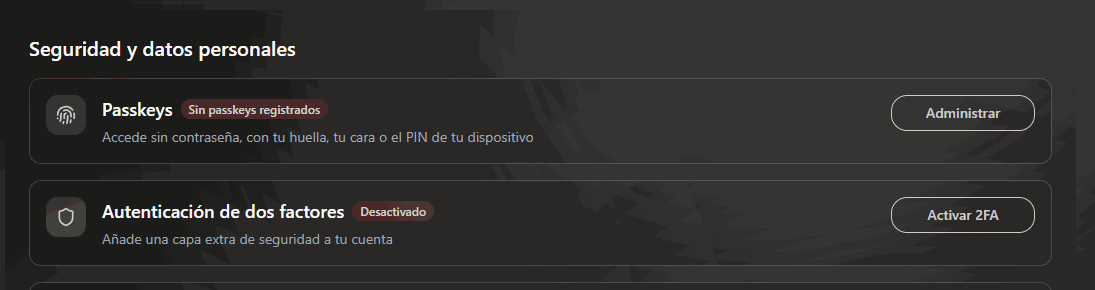
Your account's two protections: passkeys and two-factor authentication.
Passkey
A passkey replaces the password with your device’s fingerprint, face or PIN. There is nothing to remember and nothing to steal: the key never leaves your phone or your computer. It is the most secure method and the most convenient at the same time, which hardly ever happens.1
Press Manage in the Passkeys row
The list of the passkeys you already have opens. If you don’t have any, you will see “You don’t have any passkeys yet”.
2
Press Add passkey
First of all you are asked to confirm it’s you. Then you choose a name for the passkey (one is suggested, such as “Chrome on Windows”) so you can recognize it later.
3
Confirm it on your device
The device asks for your fingerprint, face or PIN. When it finishes you will see “Passkey added successfully”.
4
Add another one from a second device
You can have several. It is recommended: if you lose your phone, you can still sign in from your computer.
Two-factor authentication
A six-digit code that changes every few seconds in an authentication app on your phone (Google Authenticator, Microsoft Authenticator or similar).1
Press Activate 2FA
The “Activate two-factor authentication” window opens.
2
Scan the QR code with your app
If you can’t scan it, below it there is a code to type into the app by hand.
3
Type the six-digit code
The one the app shows you at that moment. Press Activate 2FA and the row changes to Enabled.
Why you are sometimes asked again
Some operations are not satisfied with the session being open: requesting a cause’s bank account, changing payment methods, touching sensitive data. In those cases the Security verification window appears (“Confirm it’s you before applying this change.”). You are asked for whatever you have turned on, no more and no less:
If you cancel, the operation simply doesn’t happen. Nothing else occurs.
Not being asked for anything means you have no method turned on. It is the sign that you should turn one on.