> ## Documentation Index
> Fetch the complete documentation index at: https://docs.causfy.com/llms.txt
> Use this file to discover all available pages before exploring further.
# Your cause page
> What the public sees, what you control, and how to pause, reactivate or close.
An approved cause has two faces: the public page anyone can see, and your dashboard, where you run it.
## The public page
It lives on the public portal, with its own permanent address generated when it is approved. That address does not change even if you edit the title, so the links people have already shared keep working.
The page shows, in this order: the main image, the title, the progress towards the goal, the sign or donate button, the story, the updates, the comments and who is organizing the cause.
The sign button is always visible while people read, with no need to scroll back up. Nine out of ten signatures come from a phone.
## Your dashboard
From your cause in the dashboard you have, all in one place:
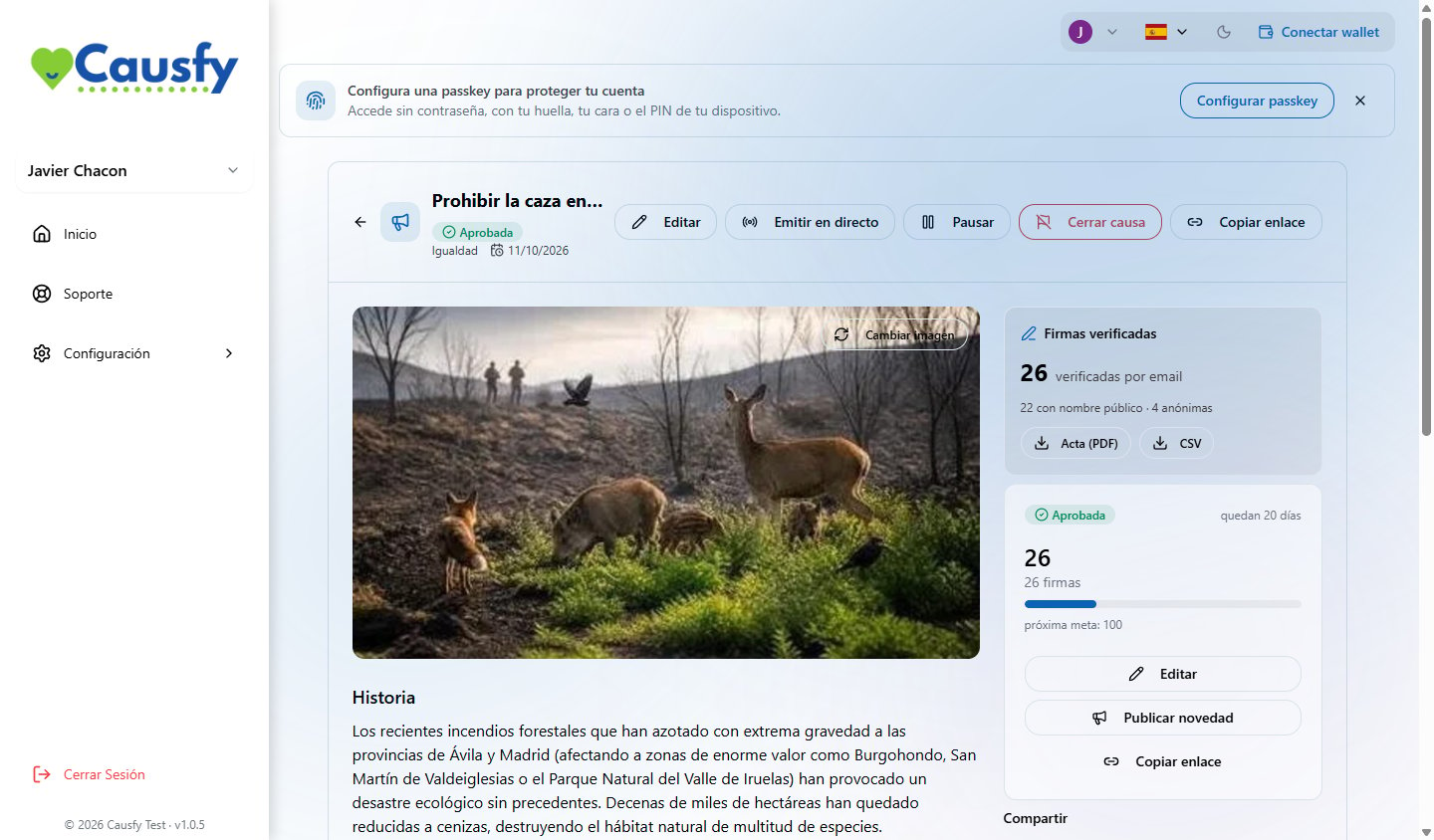 Takes you back into the wizard at whichever step you want to change. No need to redo the whole thing.
The public address of the cause, ready to paste wherever you want.
The link, the social networks and the button to embed on another website. [How to spread the word](/en/causa/compartir)
Who has backed it, how much has been raised and the documents. [Signatures and certificates](/en/causa/firmas)
## Comments
Anyone visiting the cause can comment. Comments go through automatic moderation before being published, and you can report any that slip through.
Replying to comments is the cheapest way to keep a cause alive. People who see the organizer answering are the ones who share.
## Pause, reactivate and close
The cause stops being visible and takes no signatures or donations. What has been collected is kept. Useful if you need to fix something important or if the subject cools down and you would rather come back to it.
It goes public again with everything it had. Shared links work again.
You consider it finished. It stops taking support but the page can still be consulted, with its final result. It is what you want when you have got what you were asking for: a closed cause with the goal passed is the best proof that it worked.
Closing cannot be undone from the dashboard. If in doubt, pause: a pause can always be reactivated.
Before closing, post one last update saying how it ended. Whoever signed left their name for this and deserves to know.
Takes you back into the wizard at whichever step you want to change. No need to redo the whole thing.
The public address of the cause, ready to paste wherever you want.
The link, the social networks and the button to embed on another website. [How to spread the word](/en/causa/compartir)
Who has backed it, how much has been raised and the documents. [Signatures and certificates](/en/causa/firmas)
## Comments
Anyone visiting the cause can comment. Comments go through automatic moderation before being published, and you can report any that slip through.
Replying to comments is the cheapest way to keep a cause alive. People who see the organizer answering are the ones who share.
## Pause, reactivate and close
The cause stops being visible and takes no signatures or donations. What has been collected is kept. Useful if you need to fix something important or if the subject cools down and you would rather come back to it.
It goes public again with everything it had. Shared links work again.
You consider it finished. It stops taking support but the page can still be consulted, with its final result. It is what you want when you have got what you were asking for: a closed cause with the goal passed is the best proof that it worked.
Closing cannot be undone from the dashboard. If in doubt, pause: a pause can always be reactivated.
Before closing, post one last update saying how it ended. Whoever signed left their name for this and deserves to know.