> ## Documentation Index
> Fetch the complete documentation index at: https://docs.causfy.com/llms.txt
> Use this file to discover all available pages before exploring further.
# Create a cause
> The steps of the wizard, different depending on whether you collect signatures or raise funds.
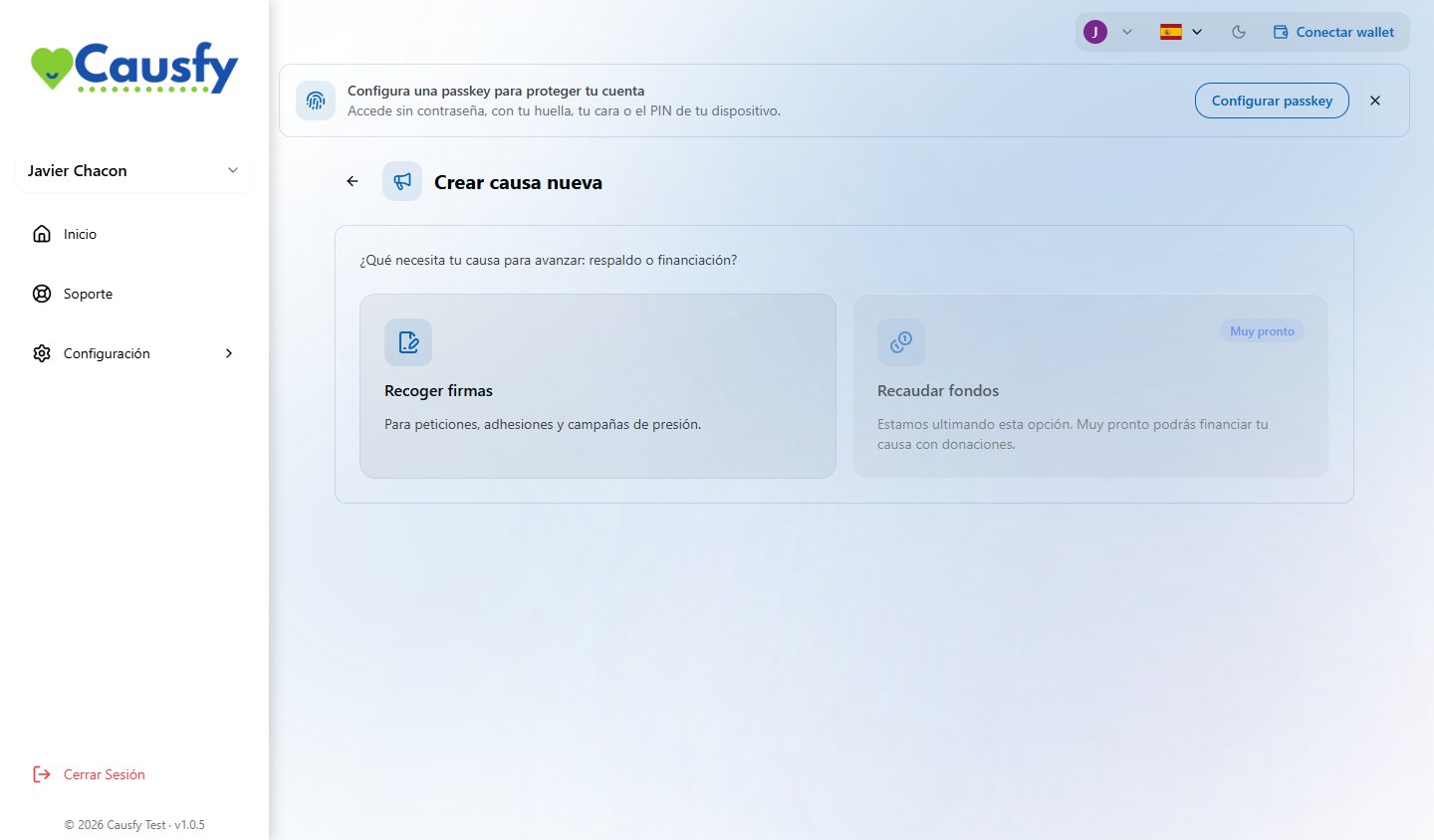
In your dashboard, press **Create new cause**. The first question decides everything else: what you want to achieve.
**Right now only signature causes can be created.** The fundraising option shows on screen marked **Coming soon** and cannot be selected. Fundraising causes that were already published keep working and taking donations as normal.
You can leave the wizard and come back whenever you want; what you wrote is kept.
 Nine steps. The first three are about knowing who you are asking for the change.
Local, national or global. A city council or a school is local; the government or parliament, national; an international institution or a large company, global.
Don't inflate it: a well-aimed local petition achieves more than a global one with no clear recipient.
Who can make the change you are asking for. It is the most important question in the whole wizard.
If you don't know who to address it to, find out before going on. A petition with no recipient is a wish.
Helps people find it on the portal. You can change it later.
The title is read in a second and decides whether anyone comes in. The story convinces.
If you struggle to get going, use **Write with AI**: you say in your own words what you want and why, and it prepares a draft title and story that you then edit. It has a usage limit.
The first image is the one that shows when the cause is shared on social media and in messages. Pick one that speaks for itself, with no small text.
How many signatures you need and by when. A reachable goal that gets passed encourages people more than a huge one left half done.
You choose **one only**, and it determines the legal value of every signature. We explain it below.
Optional. If you run paid campaigns, this is where you connect your own Google Analytics, Meta or TikTok identifiers to measure them.
They only fire if the visitor to the cause accepts marketing cookies, and the processing of that data is your responsibility.
You go over everything together and send it.
This option is on hold: no new fundraising causes can be created. What follows describes how the wizard works for when it opens again, and helps you understand the fundraising causes that already exist.
Seven steps.
What it is about. Helps people find it.
How much money you need and what for. Be specific: "two thousand euros for six months' rent on the premises" raises more than "help for the project".
Local, national or global.
Short and clear.
What is happening, why it matters and what you are going to do with the money. You can also write it with the help of artificial intelligence.
The first one is the one that travels when it is shared.
You go over it and send it.
Getting paid is separate. The cause can be approved and getting visits while you set up card payments. Do both at once so you don't lose the first days, which are the best ones. [How to get paid](/en/cobrar/formas)
## The signature types
Three cards are shown, but **right now only the basic one can be chosen**. The other two show the **Coming soon** badge and are greyed out.
Nine steps. The first three are about knowing who you are asking for the change.
Local, national or global. A city council or a school is local; the government or parliament, national; an international institution or a large company, global.
Don't inflate it: a well-aimed local petition achieves more than a global one with no clear recipient.
Who can make the change you are asking for. It is the most important question in the whole wizard.
If you don't know who to address it to, find out before going on. A petition with no recipient is a wish.
Helps people find it on the portal. You can change it later.
The title is read in a second and decides whether anyone comes in. The story convinces.
If you struggle to get going, use **Write with AI**: you say in your own words what you want and why, and it prepares a draft title and story that you then edit. It has a usage limit.
The first image is the one that shows when the cause is shared on social media and in messages. Pick one that speaks for itself, with no small text.
How many signatures you need and by when. A reachable goal that gets passed encourages people more than a huge one left half done.
You choose **one only**, and it determines the legal value of every signature. We explain it below.
Optional. If you run paid campaigns, this is where you connect your own Google Analytics, Meta or TikTok identifiers to measure them.
They only fire if the visitor to the cause accepts marketing cookies, and the processing of that data is your responsibility.
You go over everything together and send it.
This option is on hold: no new fundraising causes can be created. What follows describes how the wizard works for when it opens again, and helps you understand the fundraising causes that already exist.
Seven steps.
What it is about. Helps people find it.
How much money you need and what for. Be specific: "two thousand euros for six months' rent on the premises" raises more than "help for the project".
Local, national or global.
Short and clear.
What is happening, why it matters and what you are going to do with the money. You can also write it with the help of artificial intelligence.
The first one is the one that travels when it is shared.
You go over it and send it.
Getting paid is separate. The cause can be approved and getting visits while you set up card payments. Do both at once so you don't lose the first days, which are the best ones. [How to get paid](/en/cobrar/formas)
## The signature types
Three cards are shown, but **right now only the basic one can be chosen**. The other two show the **Coming soon** badge and are greyed out.
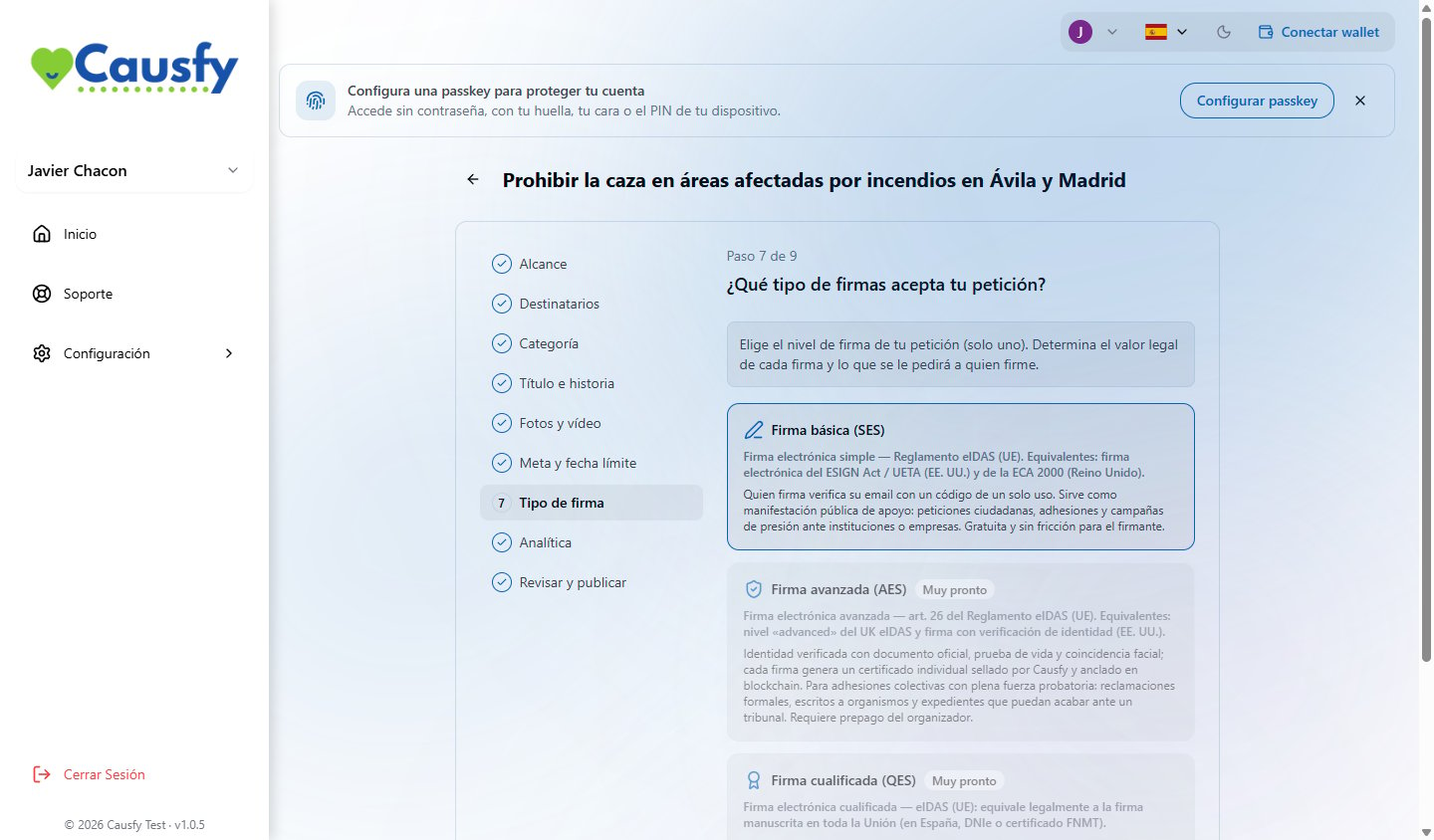 Signers confirm their email with a one-time code. Their identity is not checked.
It works as a public show of support: citizen petitions, endorsements and pressure campaigns aimed at institutions or companies. It is the one most people use.
Signers would verify their identity with an official document, a liveness check and a face match, and each signature would generate an individual certificate.
**It cannot be chosen yet.** A cause that already had it assigned keeps it.
It would be legally equivalent to a handwritten signature. Not available either.
The signature type is chosen before publishing and it sets the value of everything you collect. If your petition is going to end up in an official register, ask whoever receives it beforehand which level they will accept.
Signers confirm their email with a one-time code. Their identity is not checked.
It works as a public show of support: citizen petitions, endorsements and pressure campaigns aimed at institutions or companies. It is the one most people use.
Signers would verify their identity with an official document, a liveness check and a face match, and each signature would generate an individual certificate.
**It cannot be chosen yet.** A cause that already had it assigned keeps it.
It would be legally equivalent to a handwritten signature. Not available either.
The signature type is chosen before publishing and it sets the value of everything you collect. If your petition is going to end up in an official register, ask whoever receives it beforehand which level they will accept.