> ## Documentation Index
> Fetch the complete documentation index at: https://docs.causfy.com/llms.txt
> Use this file to discover all available pages before exploring further.
# Share your cause
> The link, the social networks and the button to embed it on another website.
An approved cause does not spread by itself. Almost all the support arrives because somebody passed it on to somebody else.
## The link
Every cause has its own permanent address on the public portal. You copy it from your dashboard, in the share section.
That link works for everything: messages, social networks, email, a poster with a QR code. It does not change even if you edit the cause.
When you paste it into WhatsApp, Instagram or X, the preview picks up the main image and the title. If the preview looks bad, it is almost always the image: change the first photo in the gallery for one that reads well small.
## The social network buttons
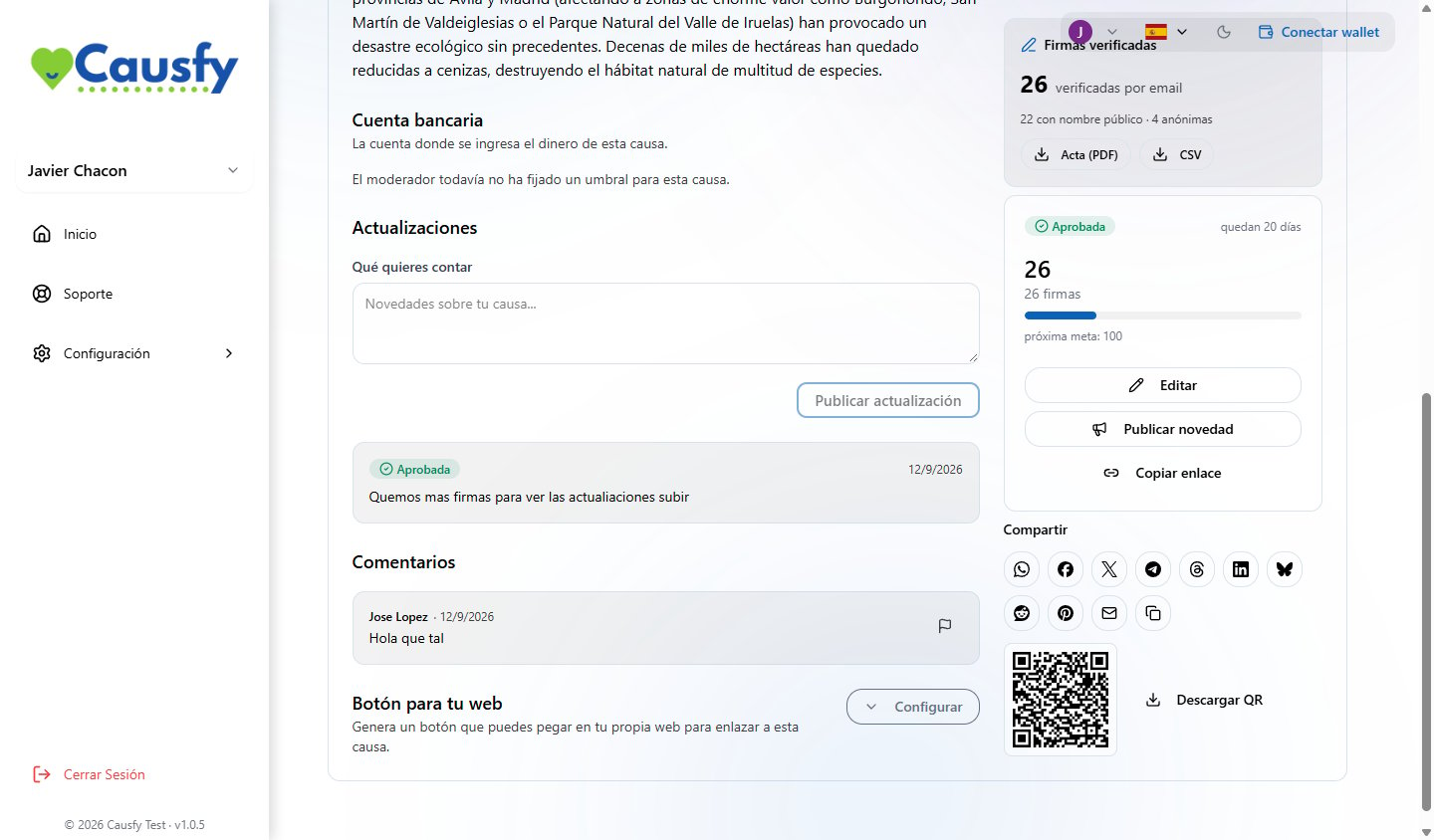
In your cause, inside the dashboard, there are direct buttons for WhatsApp, Facebook, X, Telegram, Threads, LinkedIn, Bluesky, Reddit, Pinterest and email, plus one to copy the link. They prepare the message with the link and the title already in place.
People who have just signed see them too, right after signing. That is the moment when most people share.
 ## The QR code
Next to those buttons you have your cause's QR code and a button to download it. It works for a poster, an information stand or a flyer: whoever scans it goes straight in to sign from their phone.
## The button for another website
If you have a website, a blog or your association's page, you can put a button there that leads to your cause.
In your cause, share section, press **Set up** under the embeddable button.
Text, background color, text color, solid or outline, and square, rounded or pill corners. You see it change alongside as you work on it.
A snippet is generated with the link to **this** cause already inside. You paste it on your website wherever you want it to show.
The look is saved to your account, not to the cause: the button for all your causes comes out the same, with your brand.
The code is a styled link, nothing more. It does not load scripts on your website and does not track your visitors.
## Measuring a campaign
If you are going to put money into ads and need to know what works, in the analytics step of the wizard you can connect your own measurement identifiers to that cause.
They only fire for people who accept marketing cookies on the portal, and the data goes to your accounts, not ours. That processing is your responsibility.
## What actually works
* **The first three days** are worth more than the rest of the month. Have the list of who you are going to write to ready before you publish.
* **Ask people to share, not just to sign.** A signature is a signature; a share is ten.
* **Say how it is going.** Every [update](/en/causa/actualizaciones) is a legitimate excuse to show up again.
* **Talk to whoever comments.** An organizer who replies gives confidence to people who haven't signed yet.
## The QR code
Next to those buttons you have your cause's QR code and a button to download it. It works for a poster, an information stand or a flyer: whoever scans it goes straight in to sign from their phone.
## The button for another website
If you have a website, a blog or your association's page, you can put a button there that leads to your cause.
In your cause, share section, press **Set up** under the embeddable button.
Text, background color, text color, solid or outline, and square, rounded or pill corners. You see it change alongside as you work on it.
A snippet is generated with the link to **this** cause already inside. You paste it on your website wherever you want it to show.
The look is saved to your account, not to the cause: the button for all your causes comes out the same, with your brand.
The code is a styled link, nothing more. It does not load scripts on your website and does not track your visitors.
## Measuring a campaign
If you are going to put money into ads and need to know what works, in the analytics step of the wizard you can connect your own measurement identifiers to that cause.
They only fire for people who accept marketing cookies on the portal, and the data goes to your accounts, not ours. That processing is your responsibility.
## What actually works
* **The first three days** are worth more than the rest of the month. Have the list of who you are going to write to ready before you publish.
* **Ask people to share, not just to sign.** A signature is a signature; a share is ten.
* **Say how it is going.** Every [update](/en/causa/actualizaciones) is a legitimate excuse to show up again.
* **Talk to whoever comments.** An organizer who replies gives confidence to people who haven't signed yet.